
Laminar 1.9.2 adds a Collimation Aid for Schmidt-Cassegrain telescopes. Point the telescope at a bright star, defocus it into a ring, and Laminar measures how far the telescope is out of collimation, in waves of coma, then tells you which of the three secondary screws to turn, which way, and roughly how far. It's on the Mac App Store now, and 1.9.3 followed this week with two crash fixes, so that's the version you'll download.
Laminar is Mac Observatory's native macOS capture app for solar, lunar and planetary imaging. It records SER files from ZWO, Player One, QHY, ToupTek and SVBONY cameras for stacking in Strata, AutoStakkert, PIPP or RegiStax, and it drives filter wheels and focusers directly. Both updates are free for anyone who already owns it.
- New: Collimation Aid for Schmidt-Cassegrain telescopes, AAF focuser support
- Collimation Aid: Schmidt-Cassegrain telescopes only, for now
- Current version: 1.9.3
- Platform: macOS 15.0 (Sequoia) or later, Apple Silicon
- Languages: English, German, French, Italian, Spanish, Dutch
- Update: Free for existing owners
- Developer: Mac Observatory
Collimating an SCT is the chore most of us put off until the planets start looking soft. The usual method goes like this: defocus a bright star into a donut, judge whether the dark shadow of the secondary sits in the middle, turn a screw, bring the star back to center, and look again. You're judging a fraction of a wavelength by eye, on a ring that boils in the seeing, and you can rarely tell whether the last turn helped or the air just steadied.
The Collimation Aid replaces that judgment with a number, and the number tells you what your eye can't: how close you are. My EdgeHD started its first night at about half a wave of coma and finished at 0.14. By eye, those two rings look the same, round and concentric. Measured, the first costs about 13 percent of the telescope's peak sharpness and the second about 1. Everything below ran on my Celestron EdgeHD 8" with a MoonLite focuser, from my backyard in Pearland.
How does Laminar measure collimation?
Open it from View › Collimation Aid (⌥⌘K). Its card takes the Weather card's place in the sidebar, the same slot ADC Assist uses, so one tool sits there at a time. Pick a bright star and center it. The card tells you how far the star sits from the middle of the sensor.
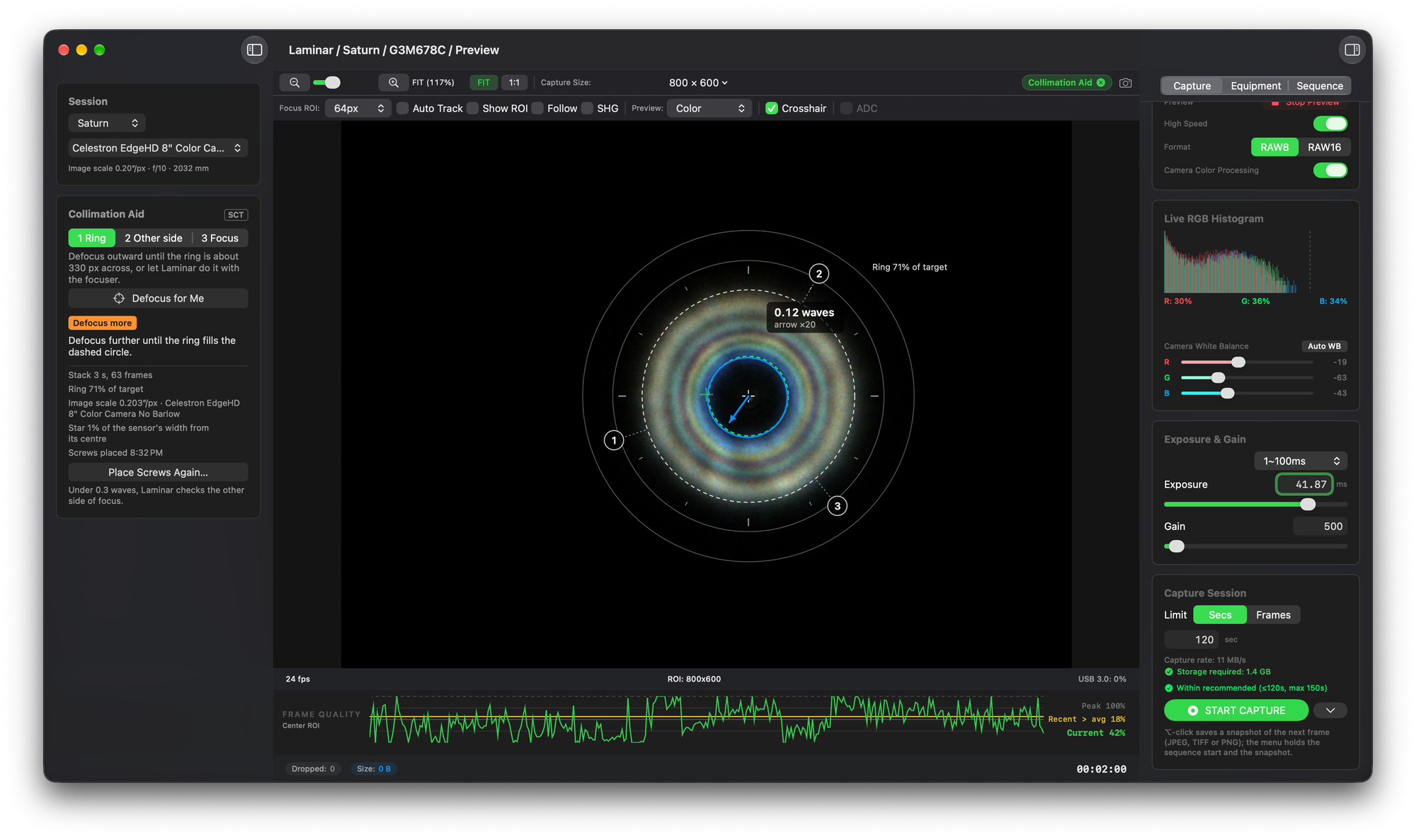
The first stage is one side of focus. Rack the focuser until the ring fills the dashed target circle, with a Ring meter, a Brightness meter and a Too dim warning to guide you. If your focuser is one Laminar controls and it moves to absolute positions, press Defocus for Me and Laminar moves the focuser to the target ring itself, then back afterward. While you set up, Laminar adjusts the exposure for you. Only the exposure: it never touches gain, and it changes nothing while you're recording. Nothing is measured until you press Start Measuring.
Then Laminar needs to know where your screws are. Hold a fingertip in front of the corrector beside each screw and its shadow shows up on the ring, which is how Laminar finds it. Dragging the numbered markers works too. From there the card reads the coma in waves, an arrow on the ring magnified 20 times points the way it runs, and the instructions name a screw, a direction and an amount. Each turn you confirm teaches Laminar how much that screw moves things on your telescope, so the advice gets closer as you go.
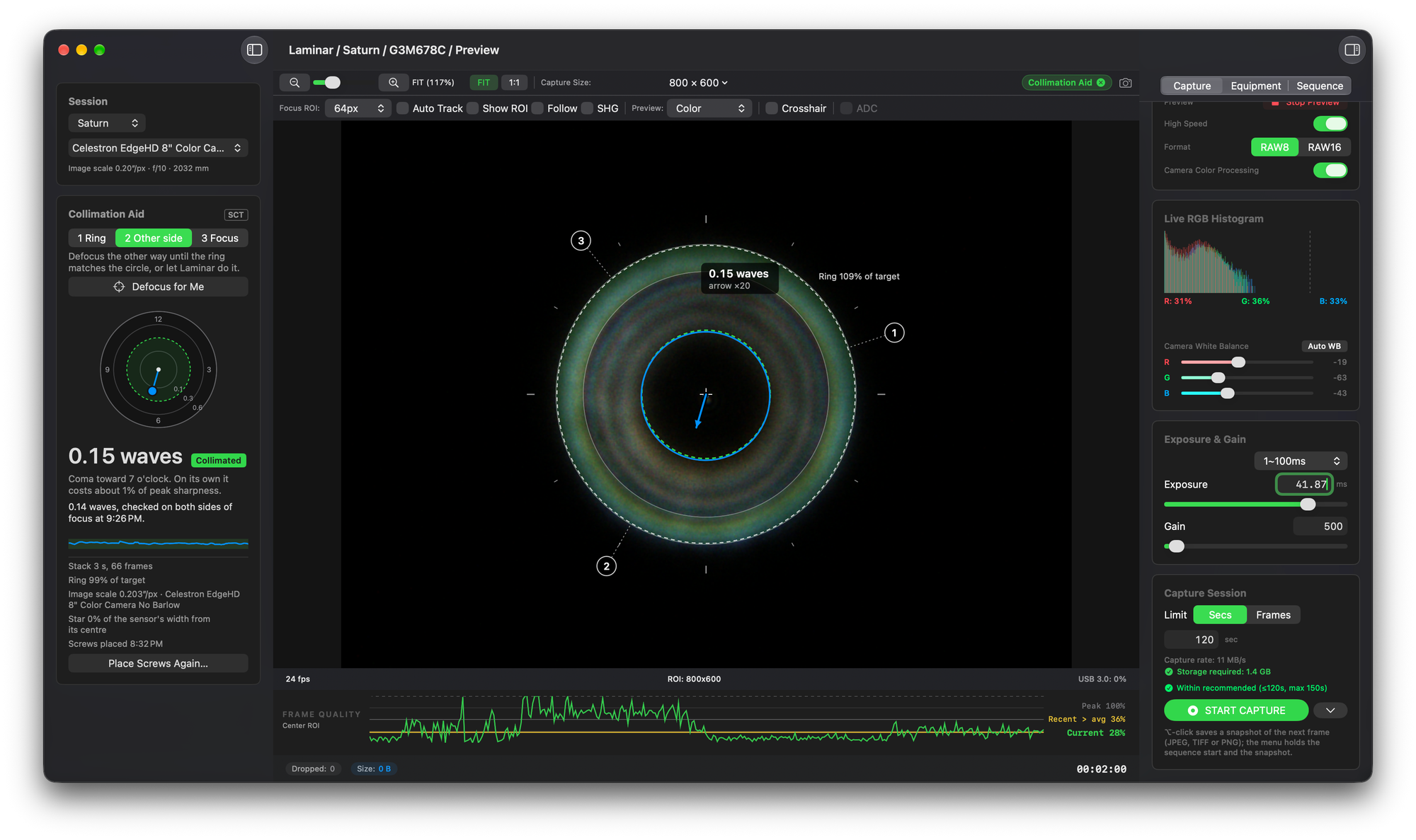
A wave here is one wavelength of green light, 550 nanometers. Collimation error bends the wavefront out of shape, and Laminar reports the coma it causes as a fraction of that wavelength. Fractions of a wave are hard to feel, so the card translates them into something you can: in the second screenshot, 0.15 waves of coma toward 7 o'clock costs about 1 percent of peak sharpness on its own.
Once the reading drops under 0.3 waves, Laminar sends you to the other side of focus at the same ring size. A ring can look lopsided for more than one reason, and comparing both sides lets Laminar separate coma, which the screws fix, from a secondary that simply sits off center. The pass is judged on both sides together. A third stage, an in-focus check, is optional and worth running when the air is steady.
Here's what that number measures, and why it beats judging the ring by eye.
Laminar saves your collimation results to your equipment profile and records them in the sidecar file stored alongside each capture. This gives you a record of the telescope’s collimation when each clip was recorded.
Equipment profiles now also include a Central obstruction field. You don’t need a motorized focuser to use the Collimation Aid, either. Your telescope’s manual focus knob works just fine. Defocus for Me simply makes the process easier. There’s also a ten-step walkthrough at the beginning of the Help page to guide you through the process.
Before testing the feature under the stars, I checked its measurements against a diffraction model and an independent Python implementation using clips I’d recorded on October 11. Laminar and the Python version agreed to within 2 percent.
Does the Collimation Aid work on a Newtonian, RC or refractor?
Not currently. The Collimation Aid was developed specifically for Schmidt-Cassegrain telescopes (SCTs), including Celestron’s EdgeHD series. Both its measurements and adjustment recommendations are intended for SCTs and shouldn’t be relied on with other telescope designs.
The adjustment guidance assumes you’re working with the three collimation screws on an SCT’s secondary mirror. Newtonians and Ritchey-Chrétiens require adjustments to both mirrors, which introduces additional complexity. I don’t own either type of telescope to test against, so supporting them would have to be a future project. Properly collimating a refractor requires a bench setup, making it unsuitable for this approach.
What did the first nights under the stars find?
My first real test was on October 13, using Vega and Saturn. I started the evening with my EdgeHD showing approximately half a wave of coma. By the end of the session, I’d brought that down to 0.14 waves. Just as importantly, Laminar’s recommendations for which direction to turn the collimation screws were correct from the beginning.
The first night also exposed a few problems.
Defocus for Me initially failed because my 10.7 ms exposure wasn’t long enough to detect the defocused ring. The focuser had plenty of travel, but the ring was simply too dim for Laminar to find. I manually increased the exposure to 41 ms, which solved that problem. I also discovered that there wasn’t anything on screen to help me center the star until Laminar had successfully fitted a ring.
Those issues led to several improvements. Each side of focus now begins with a setup step, and I’ve added a target circle and meters to help with positioning. Laminar also handles exposure adjustment automatically.
The following night revealed another issue. As the defocused ring grew larger, it moved beyond the portion of the image Laminar was monitoring. The interface continued reporting “No ring” for 40 seconds during one test and 70 seconds during another. I’ve since changed the tracking behavior so that Laminar searches the entire frame again whenever it loses the ring.
October 14 also revealed something interesting about my imaging equipment.
Using a ZWO ASI462MC, the telescope measured between 0.034 and 0.046 waves of coma. Switching to my ToupTek G3M678C produced measurements of 0.148 and 0.194 waves, even though I hadn’t touched the telescope’s collimation.
After some investigation, I traced the difference to how the ToupTek camera was seated in my atmospheric dispersion corrector (ADC). Unlike cameras with a broad, flat mounting surface, the ToupTek doesn’t have much of a shoulder to help keep it perfectly square when secured by a compression ring. Unless I firmly press the camera against the ADC while tightening it, there’s a possibility of introducing a slight tilt. The ADC itself also needs to be seated squarely against the focuser drawtube.
That small amount of tilt turned out to be the cause of a problem I’d been chasing for some time. Light reflecting off the ToupTek’s UV/IR-cut window was producing a faint ghost on one side of the image. I’d been seeing it along Saturn’s limb in my planetary recordings without knowing exactly where it came from.
The same reflection affected Laminar’s collimation measurements. Because it distorted one side of the defocused star’s ring, the software interpreted some of that asymmetry as coma. This explains why the ToupTek reported considerably higher values than the ZWO camera, despite both being used on the same telescope without any collimation adjustments.
It was a useful reminder that the entire imaging train matters when evaluating collimation. Even a very small amount of tilt between components can introduce optical effects that look like problems with the telescope itself. Threaded connections are preferable wherever possible because they provide a more secure and repeatable way to keep components square. When using compression rings, it’s worth taking the extra time to make sure everything is seated firmly and aligned properly.
In my case, correcting the camera’s seating resolved a ghosting problem that had appeared throughout my Saturn recordings, and helped explain why two cameras were giving me such different collimation measurements.
A ghost from a camera's own window reads as coma. If the reading stalls at a couple of tenths of a wave whichever screw you turn, measure with a different camera before turning any further. Chasing a camera's ghost with the secondary screws only adds real coma to the telescope.
What else is in 1.9.2?
Laminar 1.9.2 also adds support for ToupTek’s AAF autofocusers, including versions sold by several other camera manufacturers. These focusers communicate through Laminar’s built-in INDIGO integration, which already handles filter wheels and focusers. Camera control continues to use Laminar’s own drivers.
The feature was requested by a G3M678C owner who was considering purchasing an AAF focuser. I don’t own one myself, so I haven’t been able to test the integration with actual hardware yet. If you have an AAF, I’d appreciate hearing how it works for you. You’ll find more information about providing feedback at the end of this article.
I’ve also made several improvements to ADC Assist. The Leveled button now provides clearer feedback about what it’s measuring. The Level card compares the live color separation with the amount expected when the ADC is in its neutral position. A progress bar shows when a measurement is underway, and if Laminar can’t accept the result, it stops after two seconds and displays both values rather than remaining stuck on “Measuring…”. I’ve also clarified in the interface and Help documentation that Laminar cannot detect the position of your ADC’s physical bubble level.
ADC Assist now displays “No figure” when it detects color separation that isn’t caused by atmospheric dispersion. The Leveled function also prevents these readings from being used to determine the zenith.
There are a few other fixes and improvements in this release.
Laminar can now detect a focuser connected after the application has launched. Just press Connect, and it will look for the newly attached device.
I’ve corrected an issue with how long-pass filter wavelengths are handled. Laminar now prevents you from saving a wavelength below the filter’s cut-on wavelength. I discovered this in my own equipment profile, where the description for my Baader IR685 filter included a range of 400–700 nm. That had been interpreted as a center wavelength of 550 nm, causing Strata to calculate its Drizzle recommendations for green light rather than infrared. Existing profiles with this issue are now flagged, but Laminar won’t modify your saved settings automatically.
I also fixed a window layout issue that could cause Laminar to become unresponsive for a minute or more when reopening the sidebar in a narrow window while the Inspector was visible.
Gain values are now handled consistently as whole numbers throughout the application, ensuring the camera settings, capture sidecar files, logs, and saved preferences all agree.
Finally, focuser status messages have been localized into German, French, Italian, Spanish, and Dutch.
What changed in 1.9.3?
Laminar 1.9.3 primarily addresses two crashes.
The first affected users running macOS 26. When both the sidebar and Inspector were open, the toolbar above the preview could repeatedly recalculate its layout, eventually consuming enough memory to crash the application. A user experiencing the problem sent me their crash report and logs, which helped identify the cause. I’ve changed how the toolbar handles its layout so that the same controls are arranged across one, two, or three rows depending on the available space. The user has since confirmed that the fix works on their Mac.
The second crash was introduced in version 1.9.2 and could cause Laminar to quit about a second after launching on some Macs, including my own. That’s been fixed as well.
I’ve also made a few interface improvements. The main window now respects its minimum width, preventing it from being resized too narrowly. The sidebar no longer unexpectedly expands when switching between stages of the Collimation Aid.
Finally, I’ve renamed the three collimation stages to First side, Other side, and Focus. The measurements don’t depend on which side of focus you start with, so the new labels better reflect how the feature actually works.
The first screenshot above was taken before this change, which is why you’ll still see the older “Ring” label.
I've run the Collimation Aid on my EdgeHD 8. If you try it on another Schmidt-Cassegrain, I'd like to hear how the readings and the screw advice held up. If you connect an AAF, please send a log: in Laminar's Settings, open Diagnostics, turn on Enable Diagnostic Logging, set Log Level to Verbose, run the focuser, then choose Export Logs. Reach me at support@macobservatory.com.
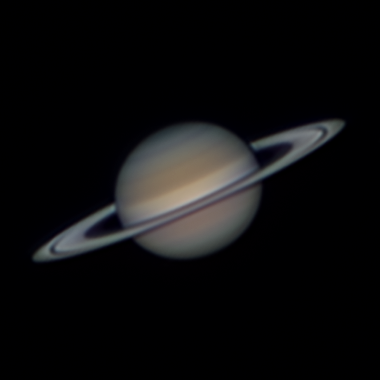
[IMAGE 3: Saturn, at native size]
Alt text: Saturn imaged through a collimated Celestron EdgeHD 8, captured in Laminar and processed in Strata.
Caption: [DATE], [CAMERA].
This Saturn came through the EdgeHD 8 once it was collimated, captured in Laminar on the [CAMERA] on [DATE] and processed in Strata.