
Meridian
Deep-sky imaging archive for Mac
Every night you've imaged. In one place.
Years of subs, calibration frames and finished images, scattered across folders and drives. Meridian reads them all, works out what you photographed, and turns your archive into a catalog you can browse, search and plan from, without changing a single file.
A real archive
Nine years of imaging. Counted in seconds.
This is the archive behind Mac Observatory: remote imaging from a Takahashi under Bortle 1 skies, and years of backyard work before it. Meridian found every target and totaled every hour.
April 2017 to September 2026, from Meridian's Statistics view. On a tester's Mac, a first scan read 32,388 frames in about 50 seconds from an internal SSD.
Spotlight
Seven years of NGC 1333. One answer.
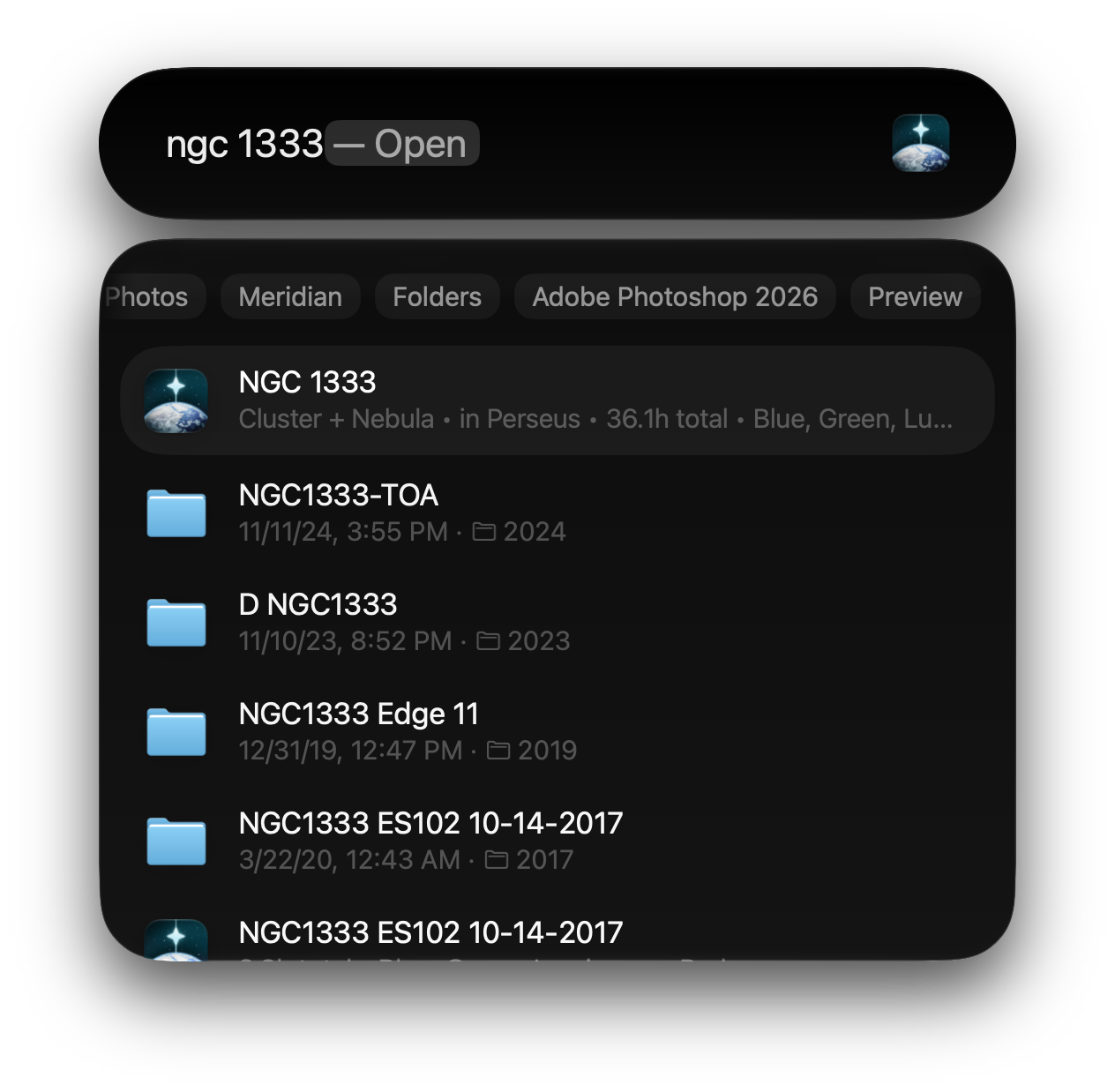
Search your Mac for a target and Spotlight finds the folders: one from 2017, one from 2019, another in 2023, and again in 2024, each named a little differently. Meridian's result sits on top and pulls them together.
- Every session, one target. NGC 1333, a cluster and nebula in Perseus, with 36.1 hours in total and the filters you used.
- No app to open first. Your targets and equipment are in Spotlight, so the answer is a keystroke away.
Automatic identification
It knows what you photographed.
Folder names drift and typos creep in. The coordinates your capture software writes into every frame don't. Meridian matches them against 41,731 cataloged objects and puts each target in its place.
- Every name, one target. M31, M 31, NGC 224 and Andromeda Galaxy all land on the same page.
- What else is in the frame. Each target lists the other cataloged objects inside your field of view.
- You have the last word. Reassign, merge or rename a target, with undo. Corrections live in Meridian, never in your files.
Search
You typed M31
Illustration. Search matches spacing, catalog numbers and common names the same way everywhere in Meridian, including ⌘K and Spotlight.
Nineteen catalogs, 41,731 objects, cross-referenced with the Caldwell list, all stored on your Mac.
Before you import
No two archives look alike. One rule makes sense of them.
Everyone files their data differently, by year, by night, by rig, by target. Meridian needs just one thing to understand yours: each target in a folder of its own. We call it the atomic folder, and Meridian shows you the recommended layout before your first scan.
- One target per folder. Everything under a target's folder, every session, calibration frame and finished image, belongs to that target. A mosaic's panel folders stay one target.
- Finished images with their data. Keep your JPEGs, TIFFs and PSDs inside the target's folder and they become its versions.
- Start small, then expand. Add one year or one drive first, see how it lands, then add the rest.
A folder per night or month, such as 2025/October with ten objects inside, becomes a single target. So do grouping folders by rig or object type above your targets. Give each object its own folder underneath first. Meridian warns you when frames in one folder point to different parts of the sky, and never moves a file itself.
Read the full guide to organizing your astrophotography library
Reads best
FITS and XISF captures from N.I.N.A., SGPro, Voyager, APT, KStars and Ekos, the ASIAIR and smart telescopes, with the telescope's pointing in each file. Meridian identifies these on its own.
Identified by folder name
The Moon, Sun and planets have no fixed coordinates, so a folder named Jupiter, Saturn or Moon files your planetary and lunar images under that target, even when it holds only finished images.
Needs a hand
DSLR frames converted to FITS usually carry no pointing, and may look like processed files. Choose Import Anyway, and they're filed by folder name until plate solving with your own Astrometry.net key finds the real target.
Can't read yet
Camera RAW files (CR2, CR3, NEF, ARW and others) are listed but not cataloged. Neither are tile-compressed FITS (.fz) or iCloud files that aren't downloaded to your Mac.
The Catalog
Every target. Everything about it.
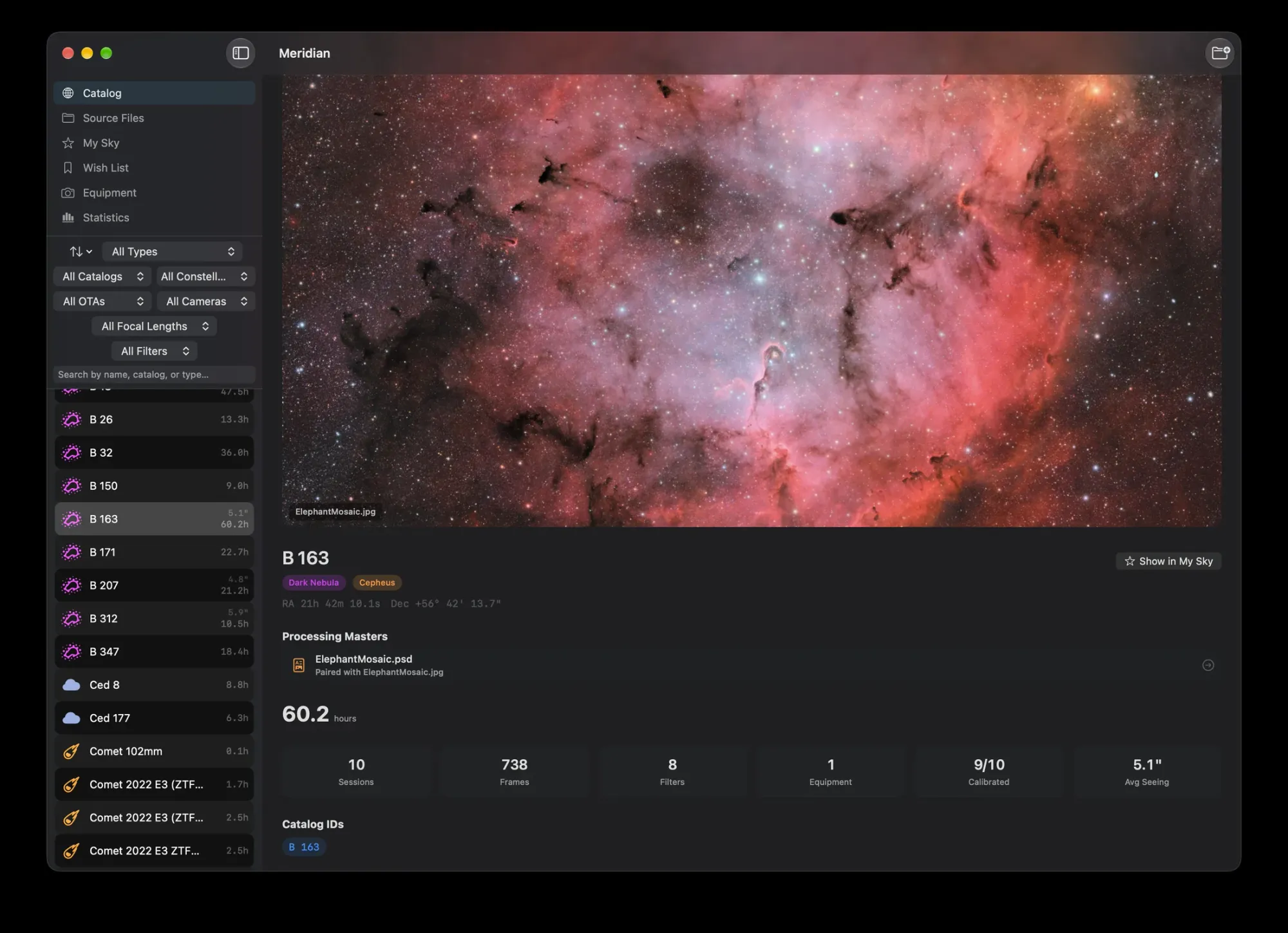
Open a target and it's all there: your finished image, hours by filter, each setup you used, every session and its seeing, and all the versions you've processed over the years.
60.2 hours over ten sessions and 738 frames, with every cataloged object in the field listed underneath.
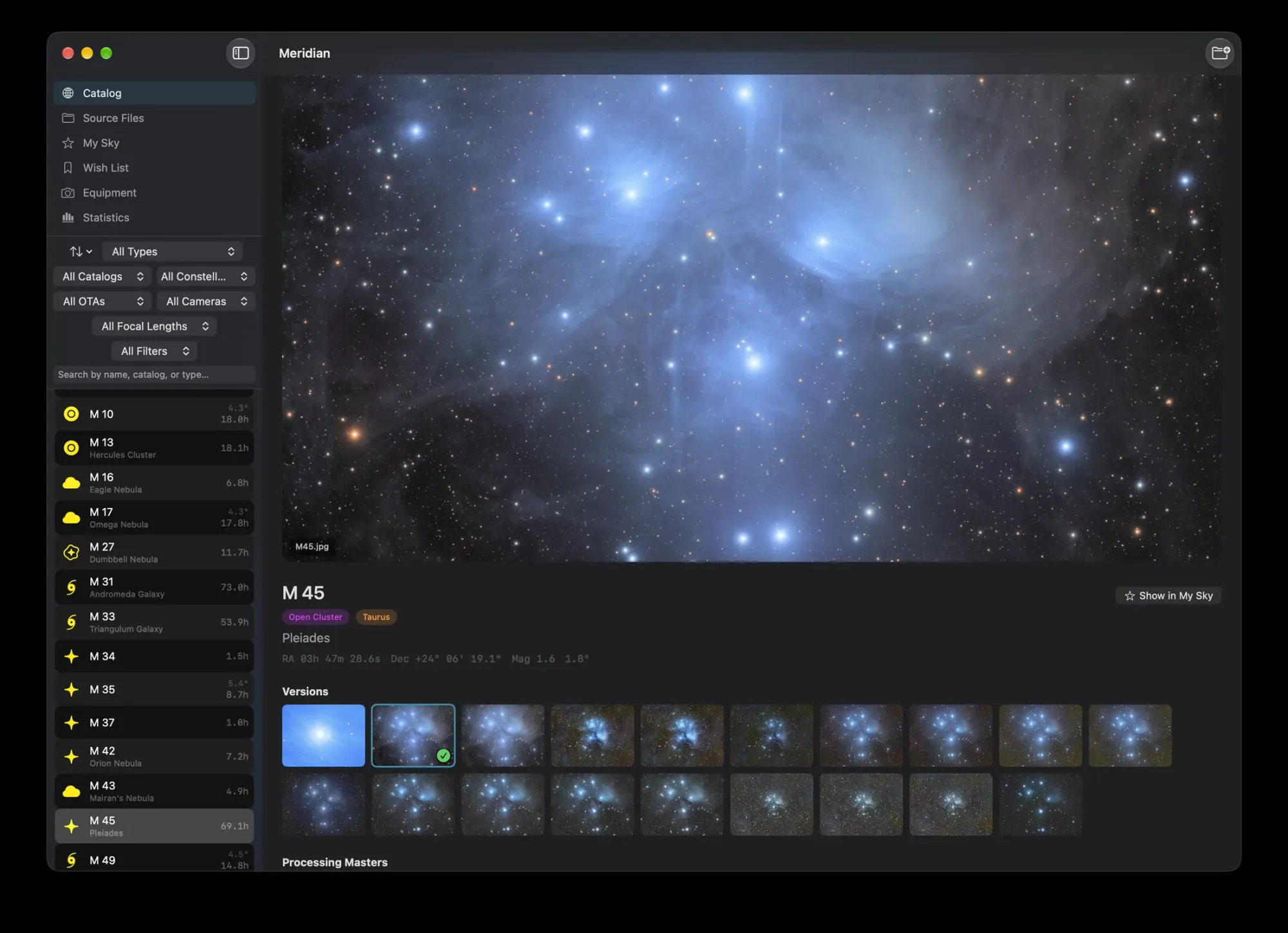
Every version you've processed of a target sits in one gallery, so you can see how your processing, and your data, has grown.
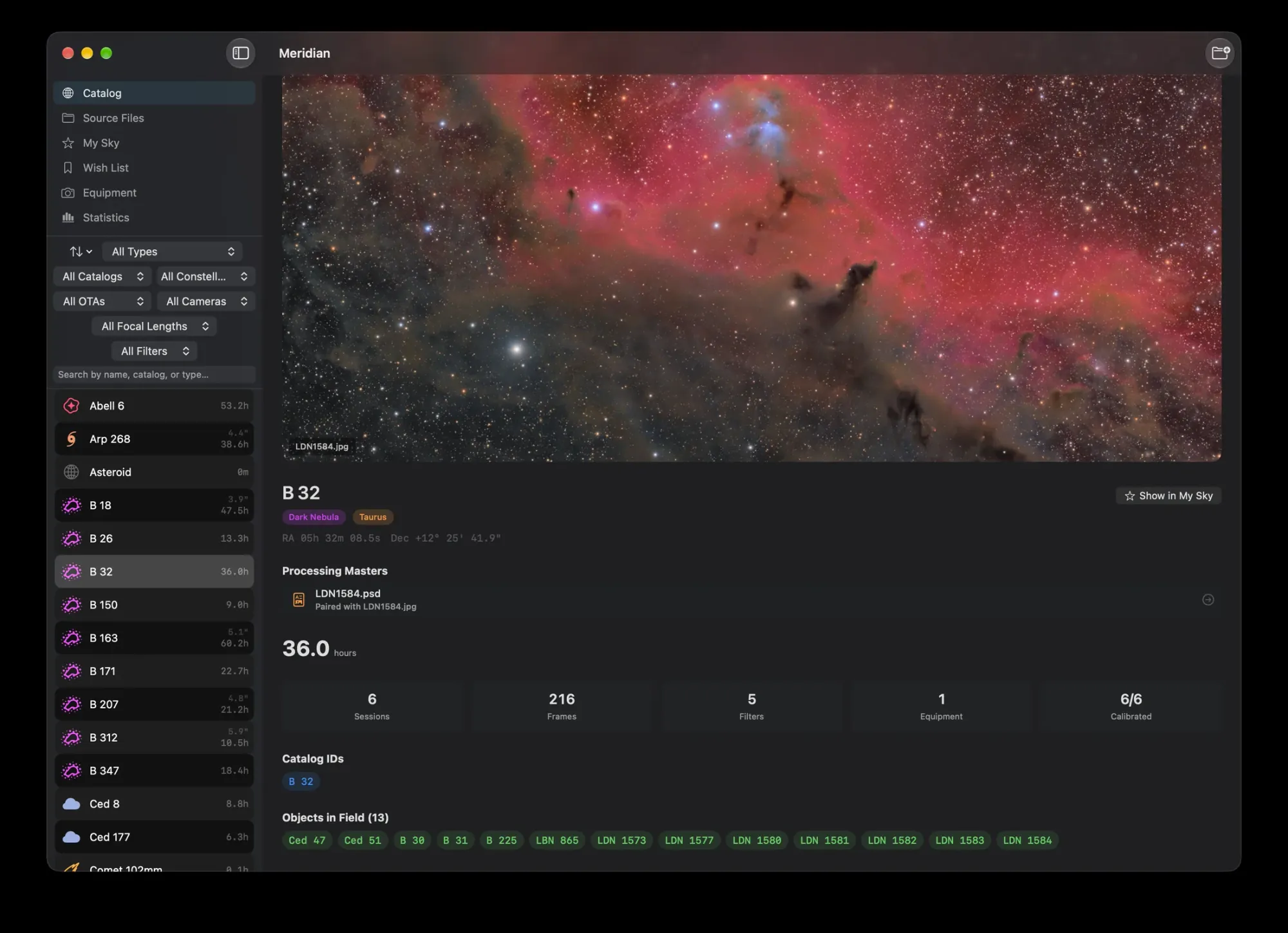
Sort and filter the whole catalog by object type, catalog, constellation, telescope, camera, focal length or imaging filter.
Wish List
Know what to shoot tonight, and what will fit.
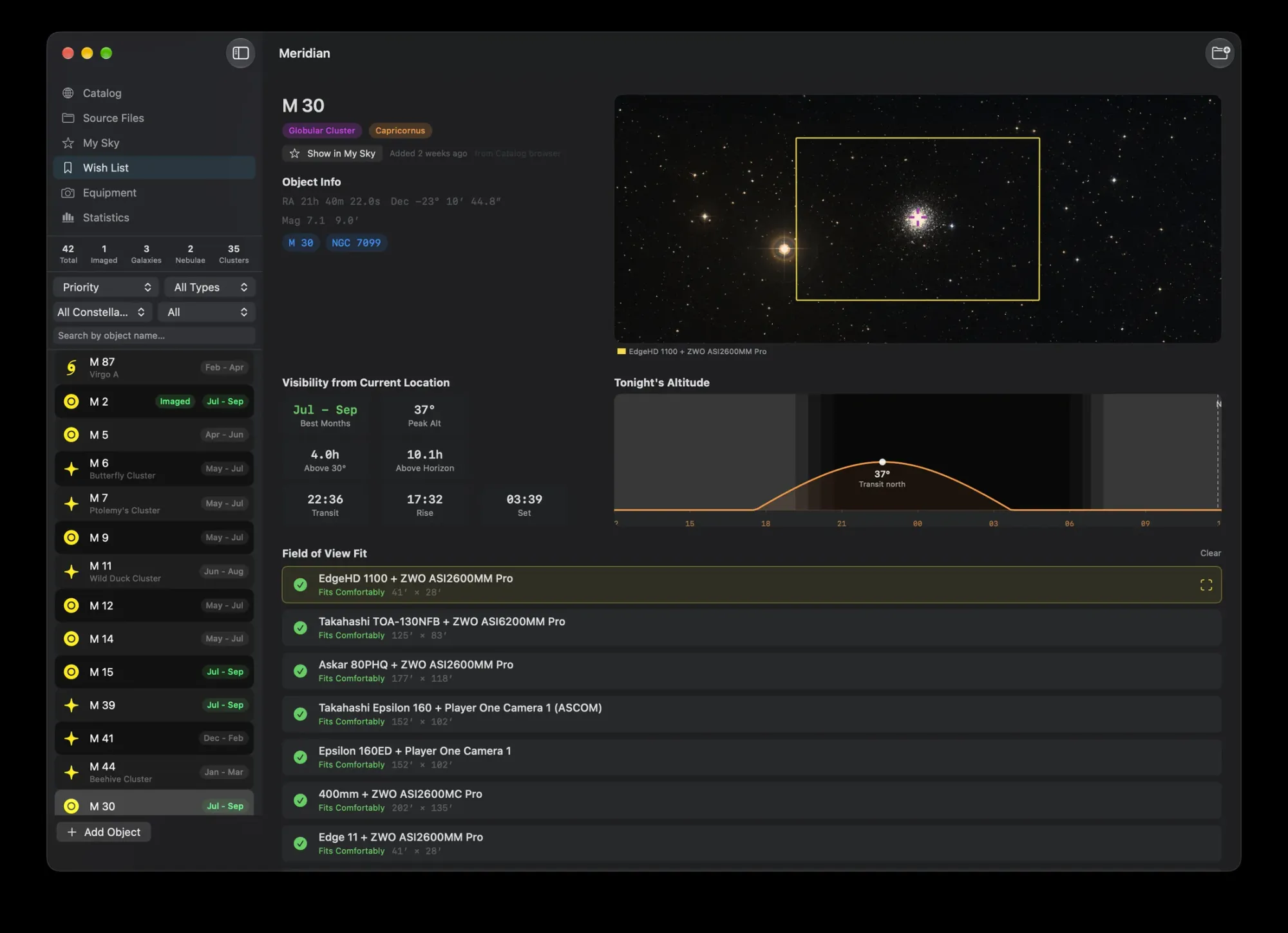
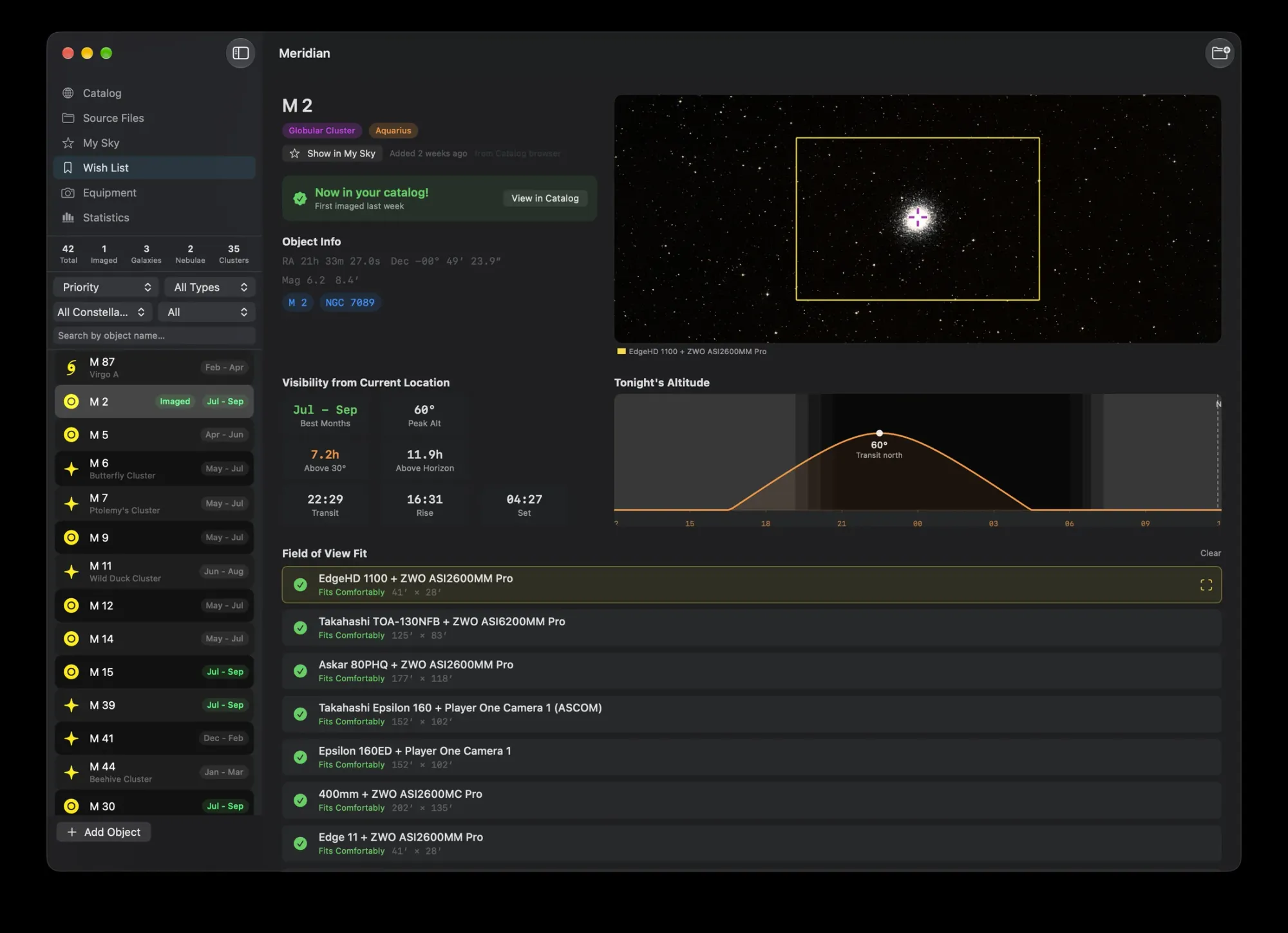
Build a list of targets you want. Meridian tells you which are up tonight, which are in season, and which of your telescopes and cameras will frame each one.
- Tonight at a glance. Best months, peak altitude, hours above 30°, transit, rise and set, and a 24-hour altitude chart with twilight.
- Field-of-view fit for every rig. Each of your setups, checked against the target's size, with the frame drawn on a real sky image.
- Sort by what matters now. Visible Now, Best Tonight or In Season, from any of your observing sites, all calculated offline.
- It notices when you're done. Targets earn an Imaged badge once they turn up in your archive.
My Sky
Your whole archive, on the sky.
Every target you've imaged, marked on an interactive sky atlas and colored by how complete it is. Browse a catalog like Messier and see at a glance how many you've captured, and which are still missing.
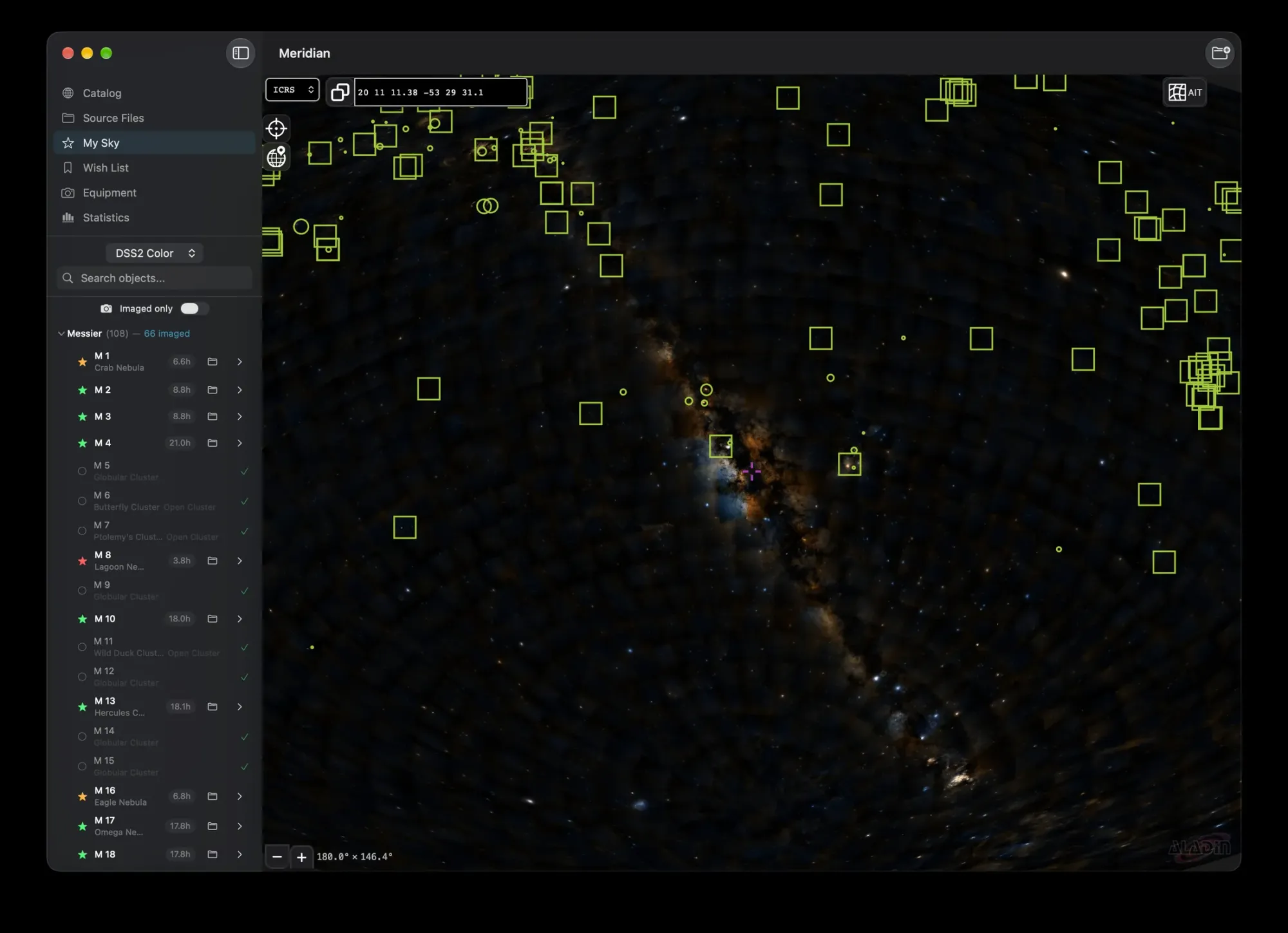
Sky surveys from DSS2, 2MASS, WISE and Mellinger. The survey images load over the internet; everything else works offline.
Statistics
See your imaging life at a glance.
Hours by month and by filter, your best nights of seeing, where your time goes by object type and constellation, and how each setup has earned its keep. For all time, a single year, or one piece of equipment.
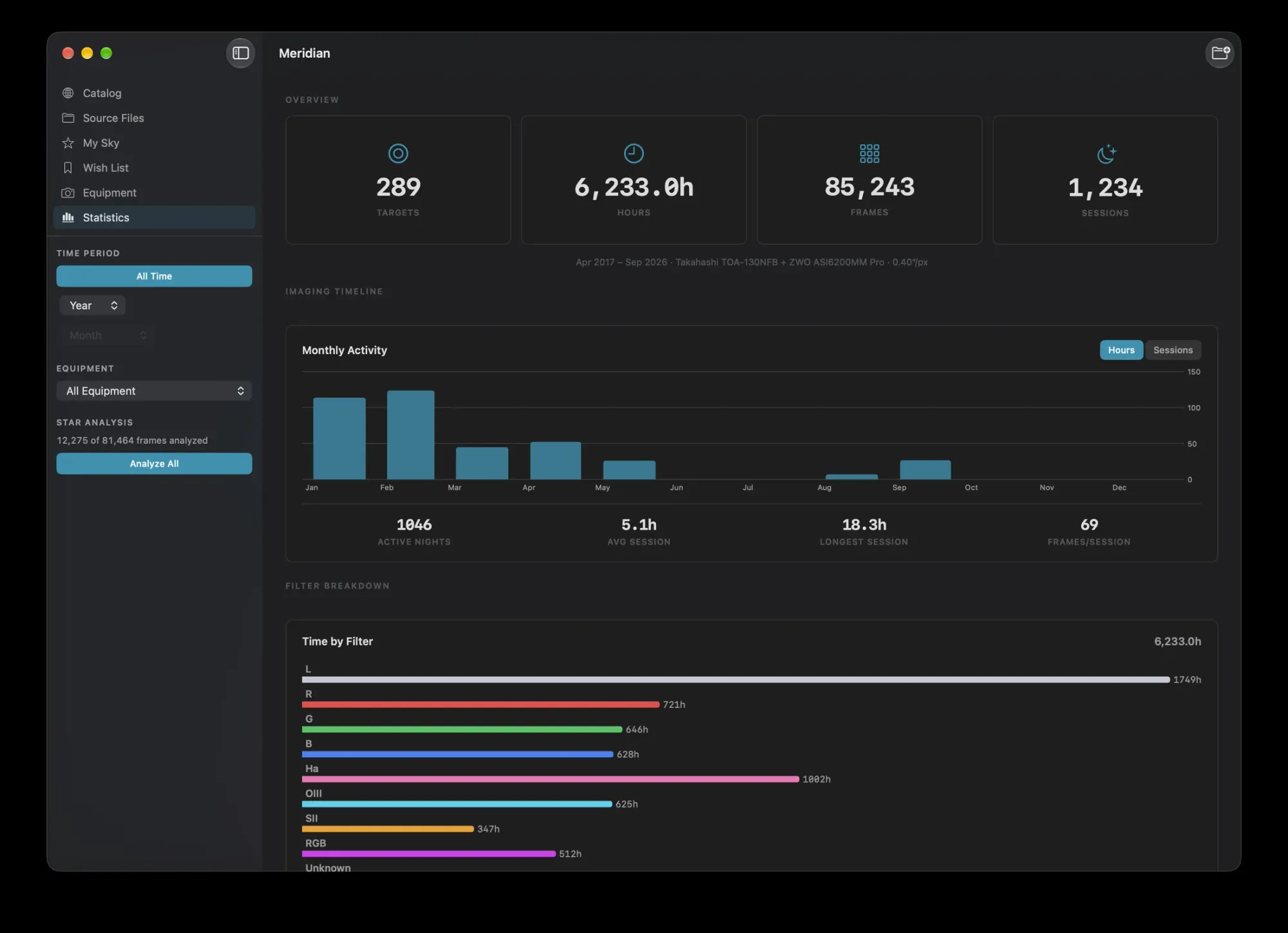
All time: 289 targets and 6,233 hours, with every month's imaging and the time spent in each filter.
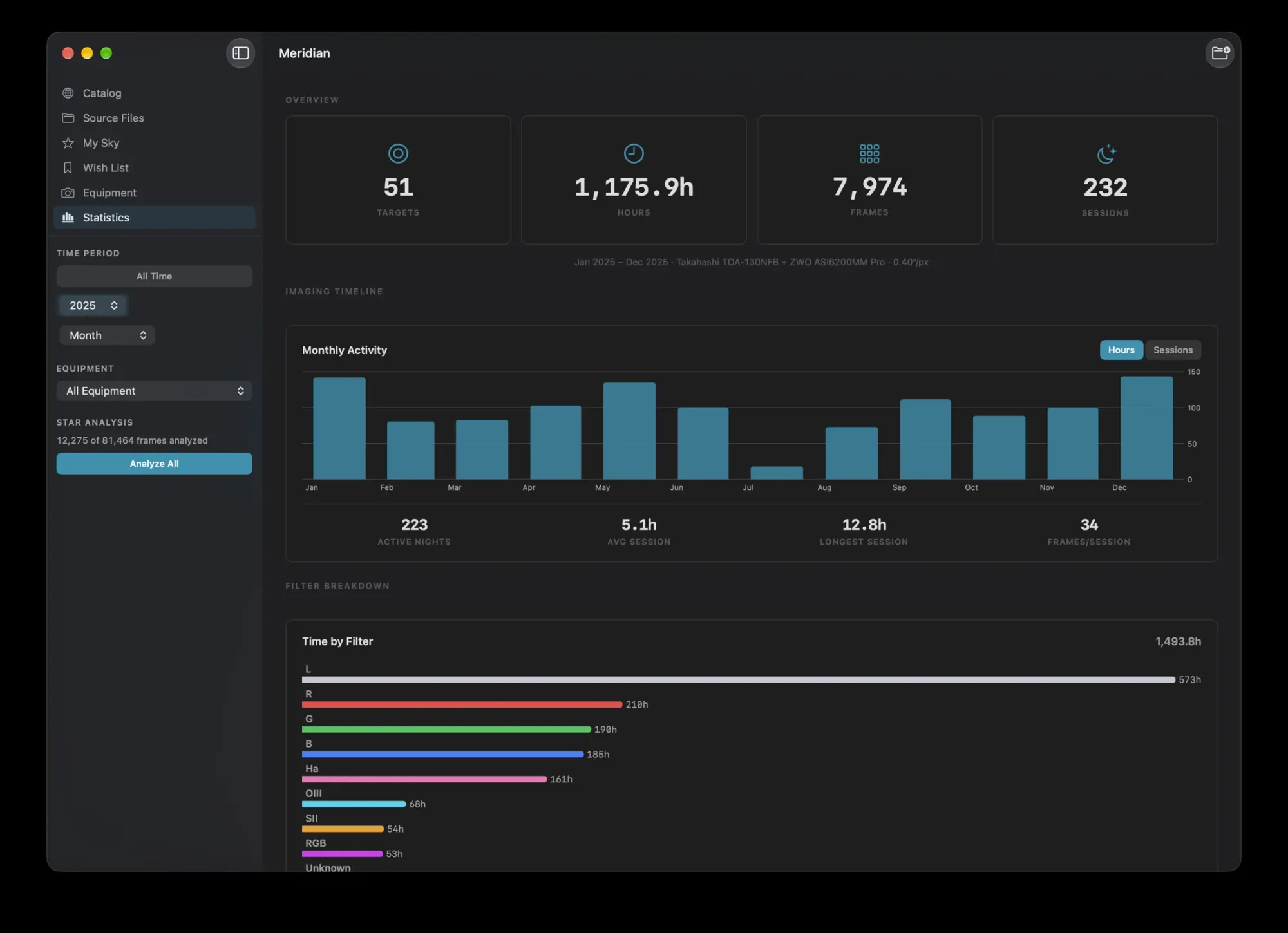
One year: how many nights you got out, your average and longest sessions, and where the hours went.
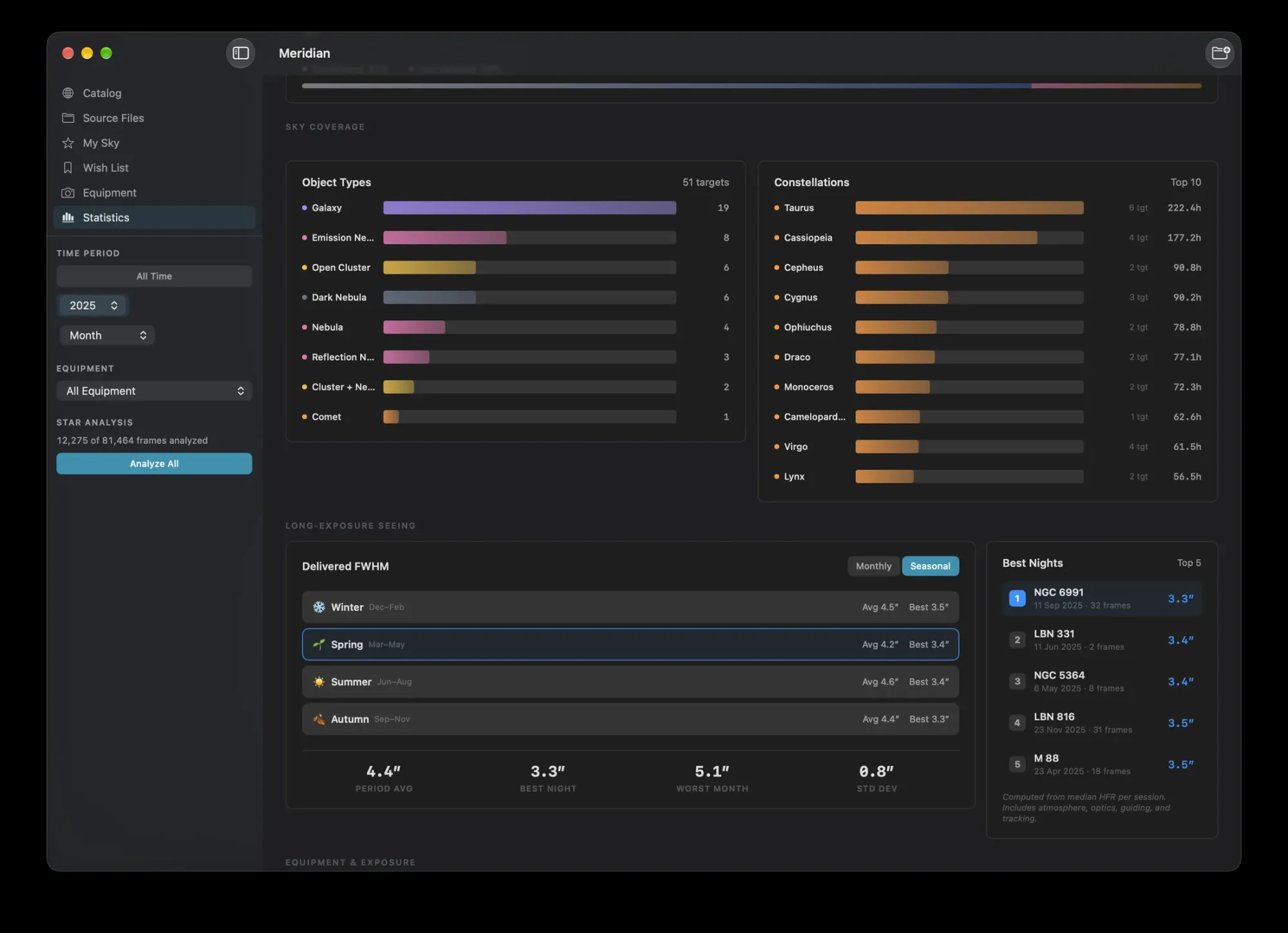
Targets and seeing: hours by object type and constellation, measured seeing by season, and your five best nights.
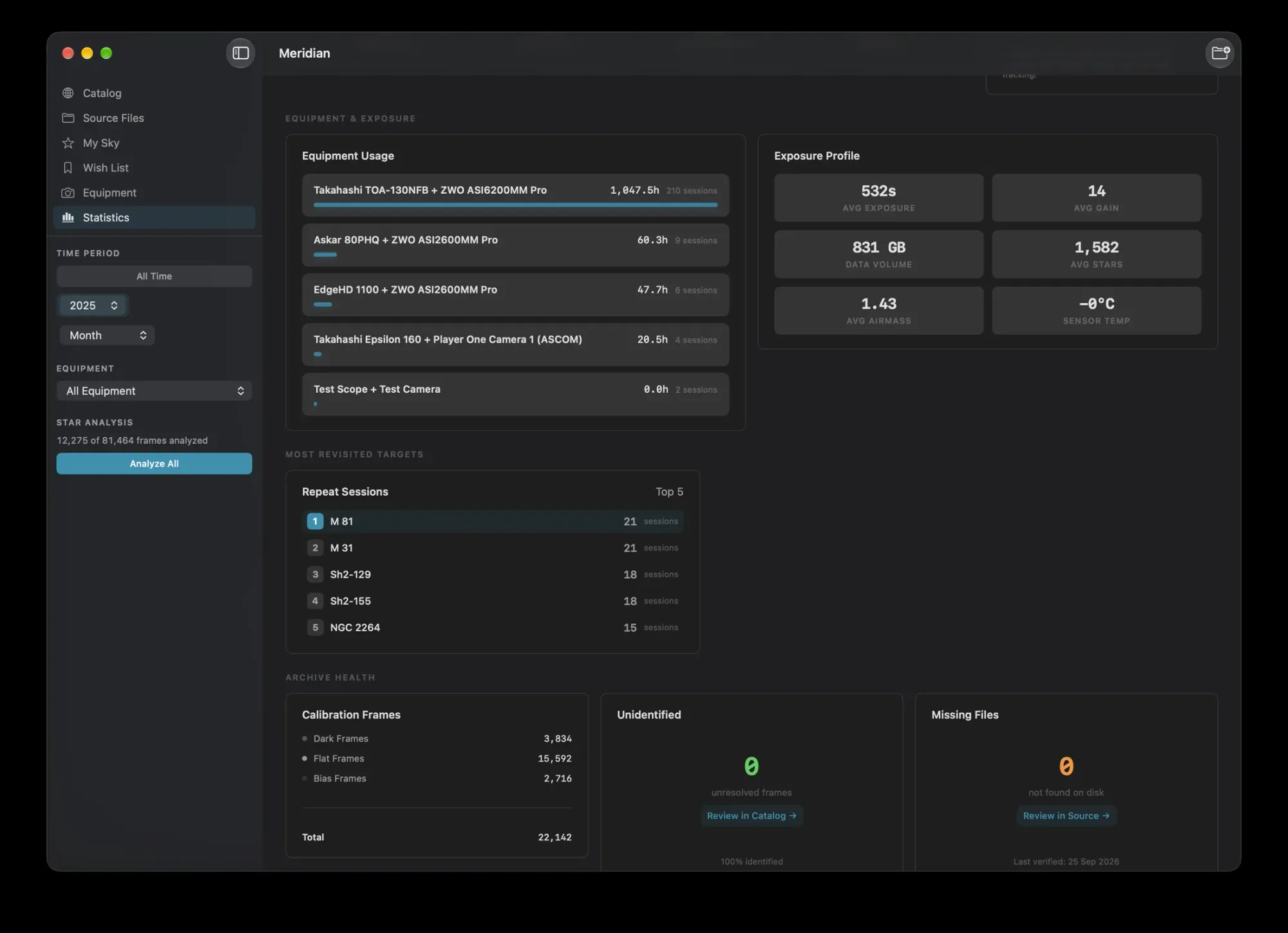
Equipment and health: hours per setup, your typical exposure and gain, data volume, and calibration frames or missing files that need attention.
Equipment
Your gear, already listed.
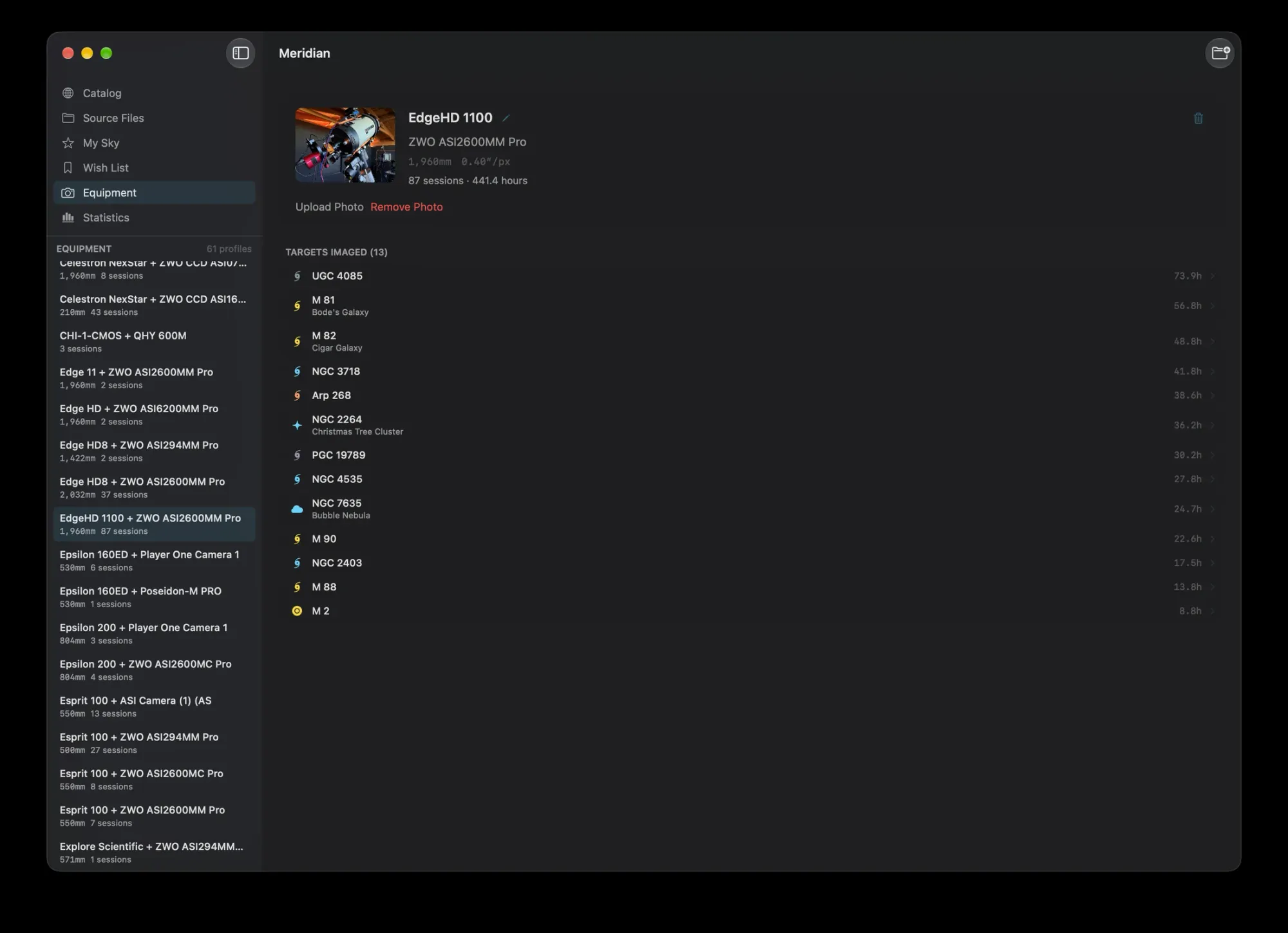
Meridian builds your equipment list from the telescope, camera and focal length in your file headers. No setup, no typing.
- Forgiving by design. A focal length logged as 754 mm one night and 756 mm the next is still the same telescope.
- Tidy it your way. Rename a setup, merge duplicates by dragging one onto another, and add a photo of the rig.
- Every setup's story. Image scale, sessions, hours, and every target it has captured.
Your files, untouched
Meridian reads. It never writes.
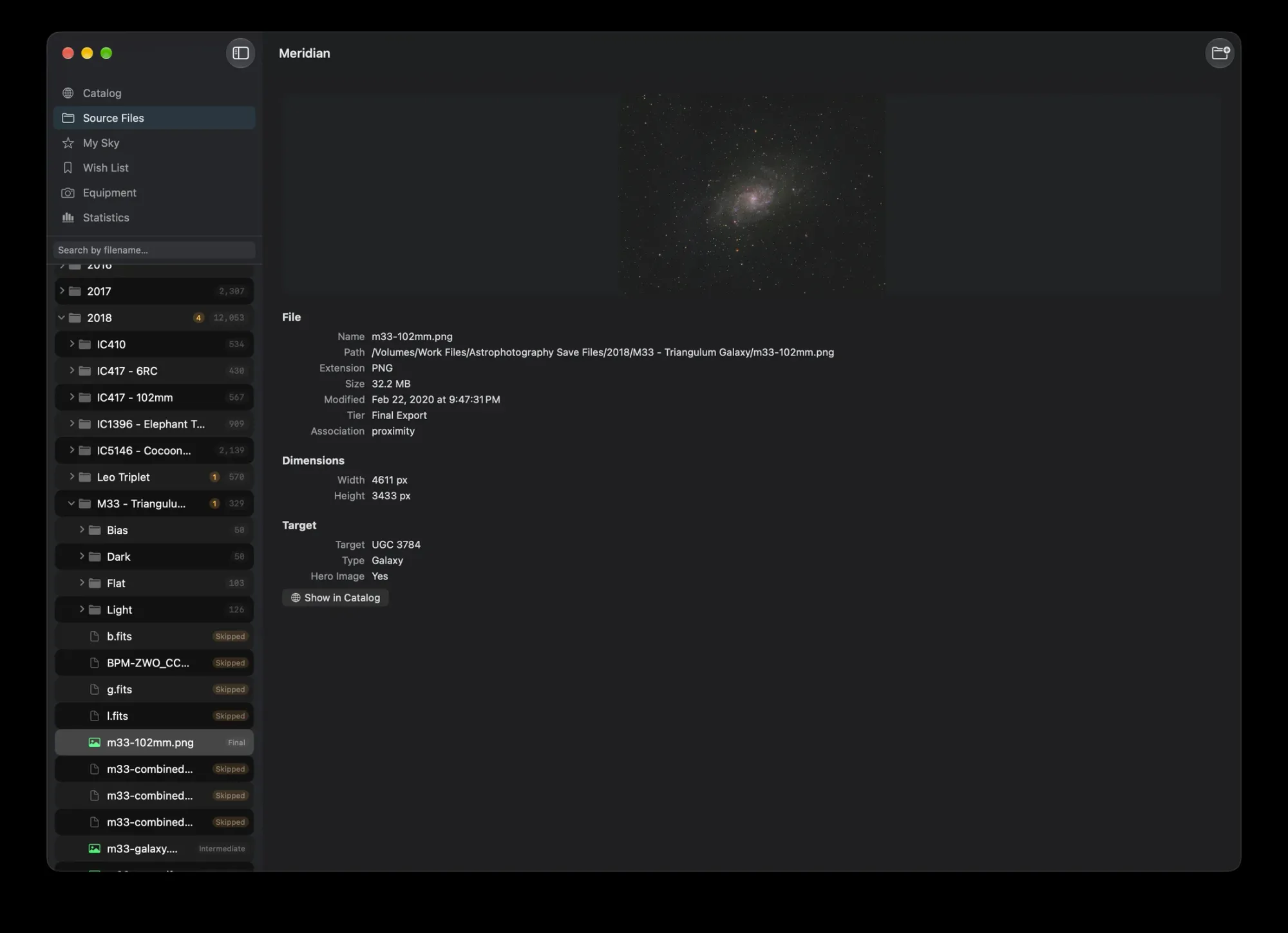
Your archive is years of clear nights. Meridian never moves, renames or modifies a file. Every correction you make lives only in Meridian's catalog.
- Drives come and go. Unplug an external drive and its targets are marked unavailable, then come back when you reconnect it.
- It knows what to skip. Processing outputs from PixInsight, Siril and Astro Pixel Processor, and thumbnail folders from the ASIAIR and APT, stay out of the way. WBPP masters are recognized.
- Previews in the Finder. Press Space on a FITS or XISF file for a stretched Quick Look preview, and see real thumbnails in Finder windows.
The details
Everything else you'll ask about.
Plate solving, when you need it
For frames with no pointing data, such as DSLR shots, Meridian can plate solve to find out what's in them, using ASTAP on your Mac or an optional Astrometry.net account of your own. It can also check every target's coordinates.
⌘K search
Jump to any target or setup from anywhere in Meridian.
New files, one command
After a session, Scan for New Files adds only what's new.
Seeing, measured
Star size and roundness from your subs, so you can compare nights.
Finished images
JPEG, PNG, TIFF and PSD files in a target's folder show up as its versions.
Private
No account, no analytics. Your location stays on your Mac.
Fast on big archives
A rescan of 122,919 files took 86 seconds on a tester's Mac.
Built for the Mac
Swift and SwiftUI, Metal for thumbnails and star measurement, and a universal app for Apple Silicon and Intel Macs.
Compatibility
Meridian reads what your capture software writes.
Captures
FITS and XISF lights, darks, flats, bias and masters, including compressed XISF.
Finished images
JPEG, PNG, TIFF and PSD, gathered as each target's versions.
Capture software
N.I.N.A., SGPro, APT, KStars and Ekos, the ASIAIR, and smart telescopes like Seestar and DWARF.
Your Mac
macOS 14 Sonoma or later, on Apple Silicon or Intel.
Not yet supported: camera RAW files (CR2, NEF, ARW and others) and tile-compressed FITS (.fz). Meridian catalogs your planetary and lunar finished images by folder name; to stack planetary videos, use Strata.
Give your archive the catalog it deserves.
$34.99One-time purchase on the Mac App Store, with Family Sharing for up to six people. No subscription, no in-app purchases.
“Fully satisfied with this app which fills a gap in my set of astrophotography software. A must have.”
Questions, answered.
What does Meridian do?
It reads the headers of your FITS and XISF files, works out which target each one shows, and builds a catalog of everything you've imaged: hours, sessions, equipment, seeing and finished images. It also plans what to image next, and it never changes your files.
Do I need to reorganize my folders first?
Usually not. Meridian expects one folder per target, and year folders above them are fine. If you keep one folder per night with several targets inside, those targets can merge; the library guide shows the layouts that work best.
Does Meridian modify my imaging files?
No. It never moves, renames or changes a file. Every correction you make, from renaming a target to merging equipment, is stored only in Meridian's own catalog.
How does it know what I photographed?
From the coordinates your capture software writes into each frame, matched against 41,731 objects from 19 catalogs. If a frame has no coordinates, it uses the folder name, and plate solving can fill in the rest.
Does it pick up new files automatically?
After an imaging session, choose Scan for New Files (Shift-Command-R) and Meridian adds only what's new. Drives you unplug are remembered and come back when you reconnect them.
Does it work with N.I.N.A., the ASIAIR and smart telescopes?
Yes. Meridian reads the FITS and XISF files they write, including from Seestar and DWARF smart telescopes, and skips the thumbnail folders the ASIAIR and APT create.
Do I need ASTAP?
No. Plate solving is optional and only matters for frames with no pointing data, such as DSLR shots. You can use ASTAP on your Mac, or an Astrometry.net account of your own.
Does it need an internet connection?
No. Scanning, identification, planning and statistics all work offline. Only the sky survey images in My Sky and Astrometry.net solving use the internet.
How is it different from PixInsight or Siril?
They process images. Meridian keeps track of them: which targets you've shot, for how long, with which gear and in what conditions, and where every file is. They work well together.
How long does the first scan take?
It depends on your drive. On an internal SSD a tester's 32,388 frames took about 50 seconds; larger archives on slower drives take a few minutes.
Does it work on Intel Macs?
Yes. Meridian runs on Apple Silicon and Intel Macs with macOS 14 Sonoma or later.
Does it catalog DSLR RAW files?
Not yet. Camera RAW files are listed but not cataloged; support is planned for a future version. DSLR frames converted to FITS can be brought in with Import Anyway, and filed by folder name until plate solving identifies them.
Can it catalog the Moon and planets?
Yes, by folder name. Solar system targets have no fixed coordinates, so a folder named Moon, Jupiter or Saturn becomes that target, even if it holds only finished images.
Is there a trial or subscription?
No subscription: Meridian is a one-time $34.99 purchase on the Mac App Store, shared with up to six family members, or part of the $99 Mac Observatory Field Kit.