
Planetary imaging capture for macOS. Real-time frame quality analysis. SER video recording. Native on Apple Silicon.
Beta requires macOS 15 or newer, ZWO or PlayerOne cameras, and an Apple Silicon Mac.
Planetary imaging on Mac has been an afterthought.
For years, Mac users have been stuck with Windows ports, Electron wrappers, or no options at all. Meanwhile, you're left guessing whether tonight's sky is worth setting up for — and whether your focus was actually good until hours later when you finally stack.
Laminar changes that. It detects your conditions before you set up, tracks focus quality as you capture, and follows your target automatically — so you know your session is sharp before you ever open a stacking tool.
Before You Set Up
Weather & seeing conditions for planetary imaging.PRO
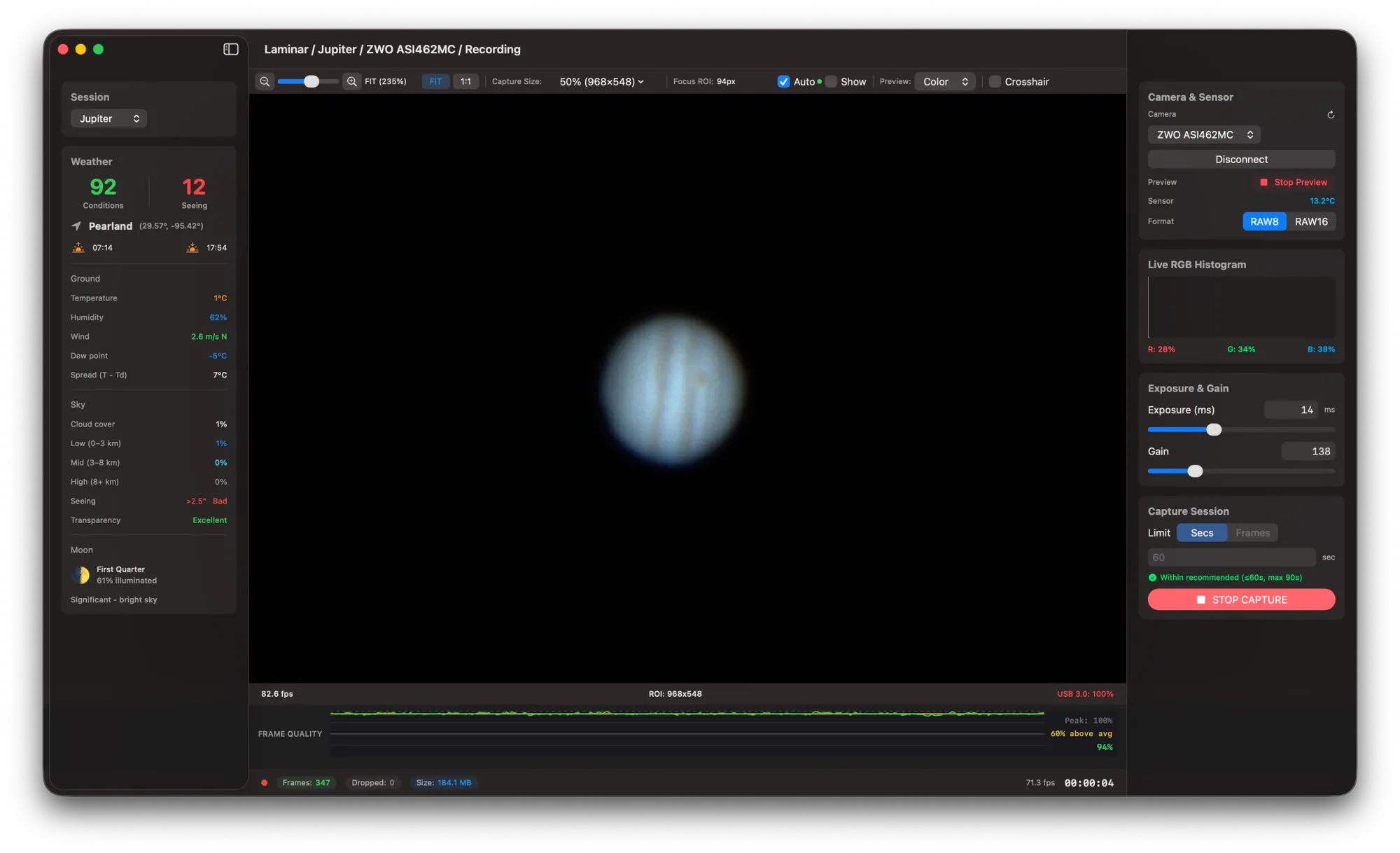
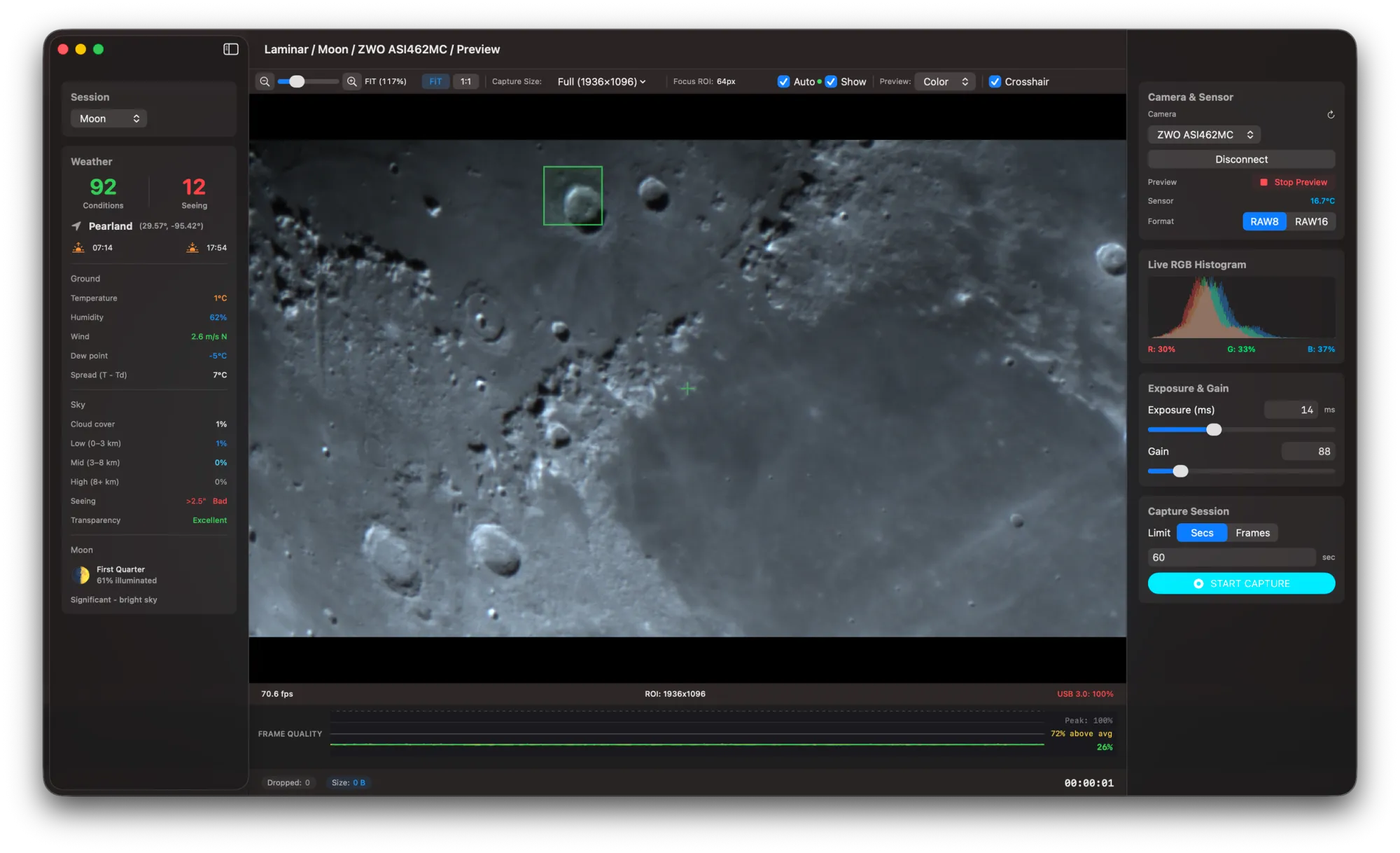
Laminar detects your location at launch and fetches real-time weather data automatically—no API keys, no configuration. Two scores tell you everything: Conditions (0–100) evaluates cloud cover, humidity, and dew risk. Seeing (0–100) estimates atmospheric stability for sharp planetary detail.
At a glance, you'll know whether tonight is worth hauling equipment outside—before you commit to setup.
While You Capture
Real-time frame quality analysis.PRO
The quality graph shows instantaneous sharpness (green), rolling average (yellow), and your session peak as you image. Use it as a live focusing aid: watch the yellow line as you adjust your focuser, and stop when it peaks.
Laminar helps you find the optimal focus position for your current seeing conditions. No more guessing. No more waiting until you stack to discover you were slightly off.
Never Lose Your Target
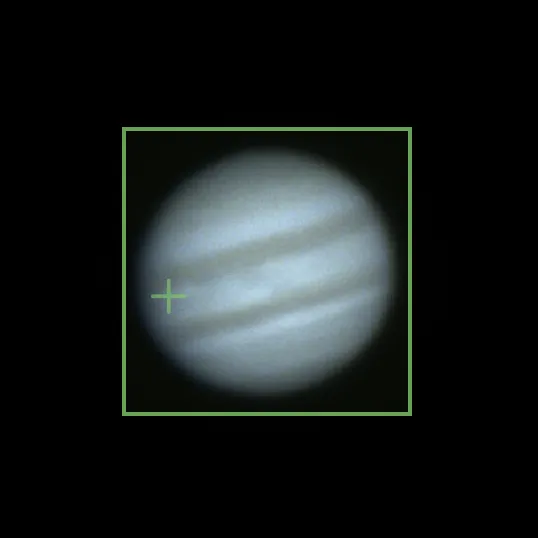
Automatic planet tracking keeps quality readings accurate.PRO
Planetary targets move. SCT mirror shift during focusing, wind gusts, accidental bumps, or even the wobble from adjusting a rack-and-pinion focuser—any of these can push your planet out of a static analysis region.
Laminar automatically detects and tracks the planetary disk frame-by-frame. The Focus ROI follows the target, so your quality measurements stay accurate no matter what shifts the image.
For Moon and Sun imaging, switch to surface feature tracking—click on a crater or sunspot and Laminar locks onto that feature, monitoring focus on the detail that matters to you.
Works with targets from a small Mars disk to Saturn's rings, and from lunar craters to solar active regions.
Native macOS planetary capture with Metal GPU acceleration.
Built in Swift and SwiftUI, Laminar is a true macOS-native app — not a port, not a wrapper, not an Electron shell. Every pixel is designed for the Mac, and every performance-critical path runs on Apple Silicon hardware.
GPU-accelerated Bayer demosaicing via Metal compute shaders — 10–50x faster than CPU processing. Live camera preview, quality analysis, and SER recording all run concurrently without dropping frames. This is what native performance looks like.
SER Video Recording
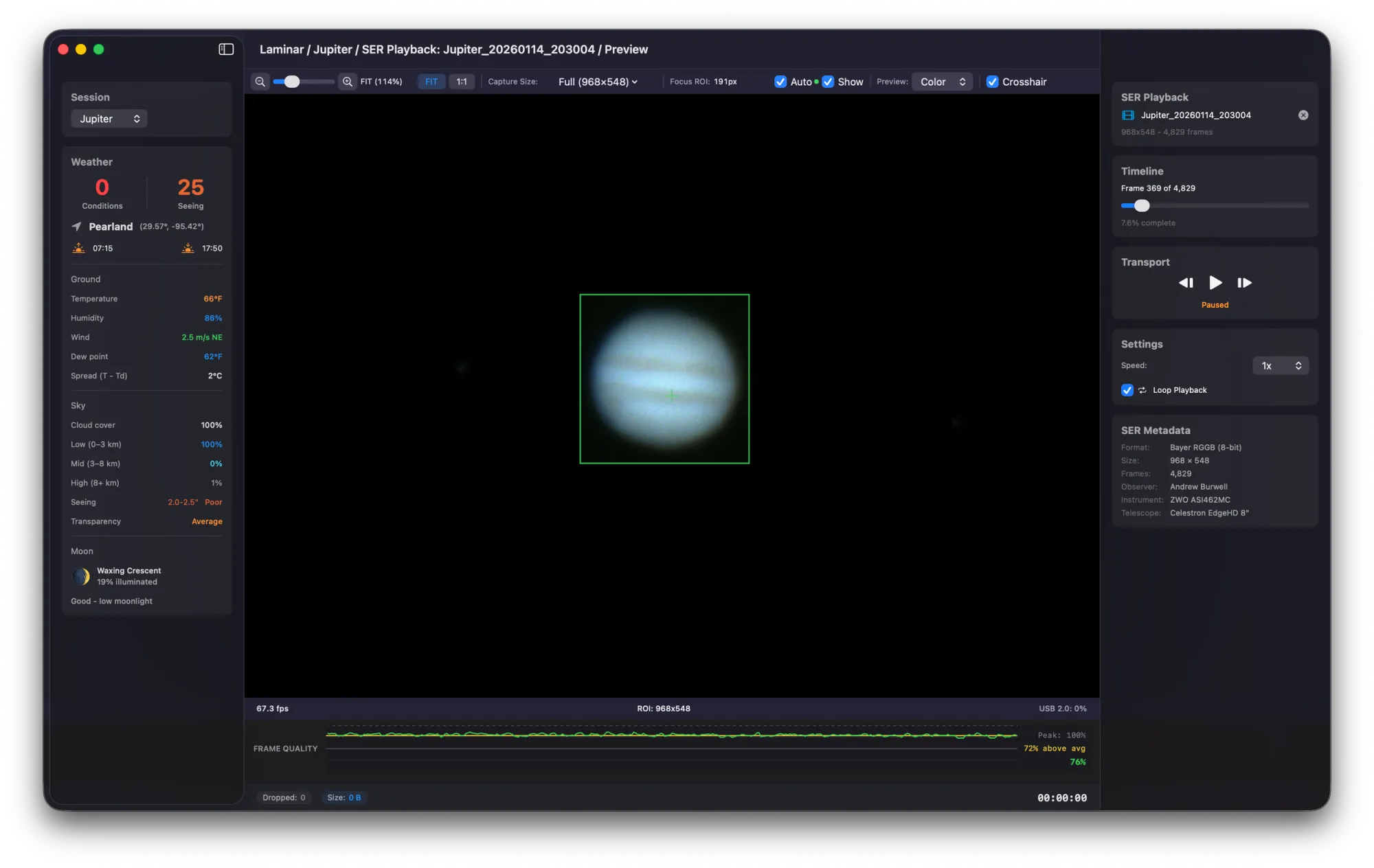
SER video recording, playback, and QuickLook preview.
Everything you need for serious planetary imaging on macOS.
SER Format with Metadata
Industry-standard SER video format with embedded timestamps, observer info, and telescope metadata.
RAW8 / RAW16
Capture in 8-bit or 16-bit raw for maximum dynamic range and compatibility with all stacking software.
Dynamic ROI
Set a region of interest to increase frame rates and reduce file sizes without cropping in post.
SER Playback & QuickLook
Review captured SER files with full playback controls, quality analysis overlay, and macOS QuickLook previews.
Zoom & Pan
Pinch to zoom and pan across the full-resolution live preview for precise focus evaluation.
Multi-Camera Support
Connect and switch between multiple cameras. Laminar detects all connected ZWO and PlayerOne devices.
Frame Drop Monitoring
Real-time monitoring of captured vs. dropped frames so you know your data is clean during capture.
Temperature Monitoring
Live sensor temperature readout from supported cameras, critical for thermal noise management.
Pre-Capture Checks
Laminar validates camera connection, storage space, and settings before you start recording.
One Tap, One Target
Pointed for Sun, Moon, and planets.
One-tap presets optimized for each target's size, brightness, and rotation rate.
One Ecosystem
From photon to archive.
The Mac Observatory Suite covers the entire planetary imaging workflow. Capture in Laminar, stack and sharpen in Strata, catalog in Meridian.
Swift & SwiftUI · Apple Silicon Native · Metal GPU · No Subscriptions
Compatible Cameras
ZWO ASI and PlayerOne camera support.
Laminar supports the most popular planetary imaging cameras — with more on the way.
ZWO ASI
All ARM64 SDK compatible models
SupportedPlayerOne
All models
SupportedPopular models tested
QHY
In development
PlannedAltair
In development
PlannedPricing
No subscriptions. Buy once, own it forever.
Free
Free forever
- Full camera capture & control
- SER playback & QuickLook
- Basic weather conditions
- Histogram
- RAW8 / RAW16
- Dynamic ROI
- ZWO & PlayerOne support
Pro
One-time purchase
- Everything in Free, plus:
- Sky Quality scores (Conditions + Seeing)
- Real-time quality graph
- Automatic planet tracking
- Surface tracking (Moon / Sun)
- Rotation warnings
Download Laminar for macOS.
Start capturing planetary images tonight. Free to try, no account required.
Download on TestFlightRequires macOS 15+ · Apple Silicon · ZWO or PlayerOne camera
Laminar FAQ
What cameras does Laminar support?
Laminar currently supports all ZWO ASI cameras compatible with the ARM64 SDK and all PlayerOne cameras. Popular tested models include the ASI462MC, ASI585MC, ASI290MM, Mars-C, Neptune-C, and Uranus-C. Support for QHY and Altair cameras is planned for future releases.
Does Laminar work on Intel Macs?
No. Laminar requires Apple Silicon (M1 or later) and macOS 15 (Sequoia) or newer. The app is built entirely on Apple's ARM64 architecture and Metal GPU framework, which are not available on Intel-based Macs.
What's the difference between Free and Pro?
The Free version includes full camera capture and control, SER playback with QuickLook, basic weather conditions, histogram, RAW8/RAW16 recording, dynamic ROI, and support for all compatible cameras. Pro is a one-time $34.99 purchase that adds Sky Quality scores (Conditions + Seeing), the real-time quality graph, automatic planet tracking, surface tracking for Moon and Sun, and rotation warnings.
Does Laminar work with AutoStakkert, Registax, and PIPP?
Yes. Laminar records in the industry-standard SER video format, which is directly compatible with AutoStakkert, Registax, PIPP, and other planetary stacking software. If you use Strata (also part of the Mac Observatory Suite), you can stack and sharpen entirely on your Mac without needing Windows tools.
How is Laminar different from FireCapture or SharpCap?
Laminar is the only planetary capture app built natively for macOS and Apple Silicon using Swift, SwiftUI, and Metal. FireCapture and SharpCap are Windows applications — FireCapture runs on Mac via Java but lacks native performance and integration, and SharpCap has no Mac version at all. Laminar also provides real-time frame quality analysis during capture, automatic planet tracking, and integrated atmospheric seeing scores — features not available in either alternative.