

Laminar 1.9.1 is live on the Mac App Store, and it takes over three jobs planetary imagers have always done by eye. Auto Focus finds best focus on a planet, the Moon or the Sun with a motorized focuser. ADC Assist measures atmospheric dispersion on the planet itself and tells you how to set an atmospheric dispersion corrector. SHG mode gives spectroheliograph users a focus score that moves when focus does.
Laminar is Mac Observatory's native macOS capture app for solar, lunar and planetary imaging. It records SER files from ZWO, Player One, QHY, ToupTek and SVBONY cameras for stacking in Strata, AutoStakkert, PIPP or RegiStax, and since 1.9.0 it drives filter wheels and focusers directly. 1.9.1 is a free update for anyone who already owns it.
- New: Auto Focus, ADC Assist, SHG mode
- Platform: macOS 15.0 (Sequoia) or later, Apple Silicon
- Languages: English, German, French, Italian, Spanish, Dutch
- Update: Free for existing owners
- Developer: Mac Observatory
Last month, in the 1.9.0 post, I wrote that autofocus was where I wanted Laminar to go next, and that I'd hold it until I had tested it under real skies. Two nights on Saturn this month were that test, and they sent me back to the code more than once. Everything below ran on my Celestron EdgeHD 8" with a MoonLite focuser, a ZWO ADC and a ToupTek G3M678C color camera, from my backyard in Pearland.
How does Laminar focus on a planet without stars?
Deep-sky autofocus measures stars. It reads how wide they are at a series of focuser positions and fits a V-shaped curve to find the bottom. A planet offers nothing like that: one bright disc, boiling in the seeing and changing shape from frame to frame.
Laminar uses its focus score instead, the sharpness reading behind the Frame Quality graph along the bottom of the window, and 1.9.1 rebuilt it. The trouble is sensor noise. To a sharpness measurement, grainy pixel-to-pixel noise looks just like fine detail, so the old graph hardly moved through 100-step focuser moves on Saturn. Behind the scenes, Laminar now blurs a working copy of each frame slightly before measuring it, which smooths the noise out and leaves the planet's real detail to be scored. That copy exists only for the measurement: what you see in the preview and what goes into your SER file are untouched. The measurement runs on the GPU and the graph rescales itself to the last 30 seconds, so a focus change shows up as a clear dip and recovery.
To run it, focus by eye first, then press Auto Focus in the focuser card on the Equipment tab. Laminar takes a reading where you are and steps outward, doubling each step, until the score falls to half. You never type in a range. It then sweeps inward from outside focus to inside, runs a second, narrower and denser pass around the first pass's peak, and finishes by approaching best focus from the inside.
At each stop it watches for a few seconds (five by default, adjustable from three to fifteen) and averages the sharpest quarter of the readings. It's the lucky imaging idea applied to focus: the moments of good seeing say more about focus than the average does. Each pass gets a curve fitted through it, and Laminar accepts the result only when the peak is bracketed and stands clear of the scatter. If it isn't, the focuser goes back to where you started. If you press Stop, it stays where it is.
The gap between the two passes is reported as backlash, or as mirror shift if your focuser moves an SCT's primary mirror.
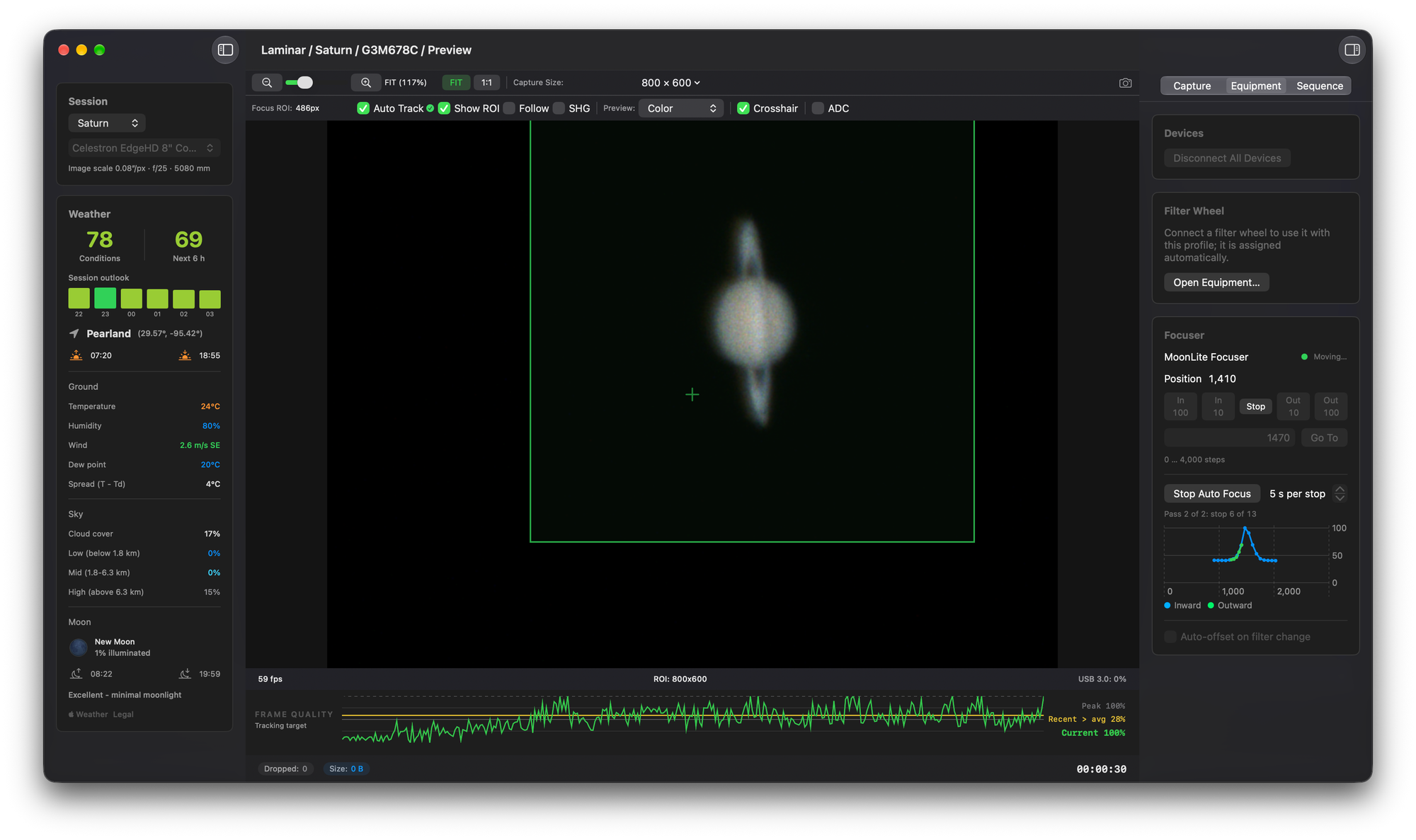
The first nights broke it in useful ways. A defocused planet grows, and the focus box grew with it, pulling in more sky and more gain noise, so the score went up as focus got worse. The box now stays fixed for the whole run. A sweep also ends once Auto Track's confidence starts to drop, instead of chasing a lost planet to the end of the focuser's travel. And at very high gain, noise can hide the focus change completely, so Laminar now measures where the score levels off. If that floor sits too close to the in-focus score, it stops and tells you to lower the gain or lengthen the exposure.
Auto Focus needs a focuser Laminar controls that moves to absolute positions, and Auto Track locked on the target. It works with surface tracking too, so a lunar crater or a sunspot is fair game. It also needs a planet it can read, which is the one thing worth setting up before you press the button.
Auto Focus works best when the planet sits well above the noise. Set brightness with exposure first and keep gain moderate. A planet that's too dim gives frames too dark to score, and too much gain raises the noise floor until the focus change disappears into it. On my Saturn runs, gain 500 worked; at gain 749 the score never fell far enough to find a peak. Gain numbers differ from camera to camera, so treat those as a direction rather than a setting.
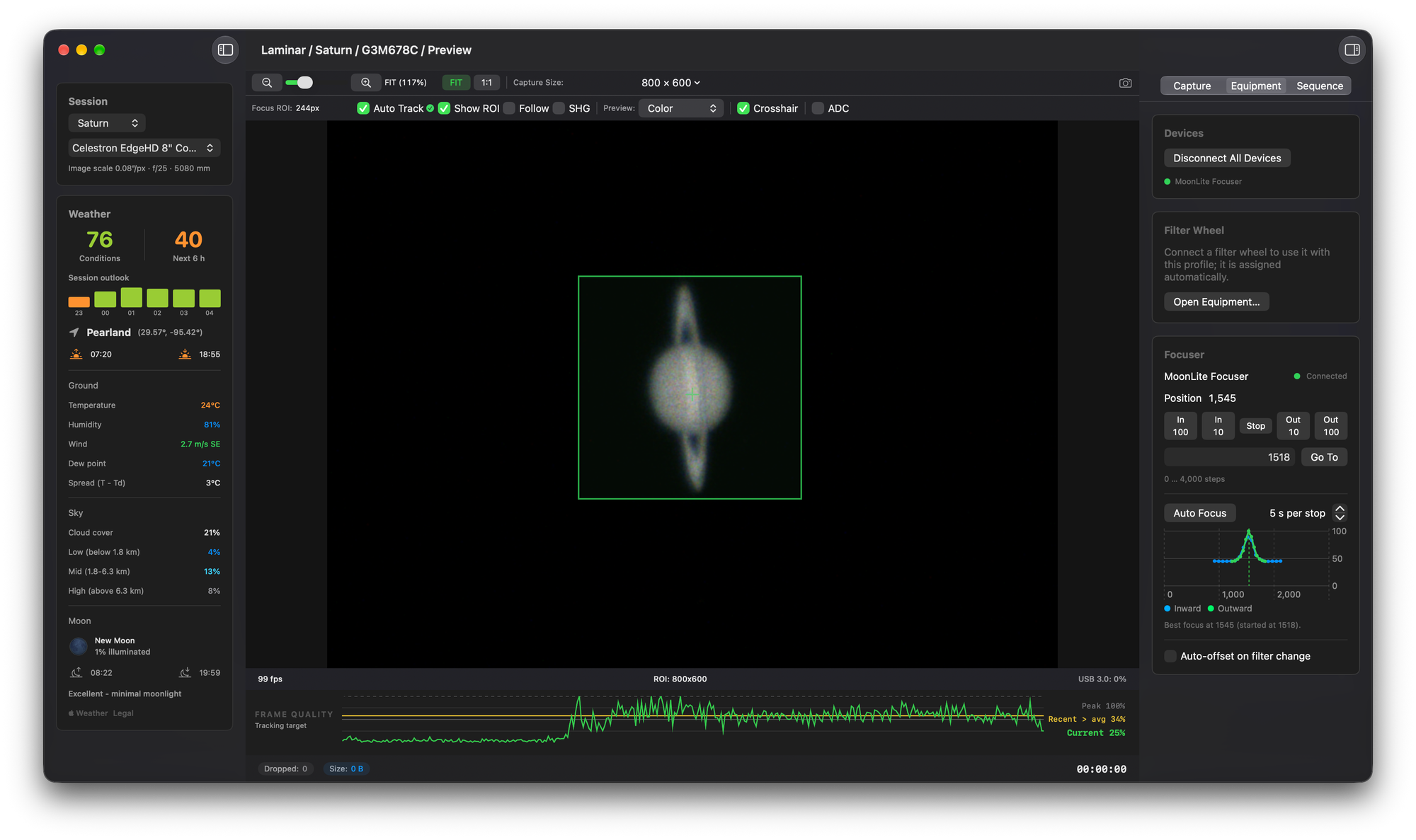
An SCT's focus doesn't hold still through a night. I measured how far an EdgeHD's focus moves as the tube cools in an earlier post, and a hands-off refocus between capture sets is exactly what I wanted from this.
What does ADC Assist do?
An atmospheric dispersion corrector (ADC) is a pair of adjustable prisms in the imaging train, usually after the Barlow, that cancels the color spread the atmosphere adds to a planet. Air acts like a weak prism. It bends blue light more than red, so a planet's blue image sits slightly higher in the sky, toward the zenith, than its red one, and the lower the planet, the wider the gap. My ZWO ADC sets its correction with two levers.
The hard part has always been setting it. The usual method is to watch for a red fringe on one limb and a blue fringe on the other and nudge the levers until they look even. On a small planet at high magnification, with the seeing moving the whole disc around, that's a guess.
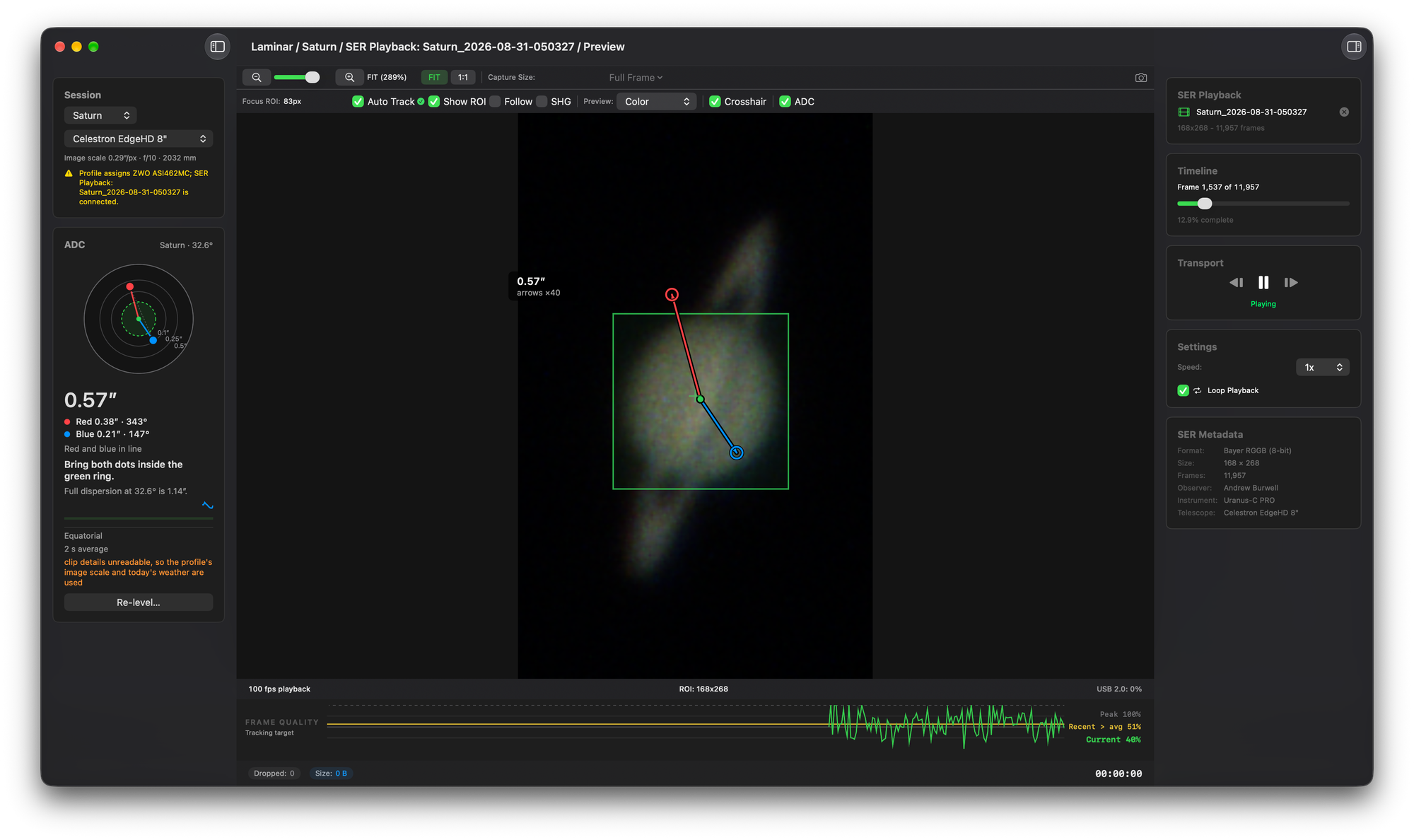
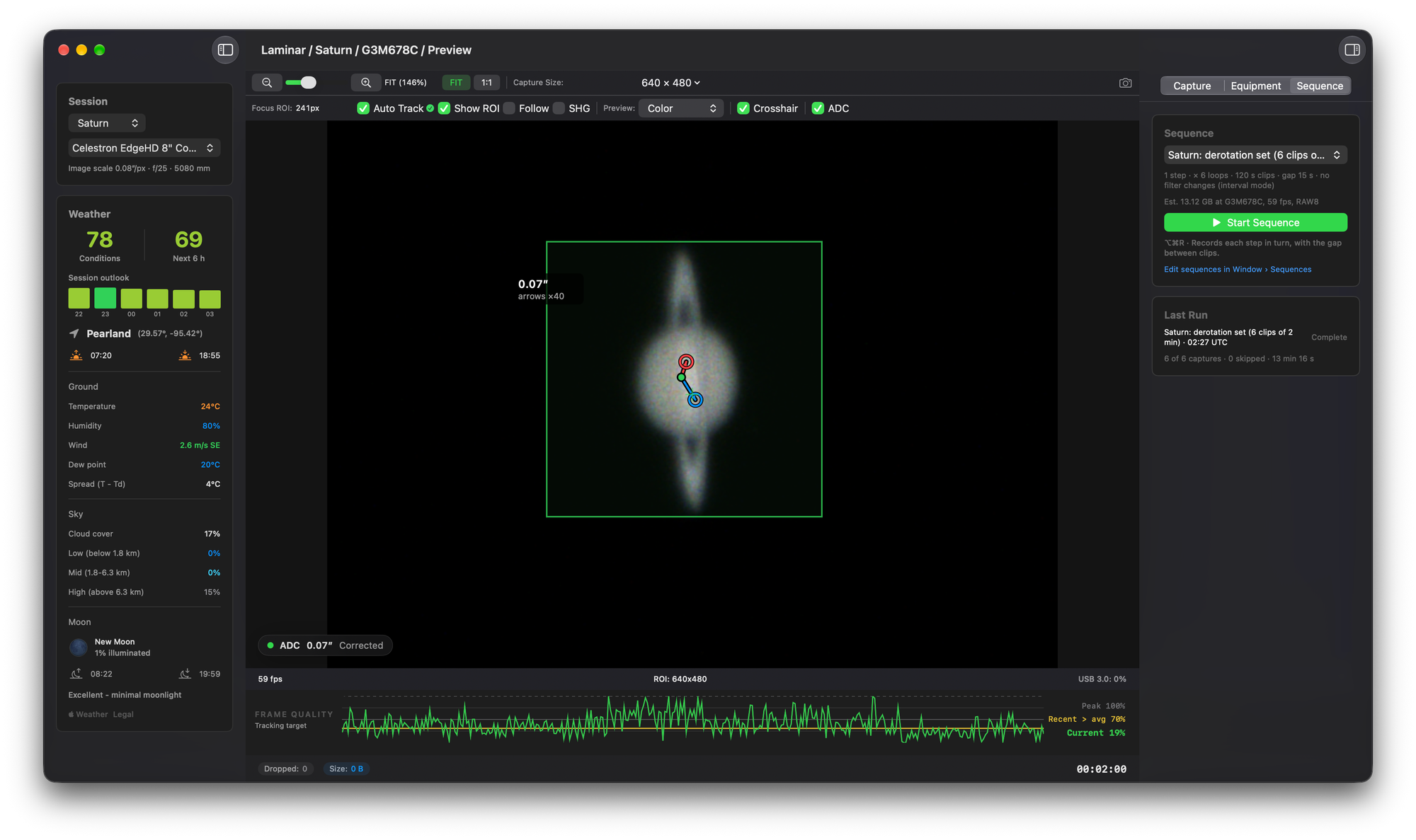
ADC Assist replaces the guess with a measurement. Check ADC in the preview toolbar (or choose View › ADC Assist, ⌥⌘A) and Laminar finds the planet's edge separately in the red and blue channels of the raw frame, works out how far apart they are in arcseconds, and draws the result on the planet: the zenith direction and a red-to-blue arrow magnified 40 times, so a fraction of an arcsecond is visible. While ADC is on, its readout takes the Weather card's place in the sidebar. A target shows where red and blue sit, and plain instructions tell you what to do with the levers or which way to turn the ADC's body.
Beside that, Laminar shows the full dispersion to expect at the planet's altitude, worked out from Apple Weather's temperature and pressure and planet positions the app computes from JPL's orbital elements. You know how much there is to correct before you touch a lever.
Before the first measurement, Laminar needs to know which way is up. The leveling card walks you through it: point at the planet and let Auto Track lock, set both levers to neutral, center the ADC's bubble level (or skip it, and Laminar will show you which way to turn the body afterward), then press Leveled. With the levers at neutral the ADC corrects nothing, so the measured dispersion points straight at the zenith, and Laminar takes its bearings from that. You choose Alt-az or Equatorial once per equipment profile. On an equatorial mount, Laminar follows the parallactic angle as the planet crosses the sky and catches a meridian flip.

The measurement runs on its own queue, from a frame handed over after the recording has written it, so when the Mac is busy it can skip a measurement but never a frame of your recording. It works in SER playback too, which is how both screenshots above were made, and clips recorded with ADC on carry the readings in their sidecar file. It does need a one-shot color camera, since it compares the red and blue channels of the same frame.
How do you focus a spectroheliograph?
A spectroheliograph (SHG) builds an image of the Sun one strip at a time. A slit passes a thin slice of the solar disc, a diffraction grating spreads it into a spectrum, and as the slit sweeps across the Sun, software rebuilds the whole disc from a single absorption line across thousands of frames. Sol'Ex and the MLAstro SHG 700 are the two most people know.
That design defeats an ordinary focus score. The absorption lines are sharp wherever the telescope is focused, because the spectrograph's own optics focus them, so the score barely moves. On SHG 700 clips from Gabe S., who suggested this mode, Laminar's normal focus score changed by 4 percent between best focus and far outside it.
SHG mode, a checkbox next to Follow, scores something that does change. Each line of spectrum carries fine bright and dark streaks running along it, put there by detail on the Sun, and they blur as the telescope goes out of focus. SHG mode averages the frame along the spectrum, filters what's left along the slit to keep only that fine detail, and scores it. On the same clips, that score changed elevenfold between best focus and far inside or outside.
Laminar measures the whole frame and assumes the slit runs along the frame's longer side. The Focus ROI controls switch off while SHG mode is on, Auto Focus uses the SHG score without needing an Auto Track lock, and the graph runs during SER playback. I tested the score against Gabe's clips before building it into the app.
Also in 1.9.1
- Follow keeps a drifting planet centered in the zoomed preview on an undriven telescope, and the border turns yellow, then red, as the planet nears the edge of the sensor. WanderingObservatory asked for it on Cloudy Nights.
- Set Focus Position records each filter's focus offset for you: focus on your master filter and click it, then switch, focus and click for each of the others.
- With a filter wheel in use, file names now include the filter by default.
- SER files get color Quick Look previews in Finder, plus a document icon of their own.
- About 120 messages that still appeared in English on translated screens are now in German, French, Italian, Spanish and Dutch, along with the Siri and Shortcuts phrases.
I've run Auto Focus on my MoonLite and ADC Assist with my ZWO ADC. If you try Auto Focus on another focuser, especially one that moves an SCT's primary mirror, or SHG mode on your own spectroheliograph, I'd like to hear what worked and what didn't. Reach me at support@macobservatory.com.
The Saturn at the top of this post came from the same rig: the EdgeHD 8 at f/25, the ZWO ADC set with ADC Assist, focus from Auto Focus, captured in Laminar on the G3M678C and processed in Strata.