

Laminar 1.9.0 is live on the Mac App Store, and it's the release that turns Laminar from a capture tool you babysit into one that runs an LRGB set on its own. Filter wheels and focusers now connect directly, and sequences can drive both together.
Laminar is Mac Observatory's native macOS capture app for solar, lunar, and planetary imaging: a Mac-native alternative to the Windows capture tools most of this hobby still runs on, recording SER files that move straight into stacking software like Strata, AutoStakkert, PIPP, or RegiStax.
- Version: 1.9.0
- Platform: macOS 15.0 (Sequoia) or later, Apple Silicon
- Languages: English, German, French, Italian, Spanish, Dutch
- Developer: Mac Observatory
Connecting a wheel
Settings > Connections is where a wheel goes in. I ran this with a Player One Phoenix on my Celestron EdgeHD 8", and once it's connected, the Equipment window is where the filter definitions live: name, kind, focuser offset, and the spectral figures (wavelength, bandwidth, cut-on) if you want them in the sidecar.
If you're running a manual wheel instead, you can declare it and Laminar still tracks position and writes it into every filename and sidecar.
Connecting a focuser
Once a focuser's connected, you get manual control from the Inspector or the keyboard, and the part that matters for sequences: each filter can carry its own focus offset, applied automatically when the wheel changes.
Driver support and a request for feedback
Wheel and focuser support in Laminar comes through INDIGO. Practically, that means any wheel or focuser INDIGO supports should work in Laminar, not just the handful of brand names I can list from my own bench. Mount support isn't part of this release, that's a future update.
- ZWO ASI
- Player One
- QHY CFW
- Astroasis
- Atik
- FLI
- Moravian Instruments
- Pegasus (Indigo wheel)
- StarlightXpress
- Brightstar Quantum
- Optec (INDIGO marks untested)
- Xagyl (INDIGO marks untested)
- Trutek / TruTech (INDIGO marks untested)
- Manual wheel (any brand, declared)
- MoonLite
- ZWO EAF
- Player One
- Pegasus (DMFC, FocusCube 3, Prodigy)
- Astroasis Oasis
- Deep Sky Dad
- Celestron / PlaneWave EFA
- iOptron iEAF
- Baader SteelDrive II
- PrimaluceLab
- Rigel Systems (nFOCUS, nSTEP)
- RoboFocus
- Shoestring FCUSB
- QHY Q-Focuser
- Optec (TCF-S, FocusLynx — INDIGO marks untested)
- Lunatico, LACERTA, Askar, USB Focus v3, and others INDIGO supports
This list follows INDIGO's own driver list as of this writing; check there directly if your hardware isn't named above.
This is the first hardware I've added to Laminar beyond cameras, and cameras I can test myself against real bodies on the bench. Wheels and focusers are a bigger space, INDIGO supports far more than I own. I've tested internally on ZWO and Player One wheels and focusers and on a MoonLite focuser, but I can't validate every combination on that list.
If you connect a wheel or focuser I haven't tested myself, I'd like to hear how it went, what worked, what didn't, anything that felt off. That's what tells me where to focus testing next. Reach me at support@macobservatory.com.
Building an LRGB sequence
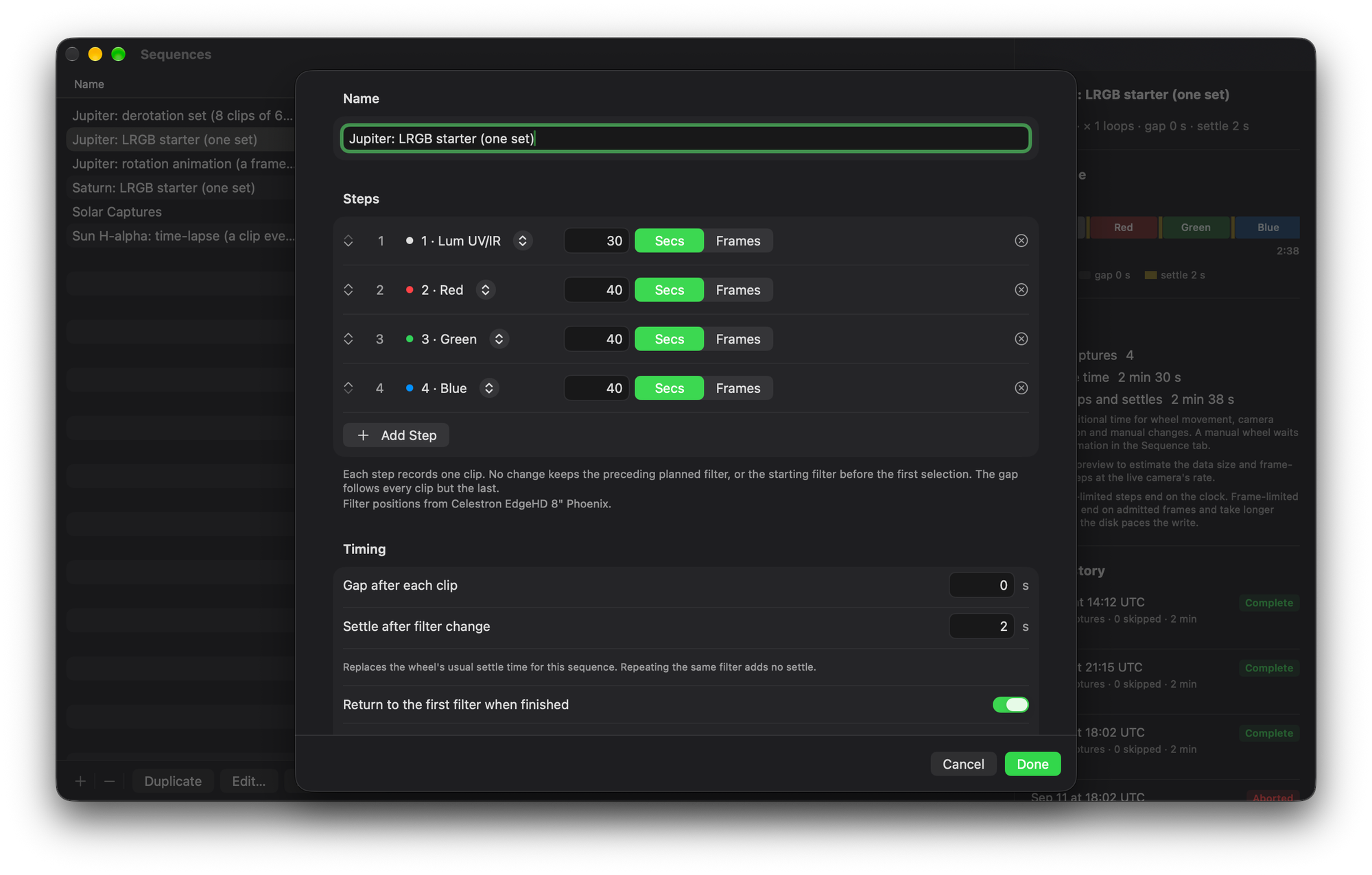
This is where the wheel and the focuser start working together. A sequence step now picks a physical filter instead of just a duration. Here's a four-step LRGB set on Jupiter, 30 seconds on Luminance, 40 each on Red, Green, and Blue:
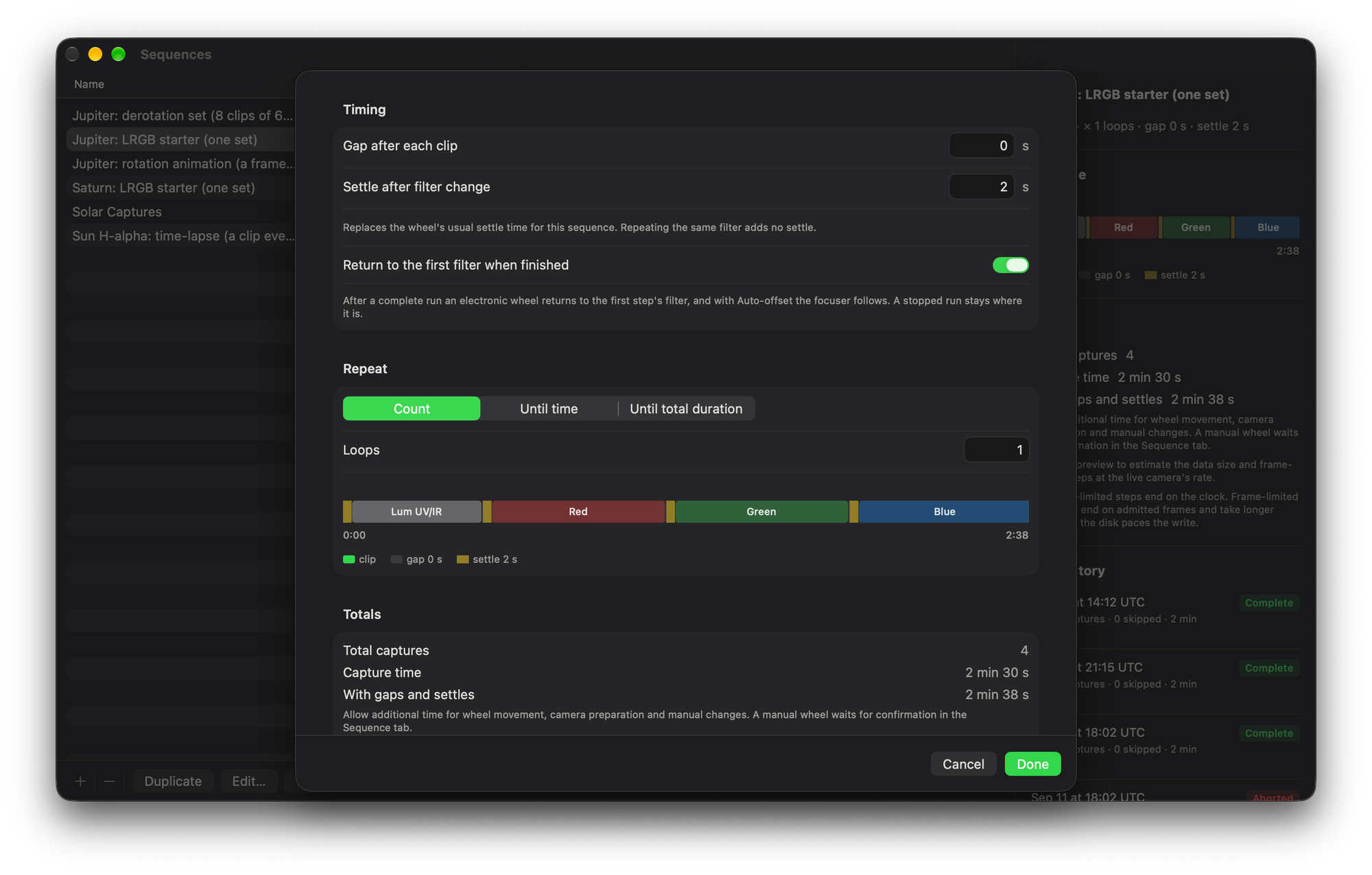
The timing panel is where you set the settle time after each filter change and whether the wheel returns to filter one when the run finishes:
Start the run and Laminar moves the wheel, waits for it to settle, applies that filter's focus offset if a focuser is connected, restores that filter's own gain and exposure, and only then starts recording. Every clip gets the filter written into its file name and its sidecar, so nothing downstream has to guess which channel it's looking at.
Autofocus is direction I want to take Laminar in next, but I'm holding it until I've tested it under real skies rather than shipping something I haven't put in front of a telescope.