
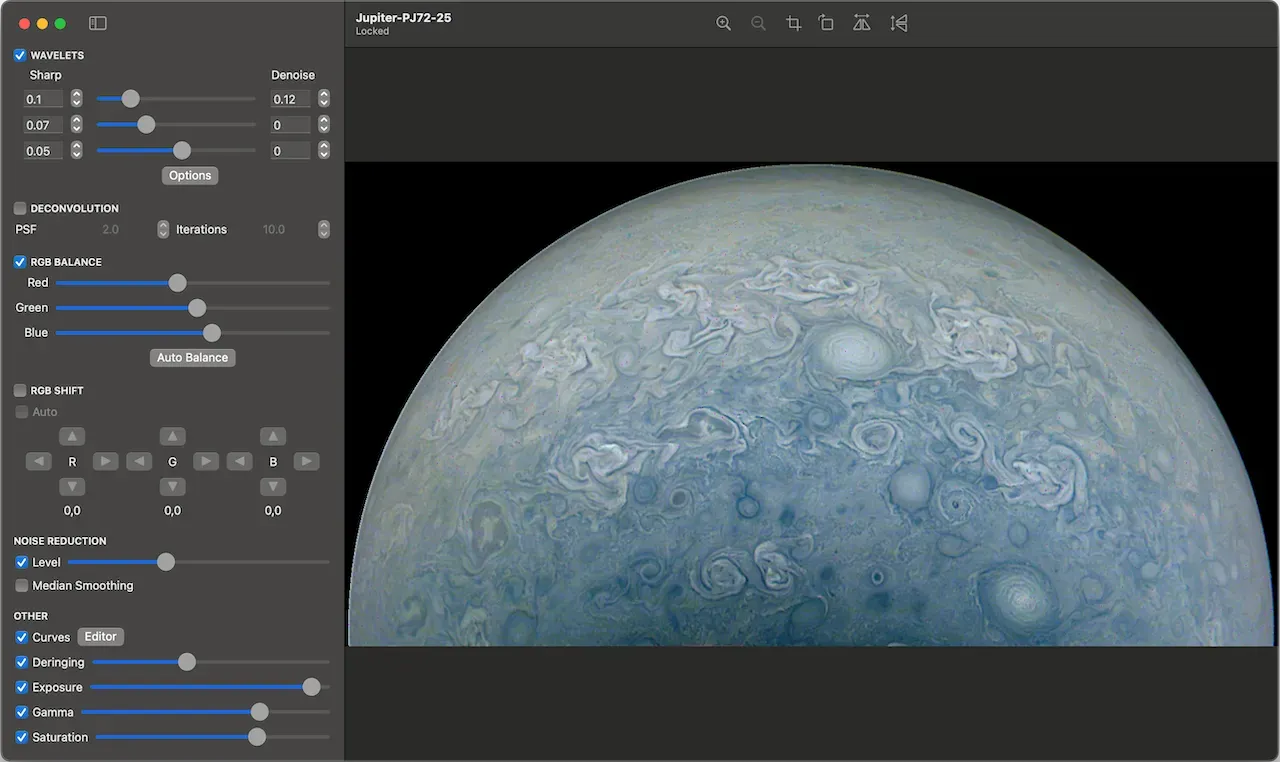
One of the long-standing frustrations for Mac-based astrophotographers has been the lack of native, high-quality stacking software tailored for planetary imaging. While Windows users enjoy a buffet of options like AutoStakkert! and RegiStax, macOS users have often found themselves patching together workflows or running software in virtual environments. That’s where Rain City Astro steps in—with a laser focus on fixing this problem.
A New Player in Mac Astrophotography
Rain City Astro is a fresh entrant in the astrophotography software scene, and they’re clearly building with intent. Their first release, Planet Stacker X, is a purpose-built macOS application that brings high-speed planetary stacking and image enhancement into a native, intuitive interface. And the best part? It’s completely free.
What Planet Stacker X Does
At its core, Planet Stacker X is designed around Lucky Imaging, the technique of capturing hundreds or thousands of video frames of a planet, then selecting and stacking the sharpest ones to overcome atmospheric turbulence. Here’s what sets it apart:
Image Processing Tools That Matter
- Wavelet Sharpening (Gaussian & Starlet): Brings out fine planetary detail without blowing out contrast.
- Wavelet Denoising: A welcome tool for noise reduction that preserves sharpness.
- Atmospheric & Optical Deconvolution: Helps correct distortions caused by seeing and telescope imperfections.
- RGB Shift & Balance: Lets you dial in accurate color registration—especially handy for one-shot color planetary cams.
- Exposure, Saturation, Tone Curves: Everything you’d expect for a finishing pass, right within the app.
Flexible Stacking Workflow
- Supports SER and RAW AVI formats: The staples of planetary video capture.
- Auto & Manual Frame Selection: Gives you full control or lets the software decide.
- Live Alignment Preview: A standout feature—watch the stacking alignment in real time.
- Batch Processing: Perfect for nights when you capture a whole family of planets and don’t want to babysit the stack.
Performance and Limitations
I’ve put Planet Stacker X through its paces on a few lunar and Jupiter sessions using SER video from an ASI224MC. Setup was painless—just drag and drop the files, preview alignment, and process. The interface feels polished, with GPU acceleration making previewing and adjustments smooth on Apple Silicon.
However, this is strictly a planetary imaging tool. Don’t expect deep-sky registration or star field alignment. This isn’t PixInsight—it’s more like AutoStakkert! with a macOS soul.
One potential caveat: It’s macOS only—no cross-platform plans announced so far. That’s fine for Mac users (finally, something just for us!), but it won’t help if you work in a mixed-OS environment.
Final Thoughts
Planet Stacker X is a gift to the macOS astrophotography community. It fills a glaring hole with elegance and purpose. While seasoned planetary imagers might still prefer ultra-granular control from Windows-native tools, Planet Stacker X brings 90% of the capability with none of the OS headaches.
If you’re shooting planets on a Mac and haven’t tried it yet, head over to Rain City Astro’s website and download it today. It’s fast, intuitive, and surprisingly powerful for a 1.0 release.