
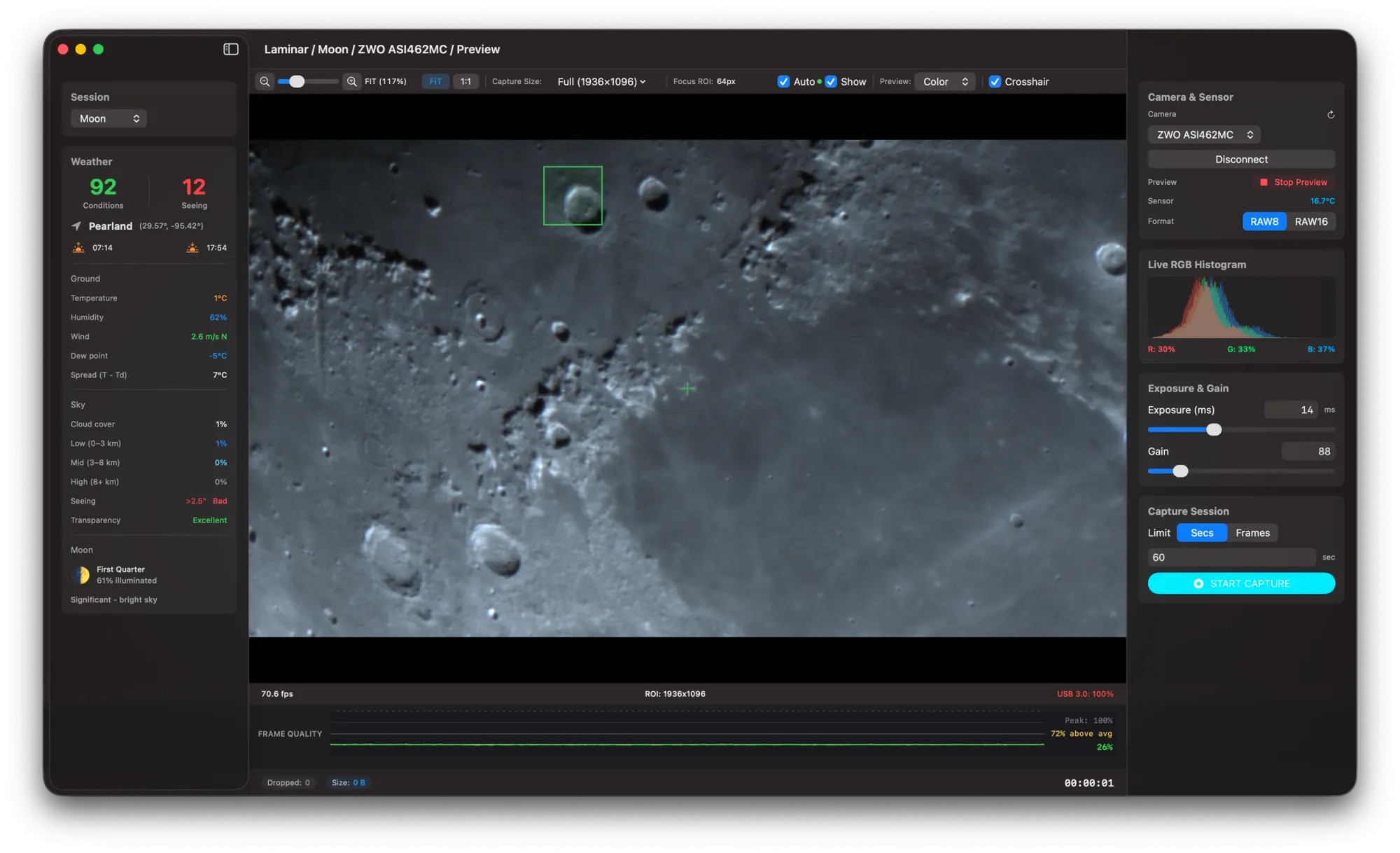
Laminar 1.1.0 is live on the Mac App Store — and it's a major camera compatibility update for Mac planetary imagers. The app now supports cameras from ten astronomy brands natively on macOS, up from two at launch. Three new direct SDK integrations cover QHY, ToupTek, and SVBONY, and the ToupTek backend automatically supports five additional OEM brands: Altair Astro, OGMA, RisingCam, MallinCam, and Omegon. If you own a planetary camera from any of these manufacturers, it now works with Laminar on your Mac.
This has been the most requested feature since Laminar launched. Planetary imaging on the Mac has historically been limited by which cameras your software actually supports. FireCapture is Windows-only. AstroDMx Capture covers many cameras but isn't a native Mac app. Most of the vendor-supplied capture tools are Windows-first, Mac-maybe. Laminar was built from the ground up as a native macOS application with direct SDK integration for each camera vendor, Metal GPU acceleration for live preview, and real-time frame quality analysis — and now that experience extends to the cameras most planetary imagers actually own.
Which Cameras Does Laminar Support on Mac?
Here's the full breakdown. Laminar 1.1.0 supports cameras through three SDK integrations, each covering one or more brands:
ZWO ASI — All ZWO ASI cameras compatible with the v1.41 SDK, including the ASI462MC, ASI585MC, ASI290MM, ASI224MC, and the newer ASI676MM. This is Laminar's most mature and thoroughly tested backend.
PlayerOne — All PlayerOne cameras, including the Mars-C, Neptune-C II, Uranus-C, and Ares-C Pro. Fully production-tested.
QHY — Support for QHY astronomy cameras including the QHY5III planetary series (QHY5III462C, QHY5III290M, QHY5III485C), QHY268, QHY600, QHY533, and QHY294 families. Requires cameras with on-chip firmware — which includes the QHY5III series and all cameras released in recent years.
ToupTek + OEM Partners — This is the broadest single integration. ToupTek manufactures the camera hardware behind several well-known astronomy brands. One SDK covers all of them. If you own a planetary camera from any of these brands, Laminar will discover it automatically:
- ToupTek Astro
- Altair Astro
- OGMA
- RisingCam
- MallinCam
- Omegon
SVBONY — Support for SVBONY cameras including the SV305, SV505C, SV705C, SV605, and SV905C series. SVBONY has been growing fast in the budget-friendly planetary camera space, and their cameras now work natively on macOS through Laminar.
What Works With New Cameras?
Every feature in Laminar works across all supported cameras. Live preview with Metal GPU debayering, SER recording, RGB histogram, frame quality analysis, planet tracking, surface tracking for the Moon and Sun, and SER playback with the QuickLook plugin. The experience is identical regardless of whether you're using a ZWO ASI462MC or an OGMA planetary camera — Laminar handles the vendor differences behind the scenes.
Using a QHY, ToupTek, Altair, OGMA, RisingCam, MallinCam, Omegon, or SVBONY camera with Laminar? Each new backend has vendor-specific diagnostic logging that captures every SDK interaction — giving us actionable data to fix issues fast. Go to Settings → Diagnostics → Export Logs and email the ZIP to support@macobservatory.com. Positive confirmation is just as valuable as bug reports.
New Camera Support Is Labeled Beta
I want to be upfront about this. The QHY, ToupTek, and SVBONY backends are complete — every feature is implemented, the code has been reviewed, and crash isolation ensures that an issue with any new backend can never affect ZWO or PlayerOne cameras. But I haven't been able to test them with physical cameras from every vendor yet.
That's where you come in. When you connect a camera from one of the new vendors, Laminar shows a Beta badge in the camera picker and a brief note encouraging you to share your experience. Each new backend has detailed, vendor-specific diagnostic logging built in — every SDK call, every state transition, every frame delivery — so when you export your logs, I get actionable data I can use to fix issues without needing your camera in my hands.
If you're using a QHY, ToupTek, Altair, OGMA, RisingCam, MallinCam, Omegon, or SVBONY camera with Laminar, I'd genuinely appreciate hearing about your experience. Export your logs from Settings → Diagnostics and send them to support@macobservatory.com — even if everything works perfectly. Positive confirmation is just as valuable as bug reports.
What Else Changed in 1.1.0?
The ZWO SDK has been updated from v1.35 to v1.41, which adds support for newer cameras including the ASI676MM. New camera backends only initialize when a matching USB device is actually connected — there's no performance overhead or extra log noise from vendors whose cameras aren't plugged in. And shared image processing code across all backends means more consistent behavior and easier maintenance going forward.
Does Laminar Work on Intel Macs?
Laminar is built for Apple Silicon, but two of the three new SDKs — ToupTek and SVBONY — ship as Universal Binaries that include Intel support. QHY's SDK is ARM64 only. For now, Laminar itself remains an Apple Silicon application, but Intel compatibility is something I'm evaluating for a future release.
What's Next
Beta testers on TestFlight are already putting these new backends through their paces. As real-world testing validates each vendor's cameras in planetary imaging sessions, I'll move backends from Beta to production status in a future update. QHY cooler support is deferred to a future release — it requires a different polling approach than other vendors, and I'd rather ship it correctly than ship it broken.
If you're new to Laminar, it's a one-time purchase on the Mac App Store with every feature included. Update to 1.1.0 to get the new camera support, or download it fresh — capture to SER format, play back your sessions, and pair it with Strata for stacking and sharpening. The complete planetary imaging workflow, native on Mac.
Capture with Laminar. Stack and sharpen with Strata. The complete planetary workflow — built for macOS.