
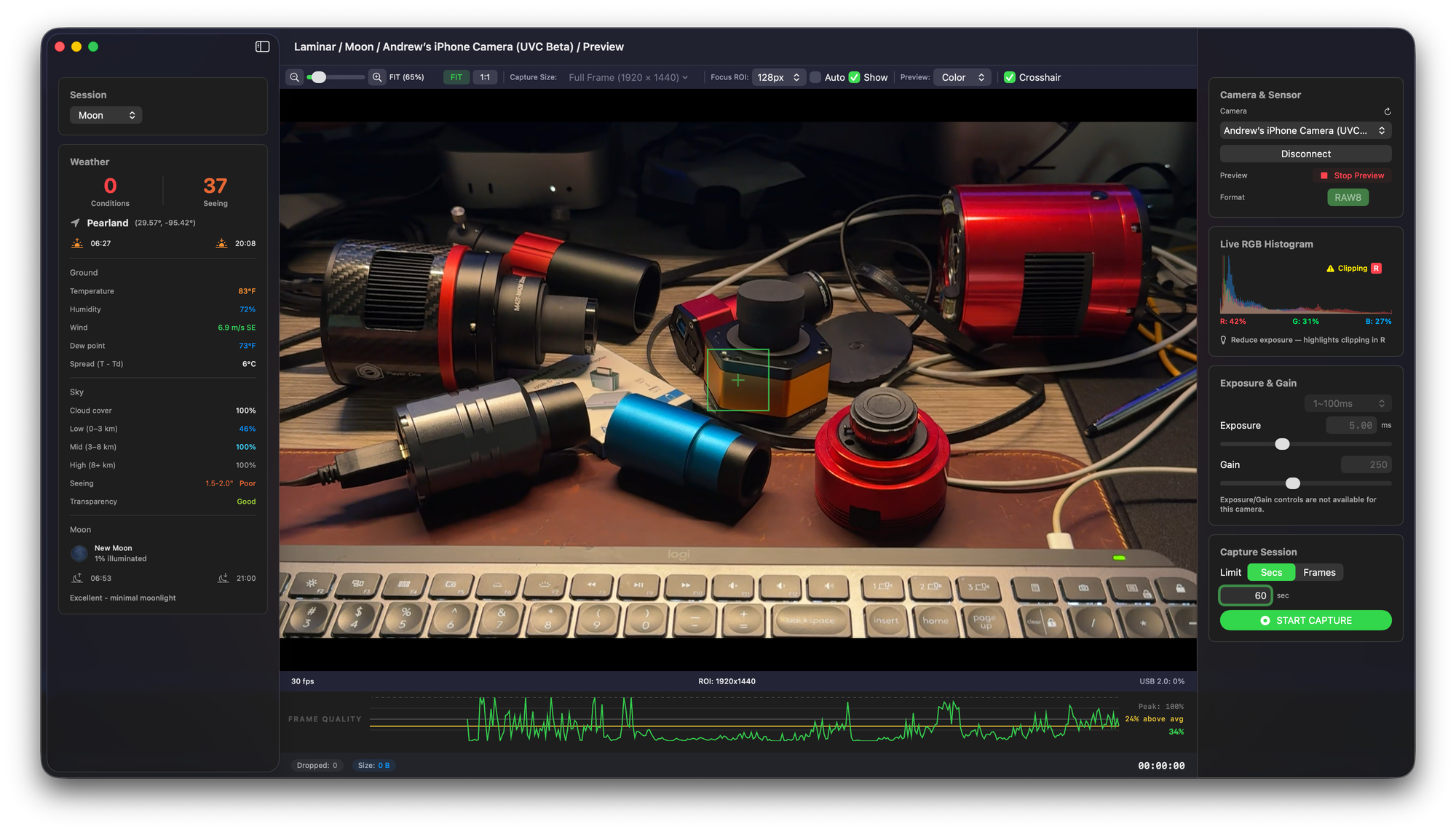
Laminar 1.2.5 (Build 36), the latest release of Mac Observatory's native planetary capture application for macOS, brings camera-side white balance directly into the Inspector, graduates two more camera families out of Beta, and adds initial support for Celestron's webcam-style astronomy cameras alongside generic USB Video Class (UVC) devices. The release is currently in Apple's App Store review queue and ships as a free update for existing Laminar owners.
This build comes out of a few months of real hardware sessions across multiple camera vendors. Particular thanks to Jochen, whose Omegon ATR585C testing drove the ToupTek OEM family graduation and whose careful bug report on numeric field editing became the deferred-field fix that ships here.
Where 1.x Sits in the Mac Astronomy Landscape
Before getting into what's new in this release, a note on context. Laminar 1.x is still finding its place in a category with some long-established players, and I want to be honest about where it sits.
Laminar 1.0 was never intended as a direct competitor to applications like FireCapture or SharpCap. Both have been refined over more than a decade of active Windows development by developers with far more capture-app experience than I have. What 1.x represents is a foundation. The goal across coming releases is to build up, release by release, toward something that does for Mac what those applications do for Windows — but native, leveraging Apple Silicon, Metal, AVFoundation, and the rest of Apple's frameworks rather than running through compatibility layers or ports.
I made a deliberate decision with 1.0 to scope-limit the feature set. The priority was validating that the core capture pipeline works across the full breadth of supported cameras, that every vendor's driver behaves correctly under Laminar's abstraction layer, and that the macOS-native interface holds up against real imaging sessions in the field. Five camera families, hardware-accelerated debayer through Metal, GPU-accelerated live preview, real-time frame quality analysis, persistent per-camera settings, Sky Quality Score tied to live astronomical seeing data — those are the foundation. Everything else builds on top of that base.
This is also my first macOS application after more than ten years of writing for the Mac astronomy community at Mac Observatory. There will be hiccups. Some of them have already happened. What I can promise is that I do not advertise features that do not exist in the app. Laminar is what it is right now, a core foundation to build on, and I would rather under-promise and deliver than the reverse.
Will every release I push be perfect? Honestly, no. Will I work to correct what breaks as quickly as I can? Yes. The changelog since 1.0 reads exactly that way. The roadmap ahead is long — Laminar 2.0 is being designed around equipment profiles, capture session sidecar files, machine-learning-assisted focus drift detection, and a substantially deeper feature set. Filter wheels, autoguider integration, ASCOM Alpaca support, and live stacking preview all sit on the list. Getting there is going to require the community's input to influence priorities and tell me what is actually getting in the way of your imaging.
White Balance Lands in the Inspector
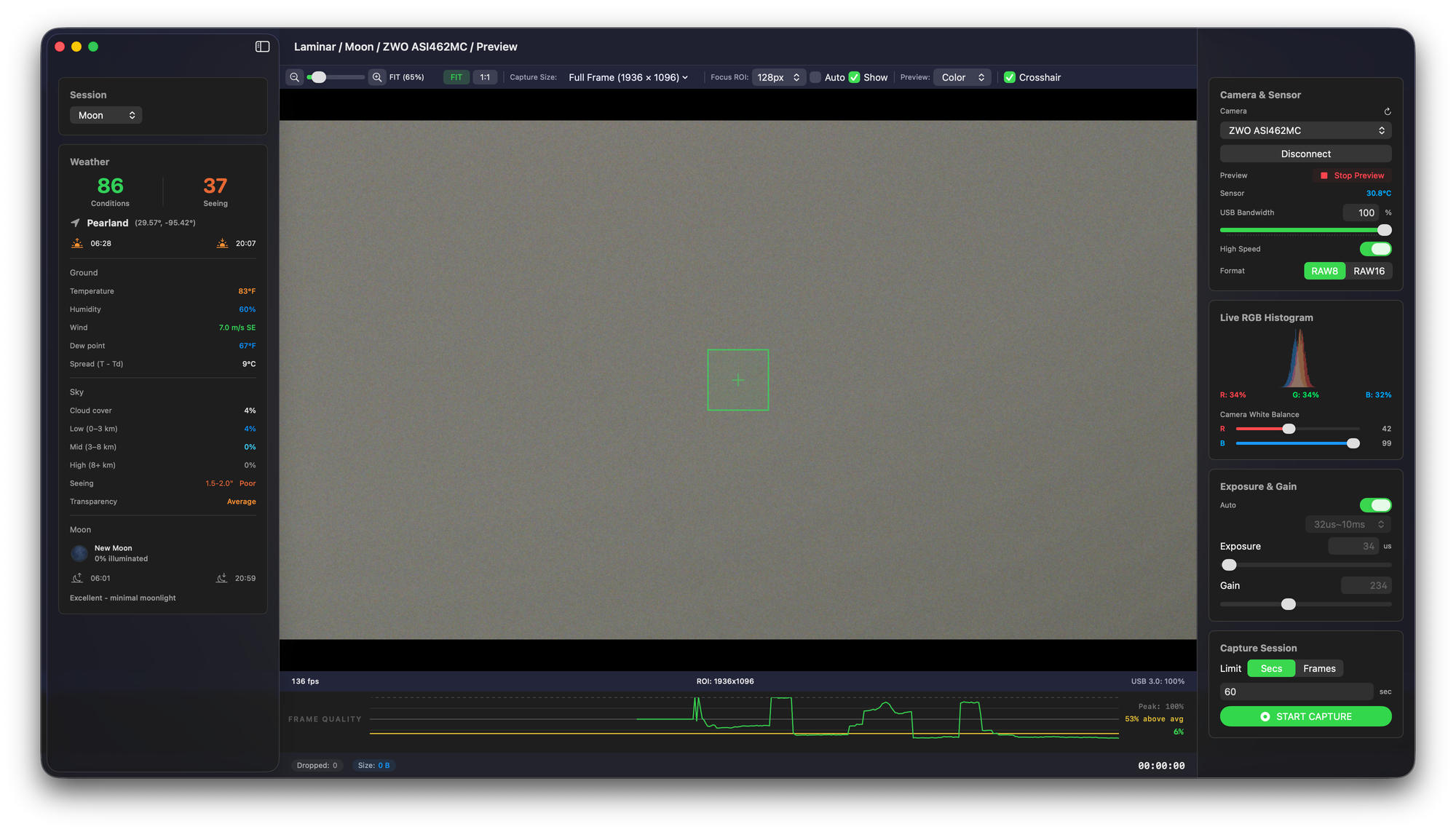
The headline feature of this release is camera-side white balance. Below the Live RGB Histogram, you will now find Red, Green, and Blue sliders plus an Auto White Balance button for color cameras that support them. These controls write directly to the camera's own internal white-balance settings. What you see in the live preview, what you see in the histogram, and what gets written to your SER recording all reflect the same color values. Laminar does not apply any preview-side color correction on top of what the camera produces.
The key thing to understand about these controls is that they are not application-wide. They are per-camera, and they are capability-driven. Laminar surfaces whatever your specific camera body exposes through its manufacturer driver at the hardware level. A premium cooled color camera with a full driver feature set might give you the complete slider trio plus continuous auto white balance tracking. An entry-level color planetary camera might give you only Red and Blue sliders. A monochrome camera shows no white balance controls at all because there is no color to balance. The Inspector adapts to the camera in front of it.
This same per-camera, capability-driven principle applies to everything else in the Inspector that touches hardware. Sensor temperature, cooler controls, USB bandwidth, sub-frame Region of Interest, high-speed mode — they all appear when your specific camera supports them, and they hide when it does not. If a control is not visible for your camera, that is not a Laminar bug. It means the camera itself does not expose that capability through its driver.
Each camera also remembers its own white balance values between sessions. Swap bodies on the same rig and each body returns to its last-known good settings on the next connect.
Two Camera Families Graduate from Beta
After repeated hardware sessions, two vendor families move from Beta to fully supported in this release.
The wider ToupTek OEM family is now production. That covers ToupTek Astro itself, plus the OEM brands sold by Altair Astro, OGMA, Omegon, RisingCam, and MallinCam. These bodies share the same underlying hardware platform, so a confirmed end-to-end session on one camera lifts the whole family. The graduating session in this case was on the Omegon ATR585C, with connect, exposure adjustment, gain adjustment, live preview, histogram, and SER capture all checked out indoors against the OEM ToupTek-family body.
SVBONY is also now fully supported across the camera lineup, after extensive validation on the SV305C PRO and a fix for a connect-time race condition that some users were hitting when a USB hot-plug event fired at the same moment as a manual connect.
These join ZWO ASI and PlayerOne as Laminar's four fully supported camera families. QHY remains in Beta pending a complete hardware-validated session. Preview, capture, and the new manual white balance sliders all work today, but I have not yet had a QHY body in hand to confirm everything end-to-end. If you own a QHY planetary camera and you want to try it with Laminar, your diagnostic logs would be genuinely useful.
- ZWO ASI — full lineup
- PlayerOne — full lineup
- ToupTek Astro — full lineup
- Altair Astro — Toupcam-family OEMs
- OGMA — Toupcam-family OEMs
- Omegon — Toupcam-family OEMs
- RisingCam — Toupcam-family OEMs
- MallinCam — Toupcam-family OEMs
- SVBONY — full lineup
- QHY — preview, capture, and manual WB work; awaiting full hardware-validated session
- Celestron UVC — NexImage, NexYZ, Skyris recognized but not tested on hardware
- Generic UVC — USB webcams and iPhone Continuity Camera, narrower control surface
Initial Celestron and UVC Camera Support
This is the other big shift in 1.2.5, and it deserves an honest caveat right at the top.
Laminar now recognizes generic USB Video Class (UVC) cameras through macOS's native video device interface. That category includes Celestron's NexImage, NexYZ, and Skyris planetary cameras, other webcam-style astronomy cameras, and any standard USB webcam. It also includes iPhone, through Continuity Camera, if you have a phone-to-eyepiece adapter and you point the phone through your scope. Preview and recording both work.
The honest caveat: I do not own a Celestron NexImage, NexYZ, or Skyris. I have not been able to test against any of them directly. The Celestron bodies are recognized by name in Laminar's camera picker — they appear with a "Celestron UVC Beta" suffix — but their classification as supported is based on Apple's UVC stack, not on hands-on Laminar testing. If you have one of these cameras and you try it with Laminar, I want to hear how it goes. Send me a note at support@macobservatory.com and let me know what works and what does not.
General UVC support, on the other hand, is more solidly validated against generic USB webcams and Continuity Camera. The control surface is necessarily narrower than what dedicated astronomy SDKs expose. There is no camera-side white balance, no cooler, no USB bandwidth adjustment, and no sub-frame Region of Interest available for UVC bodies, because the OS-level UVC interface simply does not expose those capabilities to applications. What you get is preview, exposure, gain where the device reports it, and SER recording. For a beginner solar imager with a Celestron NexImage already on the shelf, or for someone who wants to try Continuity Camera with an iPhone holder at the eyepiece, this opens a path that did not previously exist on Mac.
With Continuity Camera in macOS, your iPhone shows up to your Mac as a standard video device. If you pair it with a phone-to-eyepiece adapter at your telescope, Laminar will recognize the iPhone in the camera picker as a UVC device — and you can frame, preview, and record a SER file directly through the scope. It will never replace a dedicated planetary camera, but it is a remarkably accessible way to try lucky imaging with hardware you probably already own.
Quality of Life Improvements
A handful of smaller improvements land alongside the big features.
Numeric fields now edit the way fields should edit. Click into Exposure, Gain, Capture Limit, USB Bandwidth, or Cooler Target Temperature. Press Delete to remove a digit. Type a new digit in its place. Press Return to commit. In earlier builds these fields rejected mid-string edits, so the only working path was to select all and retype. They behave the way you would expect now. The Exposure field also accepts both period and comma decimal separators, which matters if your Mac is set to a European locale.
SVBony cameras no longer stall on connect when a USB hot-plug event fires at the same moment as a manual connection attempt.
Quieter support logs at launch and shutdown — benign layout breadcrumbs that used to fire as warnings are now demoted to debug level, which makes real issues easier to spot in diagnostic logs when you are debugging a session.
A Note of Thanks
Genuine appreciation to every Laminar user who has emailed support@macobservatory.com since 1.0 shipped. Bug reports, camera compatibility notes, diagnostic logs, feature requests, observations that something in the Inspector did not quite feel right — every one of those has found its way into a release, often within a week or two. I have worked directly with each and every person who has reached out, and that direct line stays open as long as Laminar exists.
A specific thank-you to the users who have spent time helping shape Laminar since 1.0:
- Donald
- Eli
- Gary
- JB
- Jim
- Jochen
- Mitch
- Shane
I have been writing for the Mac astronomy community at Mac Observatory for more than ten years, and the goal with the Mac Observatory Suite — Laminar, Strata, and Meridian — is to give Mac users serious imaging tools built specifically for the platform rather than ported from elsewhere. None of it works without the community's input and patience as I find my footing in macOS development. I appreciate all of it, and I hope to keep supporting the Mac side of this hobby for years to come.
Getting the Update
Laminar 1.2.5 ships as a free update for existing owners through the Mac App Store. If you do not yet have it, Laminar is a one-time $34.99 purchase and runs on macOS 14.6 (Sonoma) or later on Apple Silicon — M1 through M5. There is no subscription and no in-app purchase.
For questions, bug reports, or camera compatibility stories — especially if you have a Celestron NexImage, NexYZ, or Skyris and can give them a spin — email support@macobservatory.com. I read every message, and the diagnostic logs from Laminar's Help menu have been invaluable for tracking down vendor-specific issues.