
After five and a half years of Rosetta 2, PixInsight finally runs as a native ARM64 binary on M-series Macs. I tested it on my Mac Studio M3 Ultra.
Pleiades Astrophoto released PixInsight 1.9.4 Lockhart today, and the headline for every Mac astrophotographer is buried two sentences into the announcement: "first macOS ARM64 native Apple Silicon version of PixInsight." That's a sentence the Mac astrophotography community has been waiting for since Apple unveiled the M1 in November 2020. Five and a half years of running the most powerful astronomical image processing platform on the market through Rosetta 2 translation. Today, that ends.
I have a 2025 Mac Studio M3 Ultra with 96 GB of unified memory, running macOS Tahoe 26.4.1. Before installing 1.9.4, I ran the official PixInsight Benchmark script on my existing 1.9.3 build (running under Rosetta 2). Then I installed the new native build and ran the benchmark again. Same machine. Same benchmark image. Same processing pipeline. The numbers are dramatic.
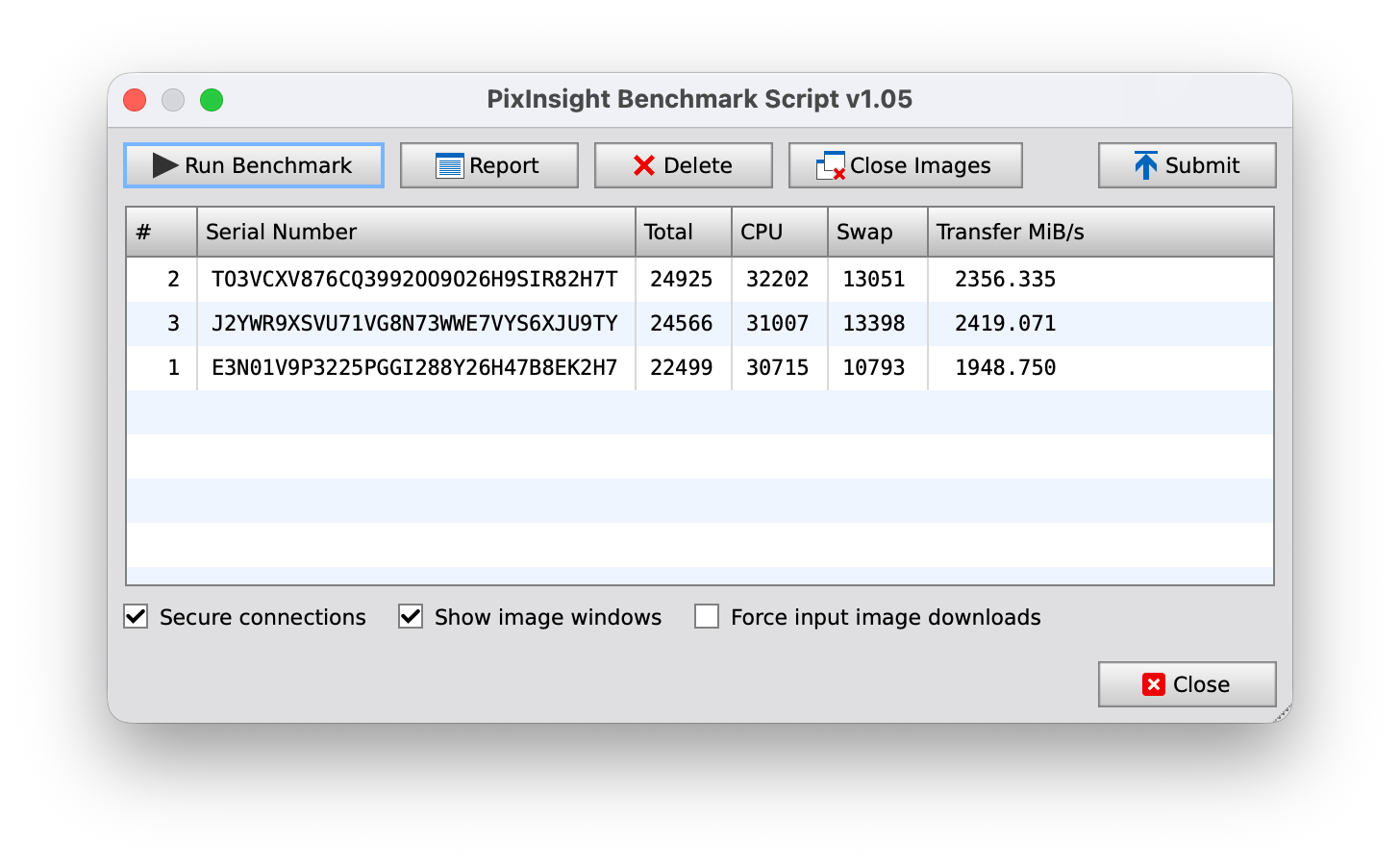
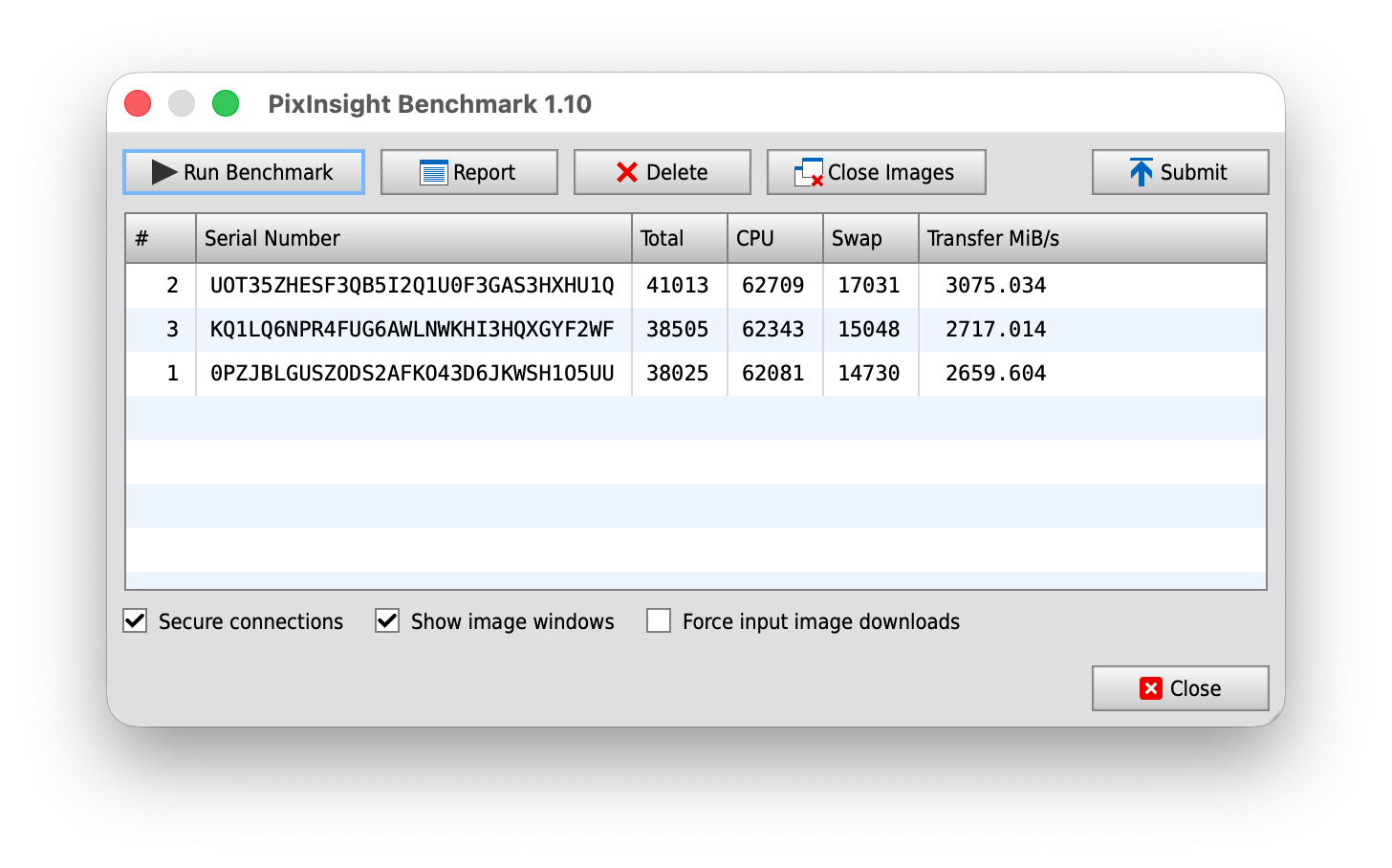
The CPU score nearly doubled. The aggregate Total score, which is PixInsight's headline performance metric and the one users submit to the community leaderboard, jumped 65%. Transfer speed (the I/O subsystem benchmark) went up 30%. None of this is surprising in the abstract. Running ARM-native instead of x86-translated should be a meaningful win on Apple Silicon, especially on a chip with as much SIMD throughput as the M3 Ultra. But seeing the gap on your own hardware, doing your own work, is a different thing.
Why this took five years
PixInsight is not a small piece of software. The platform has a deep, custom scripting layer (the PixInsight JavaScript Runtime, or PJSR) that powers every preprocessing workflow, every WBPP run, every gradient-removal pipeline, every astrometry routine the community has built over the past decade. For years, that runtime was built on Mozilla's SpiderMonkey 24 engine. SpiderMonkey 24 was originally released in 2013. It has a complicated build matrix and a long list of dependencies that did not port cleanly to ARM64.
In March 2026, Juan Conejero published a detailed technical article titled "The New V8 JavaScript Runtime in PixInsight 1.9.4: Script Porting Guide" explaining that he had spent more than a year replacing SpiderMonkey 24 with Google's V8 engine. V8 is the high-performance JavaScript runtime that powers Chrome, Node.js, and Electron. It is actively maintained, it has a clean cross-platform build story, and it includes a just-in-time compiler that translates JavaScript to machine-specific native code on the fly. That JIT is the foundation of the new architecture support.
What shipped today is the payoff. The V8 runtime, the native ARM64 build, and a long list of platform updates all arrive together as 1.9.4 Lockhart.
What's actually in 1.9.4 beyond the architecture switch
The release notes from Pleiades cover more than just the Apple Silicon port. The full announcement is worth reading on the PixInsight Development site, but the items that matter most for Mac users come down to a handful:
The performance claim Pleiades makes for V8 versus the legacy SpiderMonkey engine is significant on its own. Their announcement includes benchmark images of a star-rendering script (GravityStarSpinner) that draws roughly 1.5 to 2.7 million stars using Gaia DR3 data, a task they describe as essentially impossible on the old SpiderMonkey engine. For Mac users, the V8 runtime is a quiet upgrade that mostly happens beneath the surface. For script developers and the people maintaining tools like WBPP and the RC Astro suite, it is a full platform reset. Pleiades has published a V8 Script Porting Guide for developers maintaining existing PJSR scripts.
The macOS support window has tightened in 1.9.4. Pleiades officially supports macOS 26 Tahoe and macOS 15 Sequoia. macOS 14 Sonoma may work but is no longer guaranteed. Anything older than Sonoma (Ventura, Monterey, Big Sur) is no longer supported. If you have been holding off on macOS upgrades, that calculus changed today.
What you should do
Check your macOS version first. PixInsight 1.9.4 officially supports only macOS 26 Tahoe and macOS 15 Sequoia. macOS 14 Sonoma may work but Pleiades does not guarantee it. Older releases (Ventura, Monterey, Big Sur) are no longer supported. Download the installer from pixinsight.com/dist; the new package will automatically remove your previous installation. Any 1.9.x license carries forward without reactivation. 1.8.x users need to handle license migration separately.
The installer for 1.9.4 will automatically remove your previous installation when you run it. Users running any 1.9.x release can update to 1.9.4 without going through license reactivation; the new installer reads your existing license file. Users still on 1.8.x will need to handle license migration, and the PixInsight FAQ on the official site covers that process.
If you want to verify you are actually running the native build rather than a fallback Rosetta install, open Activity Monitor after launching PixInsight and look at the Kind column. Native Apple Silicon processes show as "Apple"; Rosetta-translated processes show as "Intel." This is the same check you would do for any other macOS app where the architecture matters.
Where this leaves the Mac deep-sky stack
A native Apple Silicon PixInsight changes the calculus for what a serious Mac-based deep-sky workflow looks like. The platform that runs WBPP, MultiscaleGradient, MARS, and every script-driven preprocessing pipeline in the community now runs at full Apple Silicon speed. Combined with the RC Astro plugins, which already use CoreML on the Mac for AI acceleration, the case for Mac as a primary astrophotography processing platform is stronger today than at any point in the past decade.
The piece that pairs naturally with PixInsight in a Mac-native workflow is Meridian, our Mac Observatory app for indexing and cataloging a deep-sky FITS archive. PixInsight processes the data; Meridian organizes everything you have captured across sessions, targets, and equipment. The two tools sit alongside each other, not in competition.
One final note from the release: Pleiades closed the announcement with a section titled "Made With Natural Intelligence," a deliberate statement that the entire 1.9.4 release was developed without AI-generated code. It is a notable editorial position from a major astronomy software vendor, and one worth flagging as the broader software industry sorts out where it lands on this question.
The wait for native PixInsight on Apple Silicon is over. Time to update.
Common questions about the PixInsight 1.9.4 Lockhart update from the Mac astrophotography community.