
Laminar for solar imaging
Hydrogen-alpha, calcium K, white light and spectroheliograph capture for Mac
Here comes the Sun.
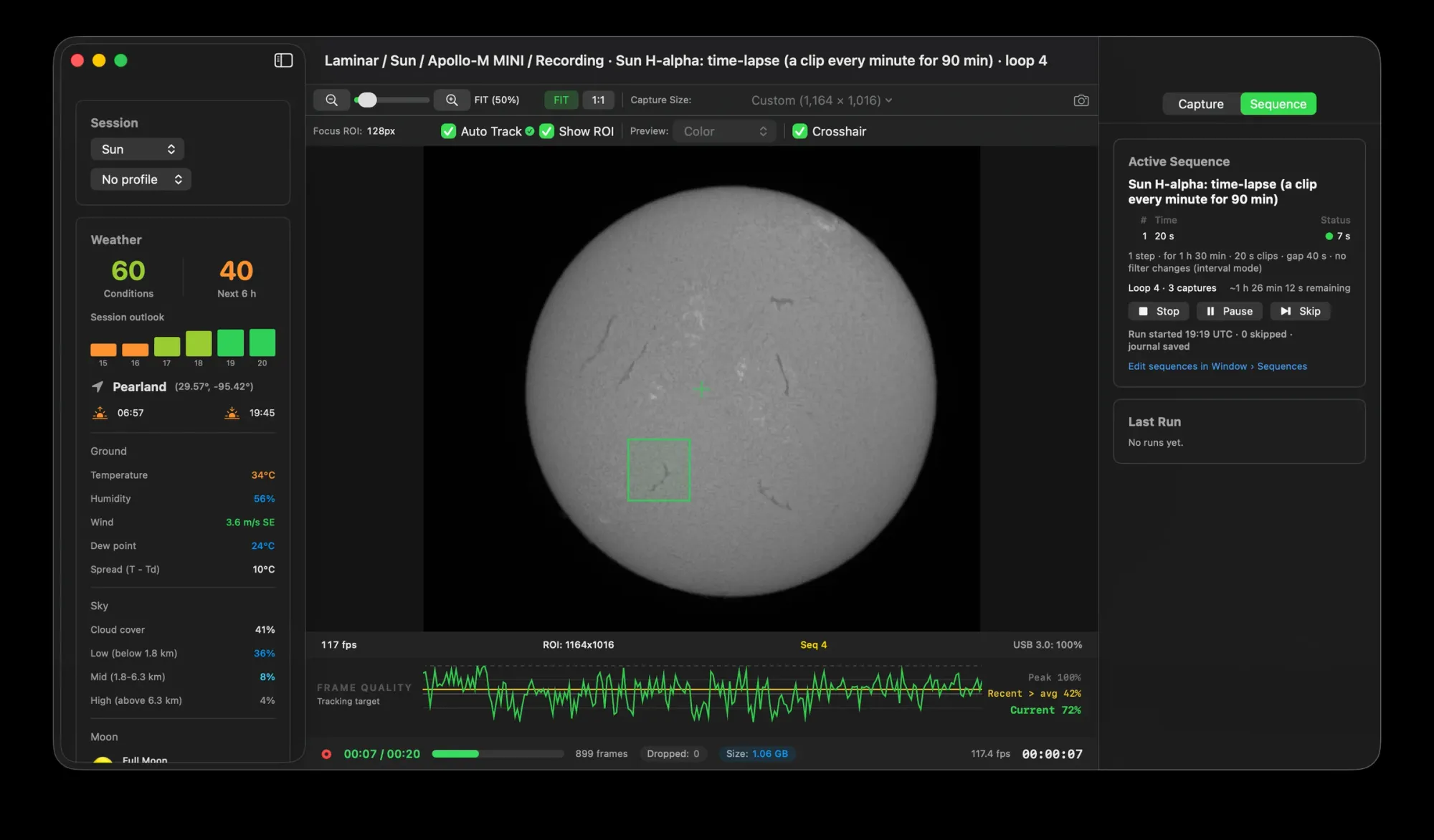
Microsecond exposures. Hundreds of frames a second. A sunspot held steady, focus found for you, and flats applied while you frame. Laminar turns a clear afternoon into your best solar session yet.
Solar filter first. Always. Image the Sun only through a dedicated solar telescope or a full-aperture solar filter, wedge or etalon. Laminar can't see what's in front of your camera.
Exposure and speed
Fast enough to freeze the seeing.
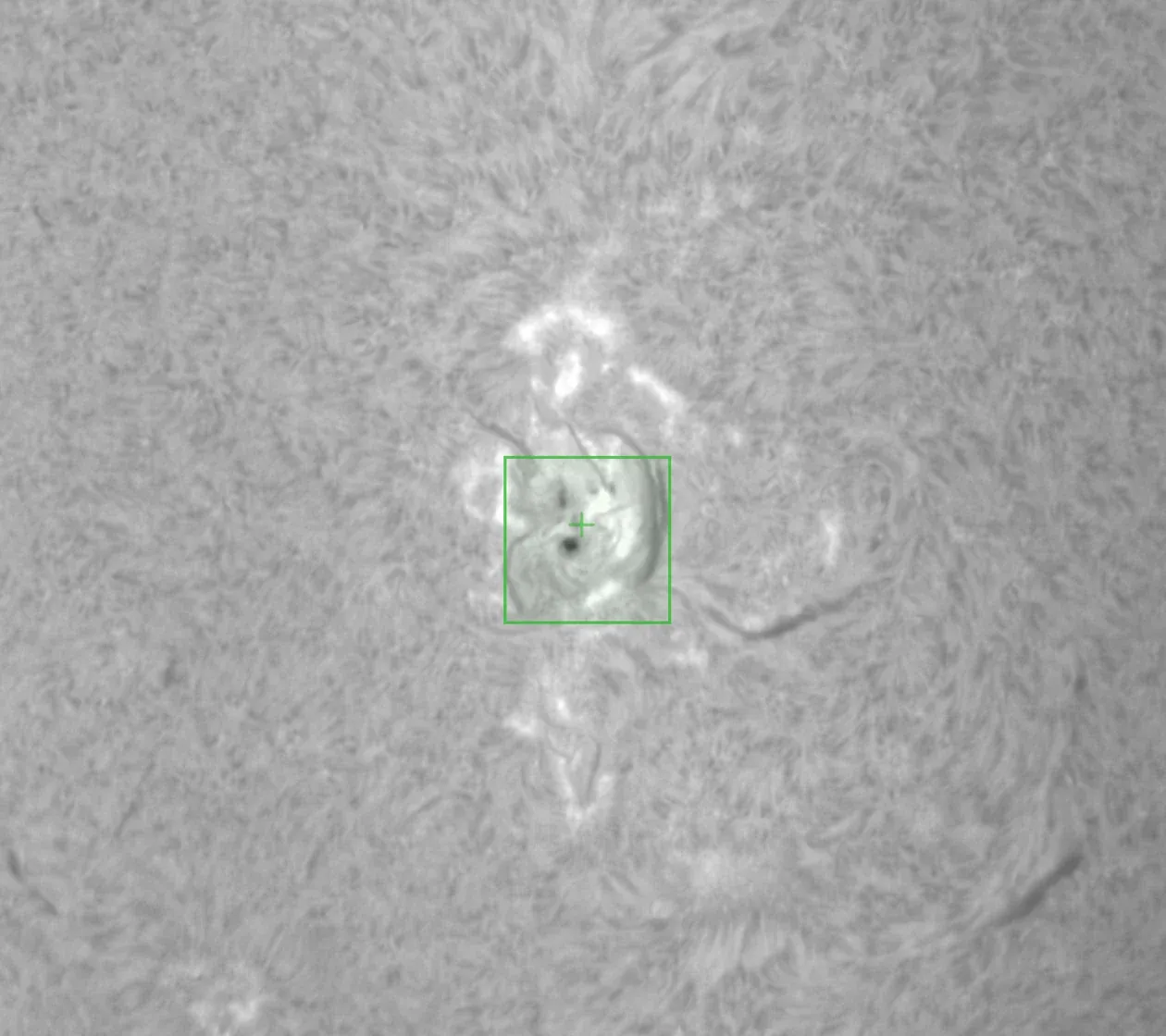
The Sun is bright. Through a Herschel wedge, it's dazzling. That's good news for sharp images, because the shorter the exposure, the more of the seeing you freeze. Shrink the capture region too, and you get hundreds of tries a second at a perfectly still instant.
- From 32 microseconds. Plenty of range for a white-light wedge or the brightest etalon.
- 16 bits for prominences. Faint prominences live at the very bottom of the histogram. RAW16 keeps them. RAW8 keeps surface close-ups lean.
- Smaller box. Faster camera. Draw a region over an active area and the camera reads only that. Laminar sets no limit. Your camera does.
- Pixels per frame
- 8.29 M
- Data per frame, RAW8
- 8.3 MB
- Share of the sensor read
- 100%
An afternoon on the Sun
Fits on a patio table. Keeps every frame.
Solar imaging happens in daylight, often at a folding table in the backyard. So we brought the most affordable Mac there is. A MacBook Neo, a Player One Apollo-M MINI and an afternoon of hydrogen-alpha. Laminar's own records kept score.
Ten captures on 30 August 2026 at 1164 × 1016 RAW8, including one unbroken 90-second clip of 10,568 frames. Laminar checks that your drive can keep up before you record. If it can't, Laminar slows to the drive's pace and counts every skipped frame.
Surface tracking
Pick a spot. It stays put.
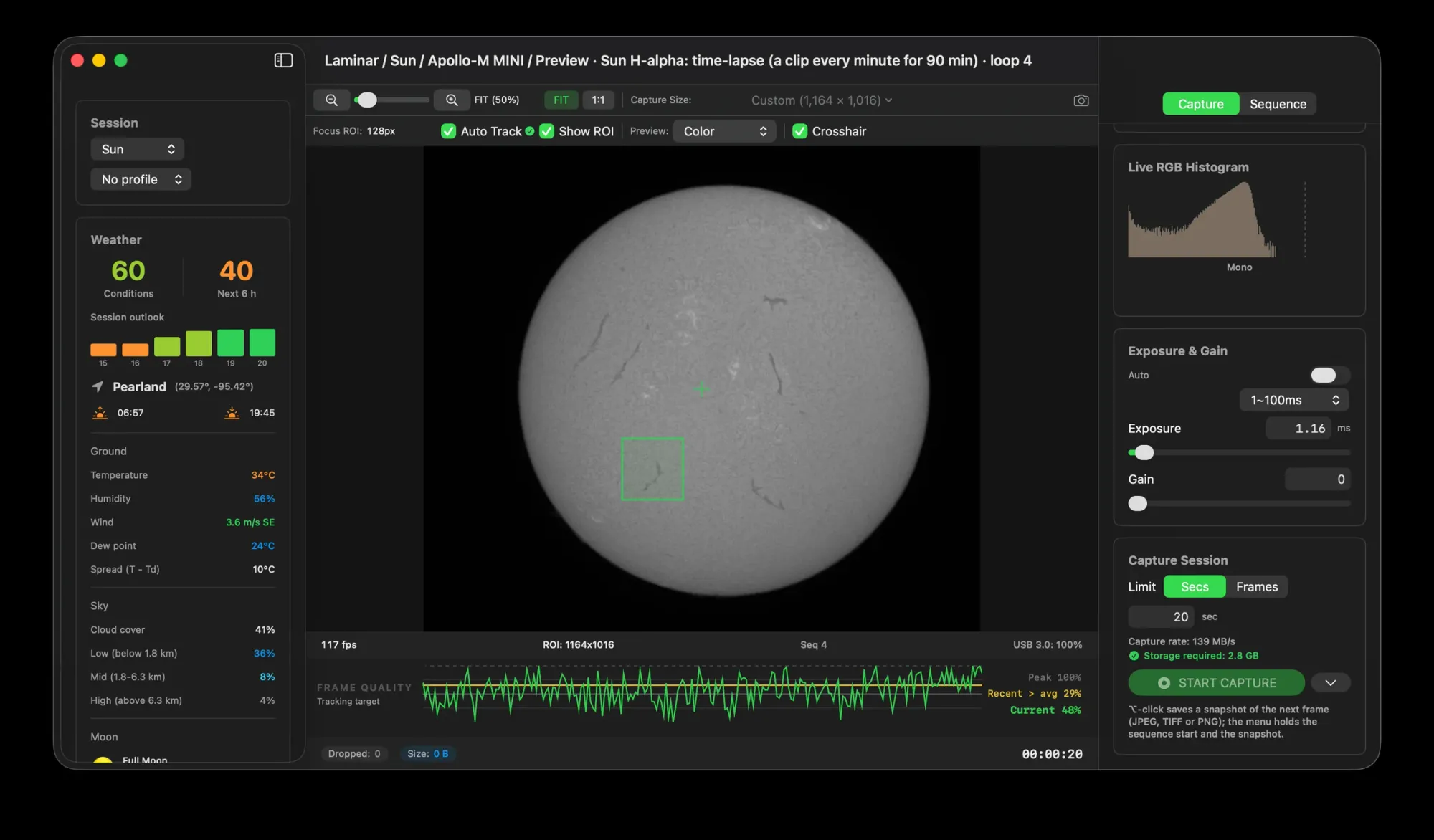
Zoom in on the Sun and there's no edge to hold on to. Just texture. A breeze nudges the scope, the field slides away, and the focus graph ends up measuring nothing in particular.
- Click once. Choose a sunspot, a filament or a bright point on the limb. Laminar remembers what it looks like.
- Found in every frame. A Metal-powered matcher finds your feature again in each new frame, even as it drifts.
- Focus where it counts. The quality graph measures the patch you picked, wherever it sits in the frame.
Tracking follows your feature in the image. It doesn't move the mount. Automatic region finding is in the works. For now, you pick the spot.
Focus
Focus you can actually see.
Granulation shimmers. Nothing ever looks quite sharp. And as the afternoon heats up, focus drifts. Laminar measures fine detail in every frame and plots it live. Watch the line climb, and stop at the top.
Auto Focus
Or let Laminar find it for you.
Get close by eye and click Auto Focus. Laminar sweeps through focus and back, scores the sharpest frames at every step and fits a curve to find the peak. It works on a tracked sunspot, and on a spectroheliograph with SHG mode on.
- Nothing to set up. It keeps stepping until the image clearly softens, learning your telescope as it goes.
- Backlash-proof. A wide pass, then a finer one around the peak, always finishing from the same direction.
- Quick enough to repeat. Three to six minutes. Refocus between captures as the day warms up.
Requires a motorized focuser with absolute positioning. Laminar includes 29 focuser drivers. We test with a MoonLite, and users report the ZWO EAF works well.
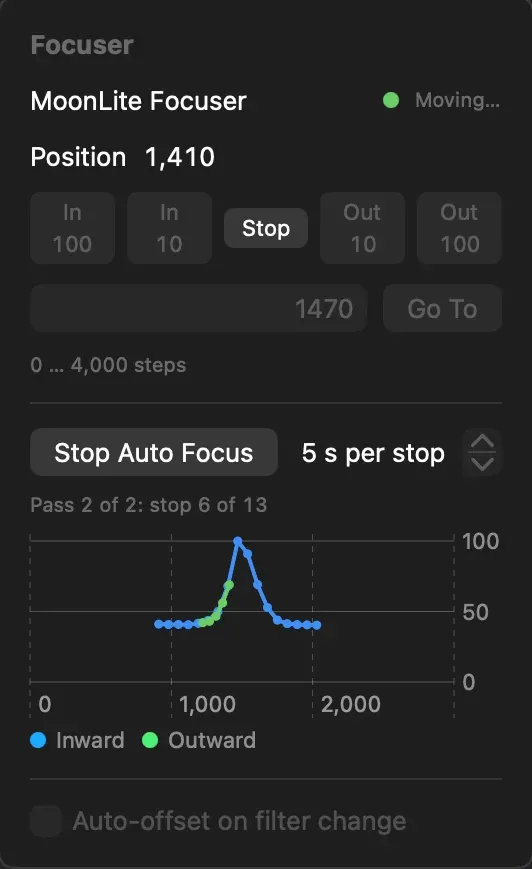
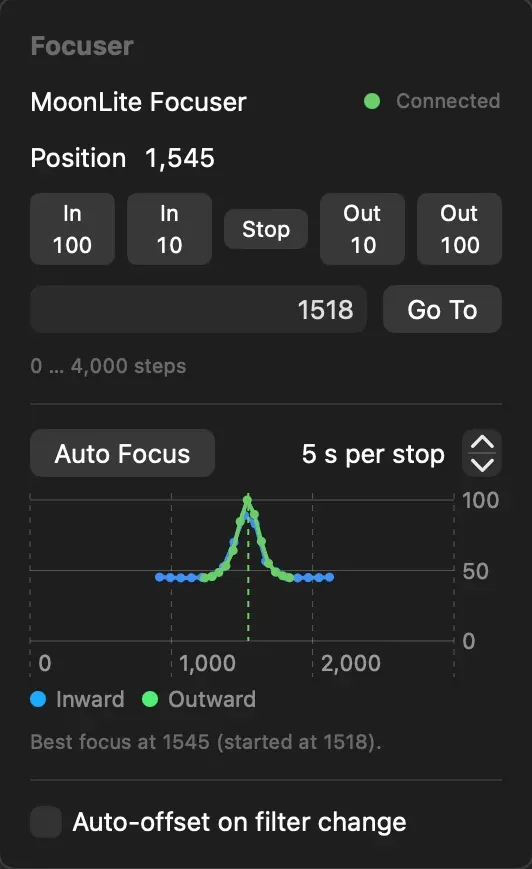
Shown on Saturn. The same routine runs on the Sun.
Live calibration
Uneven optics. Even Sun.
Solar optics rarely light the field evenly. Etalons leave a sweet spot. Dust leaves soft rings. Edges fade. One flat fixes all of it, and Laminar applies it live. What you frame is what you'll stack.
- A flat wizard built for the Sun. Defocus the disc or cover the front with a diffuser, name the filter, and Laminar sets the exposure for you.
- Save and Apply Now. One click saves the flat and turns it on. Perfect for retuning an etalon mid-session.
- Raw stays raw. Preview and recording have separate switches. Recordings stay untouched unless you say otherwise, and a CAL badge tells you when they're not.
- The right flat, automatically. Flats match by filter. Darks and hot-pixel maps match by gain, exposure, temperature and region.
Already have masters from FireCapture or SharpCap? Bring them in as FITS, 16-bit TIFF, PNG or SER. Solar flats don't need a matching dark.
Even light
Defocus well past focus, or cover the aperture with a diffuser. Leave the filter and camera exactly as they are.
Capture Master Flat
Press Shift-Command-F, name the filter, and let the meter settle at 40 to 60% of the mean level.
Save and Apply Now
Gradients and dust shadows vanish from the preview.
Choose the files
Keep recordings raw for later, or calibrate as you record. The CAL badge shows which.
Filters and equipment
Knows all its lines.
Set up your solar scope once. A telescope can carry its own built-in filter, like a Lunt or Coronado. A filter wheel slot can hold any solar line, and Laminar fills in the wavelength for you.
- On every file. Filter name, wavelength and bandwidth travel with each SER file in its capture record.
- Strata picks it up. On import, Strata reads the wavelength, H-alpha · 656.3 nm for example, and starts with the right solar settings.
- The optics math, done. Focal length, f-ratio, image scale and field of view, worked out from your telescope, Barlow and camera.
Filter kind
For etalons and DayStar Quantum filters. Prominences, filaments and plage.
These are the wavelengths Laminar fills in. Change them if you like, and add the bandwidth, around 0.07 nm for a typical solar etalon.
Sequences
The time-lapse runs itself.
Prominences change shape in minutes. A flare can come and go in half an hour. Set up a sequence and Laminar records a clip, waits, and records again, all afternoon. You come back to evenly spaced clips, ready to stack into a time-lapse.
Sun H-alpha: a clip every minute for 90 minutes
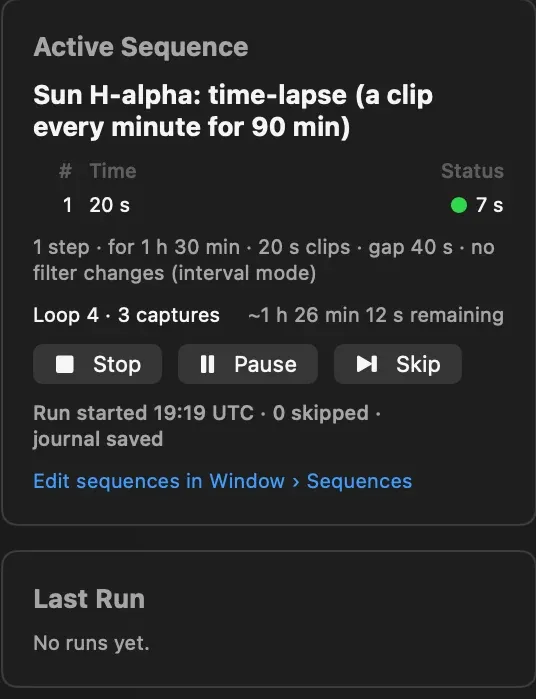
Start from ours. Make it yours.
- Sun H-alpha. A 20-second clip every minute for 90 minutes.
- Sun white light. A 15-second clip every minute for an hour.
- Your schedule. Repeat a set number of times, until a time of day in UTC, or for a total duration.
- Clouds happen. Pause, skip or resume without losing your place.
Laminar records on your schedule. It doesn't detect flares. Open Window › Sequences, or press Option-Command-U.
Spectroheliographs
Spectroheliographs, finally in focus.
A Sol'Ex or other spectroheliograph records a thin slice of the spectrum, frame after frame, as the Sun drifts across the slit. Its spectral lines look sharp at any focus, so ordinary focus aids are no help. SHG mode watches what actually changes, the fine detail along the slit.
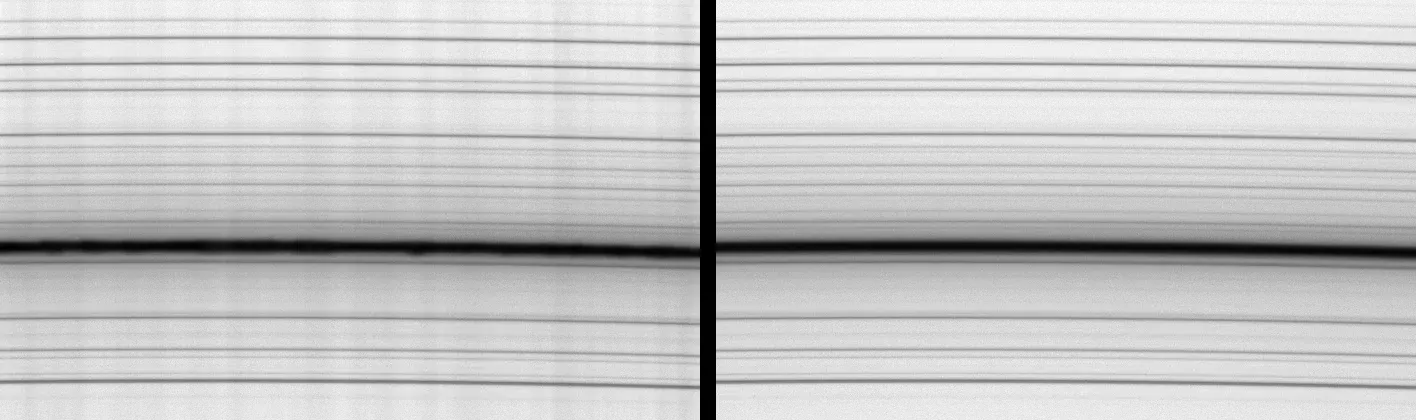
SHG mode
Check SHG next to Follow, and the quality graph scores detail along the slit. In testing, the score swung elevenfold through focus. The usual measure moved 4%.
Auto Focus, on the slit
With SHG on, Auto Focus uses the same score and needs no tracking. Start it and let it run.
Focus after the fact
The graph runs during SER playback too. Check a session's focus from the comfort of indoors.
Standard SER files
Each scan is a standard SER file, ready for JSol'Ex, INTI or your favorite spectroheliograph software.
SHG mode expects the slit along the frame's long side. Laminar records the scan. Your spectroheliograph software turns it into a solar image.
Recording region
One strip. Every camera.
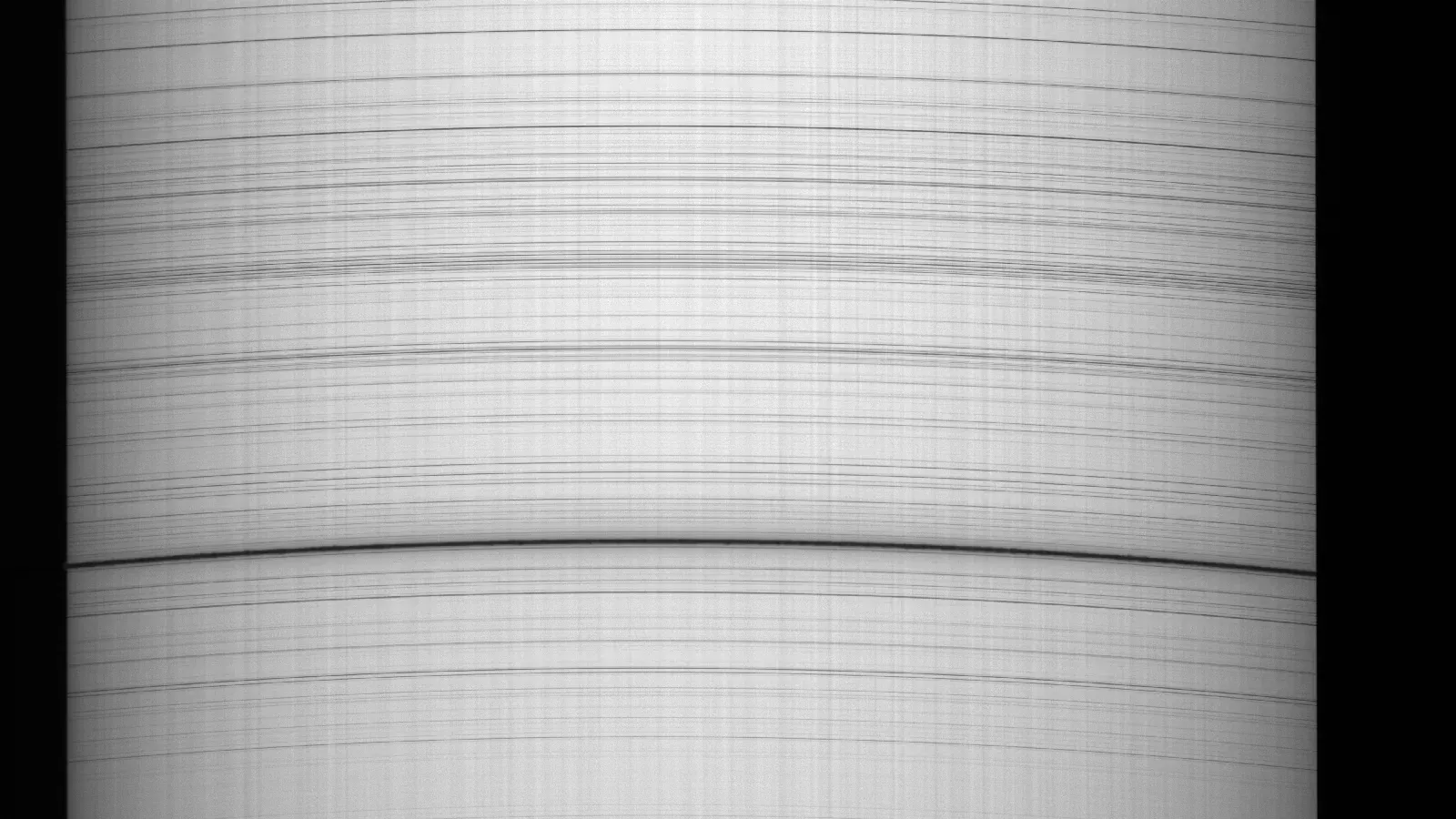
A spectroheliograph needs only the rows around one spectral line. Read just those, and your camera runs much faster, slicing the Sun into more, finer steps. Draw the strip once and save it. It's ready for every scan after that.
- Rows read
- 240 of 2,160
- Share of the sensor
- 11%
- Per frame, RAW8
- 0.92 MB
Try it on a real frame. Drag the sliders to set the strip over the line. On most cameras, fewer rows means a higher frame rate. Spectrum from a Laminar user's G3M678M, 10 October 2026.
- Draw it. Choose Capture Size › Custom… in the Inspector and drag across the live preview.
- Make it exact. Drag the handles, easy to grab even on a thin strip, or type X, Y, W and H in the bar below the preview. Then click Apply.
- Save it. Save as Preset… adds the strip to the Capture Size menu, ready for the next clear day.
- Tweak it anytime. Settings › Capture › ROI Presets keeps your library. Add, remove, or double-click a preset to edit it.
New ROI Preset
Shape
Width = 3840 px on this sensor; scales with each camera's full width.
Position
Preview
An illustration of the preset editor, mirroring the strip above. Laminar keeps the numbers you typed and adjusts them to each camera's requirements when you apply the preset. One preset, every camera. Untick Y Centered to place the strip right on the line.
Capture records
The notes write themselves.
Next to every SER file, Laminar writes a short record of the capture. Target, camera, exposure, gain and region. Frames written and dropped. The weather. And with an equipment profile, the filter and its wavelength. Strata reads it all on import, so processing starts from the right place.
{
  "capture": {
    "target": "Sun",
    "frames_written": 7046,
    "frames_dropped": 0,
    "stop_reason": "time_limit"
  },
  "camera": {
    "vendor": "playerOne",
    "model": "Apollo-M MINI",
    "bit_depth": 12
  },
  "capture_settings": {
    "exposure_ms": 1.156,
    "gain": 0,
    "roi": { "width": 1164, "height": 1016 }
  }
}
- Target
- Sun
- Camera
- Player One Apollo-M MINI
- Frames
- 7,046 written, 0 dropped
- Exposure and gain
- 1.16 ms, gain 0
- Wavelength
- From the filter in your profile
Excerpt from a real capture record, 30 August 2026. SER files also open in AutoStakkert!, PIPP, RegiStax and Siril. See what Strata does with it
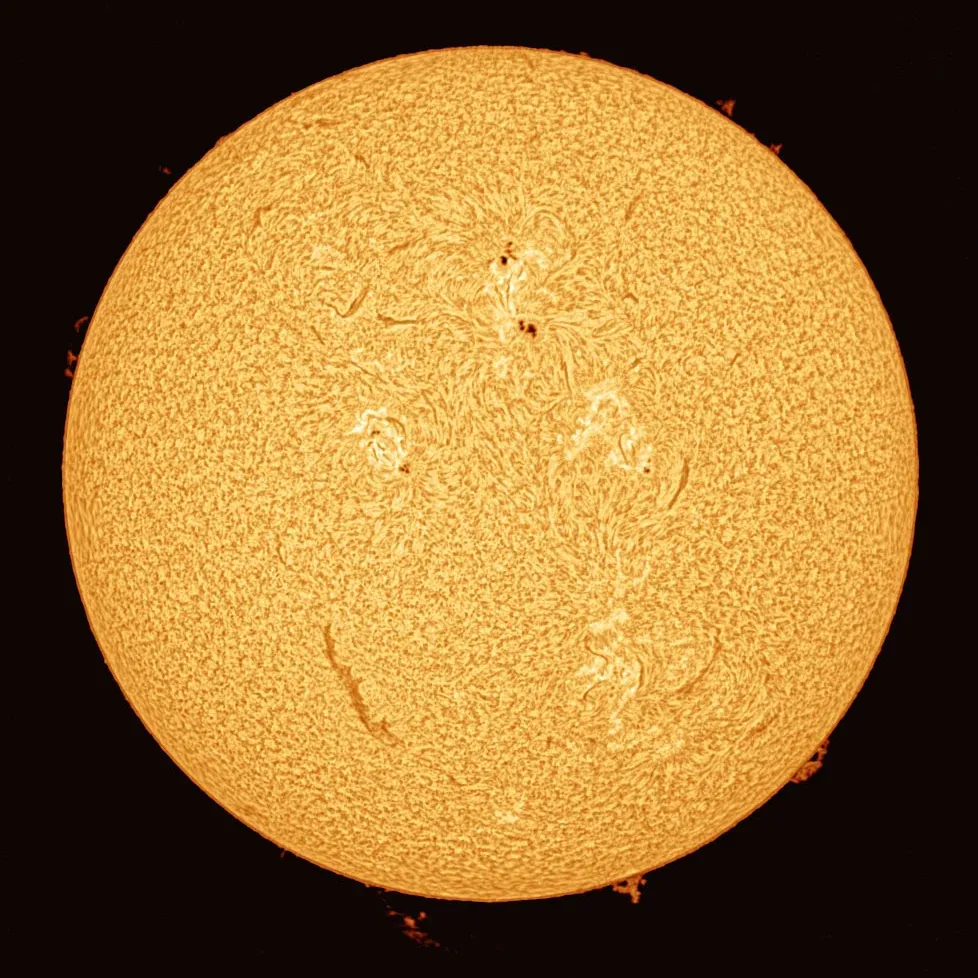
Captured in Laminar
Captured here. Finished in Strata.
Tracked, focused, flat-fielded and recorded at full speed in Laminar. Graded, stacked, sharpened and colored in Strata. Two Mac apps. One solar workflow.
The details
And all the little things.
Disk math before you record
Fast solar cameras can outrun a tired external drive. Laminar learns each drive's real speed, warns you before you record, and suggests a safe limit in one click.
Weather for the day ahead
A score for the next six hours from Apple Weather, with low, mid and high cloud. Know whether that gap in the clouds will last.
SER, RAW8 or RAW16
Standard files that open in Strata, AutoStakkert!, PIPP, RegiStax, Siril and spectroheliograph software.
Snapshots
Save the next frame as JPEG, 16-bit TIFF or PNG. Share a sunspot in seconds.
Quick Look for SER
Press Space on a capture in the Finder for a look inside.
Its own settings
Laminar remembers exposure, gain and region for the Sun, separately from the Moon and planets.
Mac to the core
Swift, SwiftUI and Metal on Apple Silicon. Shortcuts actions to start and stop sequences. Keyboard shortcuts for everything you reach for at the scope.
Compatibility
Bring your own camera.
Most solar imaging happens on fast monochrome cameras. Laminar connects to them through each maker's own driver. No Windows. No Wine. Nothing else to install.
Player One
Apollo, Mars, Neptune and Uranus. Our solar images come from an Apollo-M MINI.
SupportedZWO ASI
Every Apple Silicon compatible USB model, including the ASI174MM and ASI290MM.
SupportedToupTek and family
G3M and ATR series, plus Altair Astro, OGMA, Omegon, MallinCam and RisingCam. A G3M678M recorded the spectroheliograph frames above.
SupportedQHY
The QHY5III series through larger sensors, with region capture and RAW16.
SupportedSVBONY
SV305, SV505C, SV605, SV705C and SV905C families.
SupportedSolar optics
Lunt, Coronado, DayStar Quantum, Herschel wedges, Sol'Ex and other spectroheliographs. If your camera can see it, Laminar can record it.
Not supported: Celestron NexImage and Skyris cameras, and ZWO's Wi-Fi cameras and the ASIAIR. USB webcams and iPhone capture don't offer a capture region. Full camera, filter wheel and focuser lists
Make every sunny day count.
$34.99One-time purchase on the Mac App Store. No subscription, no in-app purchases. The same app captures the Moon and the planets.
Questions and answers.
Which solar telescopes and filters does Laminar work with?
All of them. Laminar talks to your camera, and your camera sees what your solar optics deliver, from a Lunt or Coronado to a DayStar Quantum, a calcium K filter, a Herschel wedge or a spectroheliograph. Equipment profiles keep track of the filter and wavelength you used.
How short can the exposure go?
Laminar goes down to 32 microseconds. Your camera's own minimum may be higher.
Should I record RAW8 or RAW16?
RAW16 for prominences, which live at the bottom of the histogram next to a bright disc. RAW8 for surface close-ups, with half the file size and room for more frames.
Does Laminar build images from a Sol'Ex or other spectroheliograph?
No. Laminar records the scan and helps you nail it, with a strip region on the line, high frame rates, and SHG mode for focus and Auto Focus. Build the final image in spectroheliograph software such as JSol'Ex or INTI.
Can it remove Newton rings?
Not with a dedicated tool. Flats correct uneven illumination, dust shadows and etalon gradients, live in the preview and, if you like, in your recordings.
Does it control my mount or keep the Sun centered?
No. Surface tracking follows the feature you click, in the image, for focus and measurement. Laminar doesn't move the mount.
Can it make a time-lapse video?
Laminar captures it. A sequence records a clip every minute, or on any schedule you set. Stack the clips in Strata or your favorite stacker, then turn the frames into a video in your animation app.
Does it work on a MacBook in the field?
Yes. We recorded 117.5 frames a second all afternoon on a MacBook Neo without dropping a frame. Laminar runs on any Apple Silicon Mac with macOS 15 or later.
Is it a separate app from the planetary Laminar?
No, it's the same app. One $34.99 purchase captures the Sun, the Moon and the planets. It's also part of the $99 Mac Observatory Field Kit, with Strata, Meridian and Transit.