
The first planetary capture app built specifically for the Mac is here.
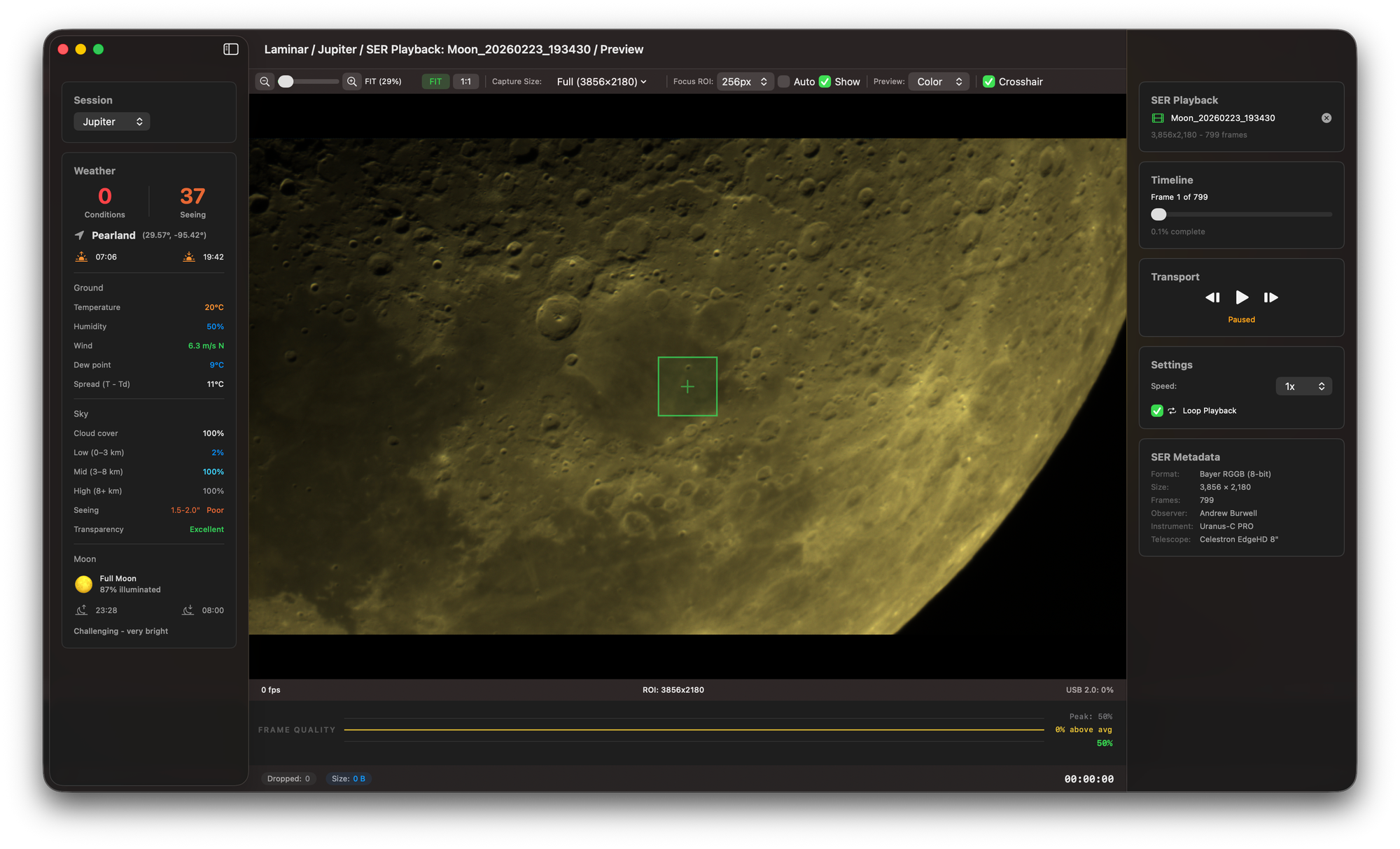
Laminar is now available on the Mac App Store as a free download with an optional Pro upgrade. It is the first planetary imaging capture application built natively for macOS and Apple Silicon — designed in Swift and SwiftUI, with GPU-accelerated Bayer demosaicing via Metal compute shaders. If you image planets, the Moon, or the Sun with a ZWO or PlayerOne camera connected to a Mac, this is the app that was missing from your workflow.
I've been building Laminar for over a year, and today it graduates from TestFlight to a proper release. This isn't a side project — it's the first app in the Mac Observatory Suite, a planned series of native macOS tools covering the entire planetary imaging workflow from capture through stacking and archiving.
Pro: $34.99 one-time — quality graph, tracking, sky scores
Requires: macOS 15+, Apple Silicon, ZWO or PlayerOne camera
The problem Laminar solves
Planetary imaging on the Mac has been an exercise in compromise. Your options, until now:
FireCapture is the incumbent. It's Java-based, cross-platform, and has been the planetary imager's go-to for years. But on a Mac it requires a Java runtime, it's not notarized by Apple, the interface feels foreign to macOS, and there's no GPU acceleration. It works, but it doesn't belong here.
ASICap / ASI Studio is ZWO's free offering. Basic capture, limited controls, ZWO cameras only. If you've browsed the BAA forums, you've seen users struggling to get it running at all — unclear documentation, greyed-out dashboards, no guidance.
AstroaDMx Capture is functional and cross-platform, but again, not Mac-native. No Metal acceleration, no macOS design patterns.
INDIGO Astro Imager is genuinely native to the Mac, but it's designed for deep-sky sequencing — not high-speed planetary video. Different tool for a different job.
None of these give you real-time frame quality feedback during capture. None tell you whether tonight's sky is even worth imaging before you set up. And none automatically track a planetary disk as it drifts during focusing.
"I just want to capture planets on my Mac without installing Java, fiddling with Homebrew, or booting into Windows. Is that really too much to ask?"
— Cloudy Nights user
"ASICap downloaded to my MacBook Air, then I picked the subset ASICap for Planets which came up with a sort of greyed out dashboard. I have NO idea how to use it."
— British Astronomical Association forum
"FireCapture works on Mac through Java, but it doesn't feel like a Mac app. No GPU acceleration, no Retina support, no integration with anything."
— r/astrophotography
What Laminar does differently
Laminar isn't just another capture app with a Mac icon. Three features set it apart from everything else in this category — on any platform.
Sky Quality Assessment. Before you haul equipment outside, Laminar fetches real-time weather and astronomical seeing data — synthesized into two scores: Conditions (0–100) evaluating cloud cover, humidity, and dew risk via Open-Meteo, and Seeing (0–100) estimating atmospheric stability via 7Timer, the Shanghai Astronomical Observatory's GFS-based seeing forecast. No API keys. No accounts. No configuration. An 85/70 means go image. A 12/25 means stay inside. No other capture app does this.
Real-time frame quality graph. The green line shows instantaneous frame sharpness. The yellow line shows the rolling average. Watch the yellow line as you adjust your focuser — when it peaks, you've nailed focus. This is the same Laplacian variance algorithm used by stacking software like AutoStakkert, applied live during capture. You know your session is sharp before you ever open a stacking tool.
Automatic planet tracking. Laminar detects the planetary disk and tracks it frame-by-frame using brightness-weighted centroid analysis. When you adjust focus on an SCT and the mirror shifts, the analysis region follows the target. No more watching your quality graph crash because the planet drifted out of a static ROI. For the Moon and Sun, click on a crater or sunspot and Laminar locks onto that surface feature using GPU-accelerated template matching.
How Laminar fits your workflow
Laminar captures to SER — the industry-standard format for planetary video. Every major stacking application reads SER natively: AutoStakkert, Registax, PIPP, Planetary System Stacker, Planet Stacker X, and Siril.
If you're already stacking on Windows, nothing changes downstream. Capture on your Mac with Laminar, transfer the SER files, stack in AutoStakkert. Your existing workflow just got a better front end.
If you want to stay entirely on the Mac, Laminar pairs naturally with Planet Stacker X for stacking and wavelet sharpening. And Strata — the next app in the Mac Observatory Suite — is already in public beta on TestFlight. It replaces the entire AutoStakkert → Registax → WinJUPOS chain with a single GPU-accelerated macOS app: multi-point alignment, 6-layer wavelet sharpening, planetary derotation, drizzle super-resolution, and Wiener deconvolution — all running natively on Apple Silicon. You can test the full Laminar-to-Strata pipeline right now.
Pricing
Laminar Free includes full camera capture and control, SER playback with macOS QuickLook support, basic weather conditions, live histogram, RAW8/RAW16 recording, dynamic ROI selection, and multi-camera support. It's free forever — not a trial.
Laminar Pro is a one-time purchase at $34.99. No subscription. It adds Sky Quality scores, the real-time quality graph, automatic planet and surface feature tracking, and rotation-aware capture timing warnings.
I went with one-time purchase deliberately. The Mac astronomy community is niche, and the people in it are enthusiasts who've already spent thousands on cameras and telescopes. A subscription for a capture app felt like the wrong ask. Pay once, own it.
What's next
Laminar 1.0 is the foundation. The v2 roadmap includes equipment profiles in Settings, filter wheel support via the INDIGO Server protocol (I have a PlayerOne cooled camera and filter wheel on loan for testing), and .laminar sidecar files that store per-frame quality metrics — laying groundwork for ML-based focus drift detection in v3.
Strata is in public beta right now and it's already feature-dense. The stacking engine runs quality analysis at ~1,500 frames per second on Apple Silicon, with GPU-accelerated multi-point alignment that achieves a 26× speedup over CPU. It supports 6-layer à trous wavelet sharpening with per-layer denoise, luminance-only sharpening mode, drizzle super-resolution at 1.5×/2×/3×, and GPU Wiener deconvolution with synthetic Airy disk PSF generation. For Jupiter and Mars, it handles planetary derotation through GPU block matching and thin-plate spline warping. For Saturn, it uses synthetic displacement projection that detects rings automatically from the image — no ephemeris data needed. There's also a dedicated solar imaging pipeline with WOW whitening, disk-masked surface contrast, and wavelength-accurate colorization presets for H-alpha, Ca-K, white light, and sodium D. Join the Strata beta on TestFlight and try the full pipeline from Laminar capture to finished image.
Meridian, the deep-sky imaging archive, is also in public beta on TestFlight. The goal is a complete Mac-native suite where each app works independently but they're built to complement each other.
If you image planets on a Mac, download Laminar from the Mac App Store and let me know what you think. I'm at support@macobservatory.com and genuinely want to hear from the people using it at the telescope.