
The most powerful astrophotography processing tool ever built asks you to think like a scientist — not a photographer. Here's what Mac users need to know.
When this article published in April 2026, PixInsight ran on macOS only under Rosetta 2. That changed on May 12, 2026. Pleiades Astrophoto released PixInsight 1.9.4 Lockhart, the first native macOS ARM64 build of the platform. I tested it on my Mac Studio M3 Ultra. CPU benchmark score nearly doubled.
Read the full update with benchmark comparison →PixInsight is a €300 one-time-purchase astrophotography processing platform from Pleiades Astrophoto that treats images as scientific data rather than photographs. It runs on macOS under Rosetta 2 on Apple Silicon — no native ARM build yet — but RC Astro's AI plugins (BlurXTerminator, NoiseXTerminator, StarXTerminator) automatically leverage Apple's CoreML for GPU acceleration, giving Mac users a genuine advantage over Windows for AI-powered processing. A full-featured 45-day trial is available with no watermarks or limitations. For Mac users who want native Apple Silicon alternatives, Astro Pixel Processor, Siril, and Seti Astro Suite cover significant ground — we compare all three paths below.
Every astrophotographer eventually hears the same advice: "You should try PixInsight." It usually comes from someone whose images have taken a visible leap in quality — sharper detail, cleaner gradients, richer color. And it usually comes with a caveat: "The learning curve is brutal, but it's worth it."
That tension defines PixInsight. Developed by Pleiades Astrophoto — a small, opinionated team in Spain — PixInsight is the undisputed heavyweight of astronomical image processing. It treats your images not as pictures to be tweaked, but as scientific data to be analyzed. That philosophical difference is both its greatest strength and the reason it sends visual-first editors running back to Photoshop within an hour of installing it.
For Mac users, there's an additional wrinkle. PixInsight runs on macOS, but it's still compiled for Intel x86 and operates under Rosetta 2 on Apple Silicon. It works — and works surprisingly well — but the lack of a native ARM build is a conspicuous gap for an application that demands every ounce of your hardware. So what does the PixInsight experience actually look like on a Mac in 2025, and is the investment of time and money justified?
Built by Astrophotographers, for a Different Kind of Astrophotographer
PixInsight isn't just another image editor with some astronomy features bolted on. It was designed from the ground up as a modular, object-oriented processing platform where every operation is a discrete, repeatable process. This is a fundamentally different approach than the layer-based, visual-feedback workflows of Photoshop or Affinity Photo. In PixInsight, you don't paint a mask with a brush — you generate one mathematically based on the luminance profile of your data. You don't eyeball a stretch — you apply a precisely parameterized transfer function to the pixel values.
The software operates on what astrophotographers call "linear data" — image data where pixel brightness is directly proportional to the number of photons captured. Most image editors immediately apply a non-linear stretch to make images viewable, which destroys information in the process. PixInsight is designed to keep your data linear through the critical early processing steps — calibration, registration, integration, deconvolution, noise reduction — and only stretch to a viewable state when you're ready. This preserves signal integrity in ways that traditional editors simply cannot match.
PixInsight saves files in its own XISF (Extensible Image Serialization Format) by default, which stores processing history and metadata alongside pixel data. It also handles FITS, TIFF, PNG, and most common formats. The scripting engine — based on JavaScript, though running on an engine that dates to roughly 2014 — enables community-developed tools that extend the platform's capabilities enormously. That extensibility is arguably PixInsight's secret weapon.
The license costs €300 (approximately $323 USD) as a one-time purchase with lifetime updates for the current major version. There's no subscription. A generous 45-day trial gives you the full application with no watermarks or disabled features. You can run the license on multiple machines across all three supported platforms.
- Type: Advanced modular image processing platform for astrophotography
- Platform: macOS (Rosetta 2 on Apple Silicon), Linux, Windows
- License: One-time purchase, lifetime updates for current major version
- Trial: 45-day free trial — full application, no watermarks, no disabled features
- Multi-machine: License works across all platforms and multiple machines
The Learning Curve: A Mathematician's Dream, A Photographer's Puzzle
The most common criticism of PixInsight — and it's voiced by fans and critics alike — is that it was clearly built by scientists and engineers rather than designers. The interface uses terminology like "MultiscaleMedianTransform" and "DynamicBackgroundExtraction" where a visual editor might say "Smooth" and "Remove Gradient." Process windows present dozens of numerical parameters with no visual preview of what changing them will do. The official documentation reads like an academic paper, complete with mathematical notation that would be right at home in a graduate-level signal processing textbook.
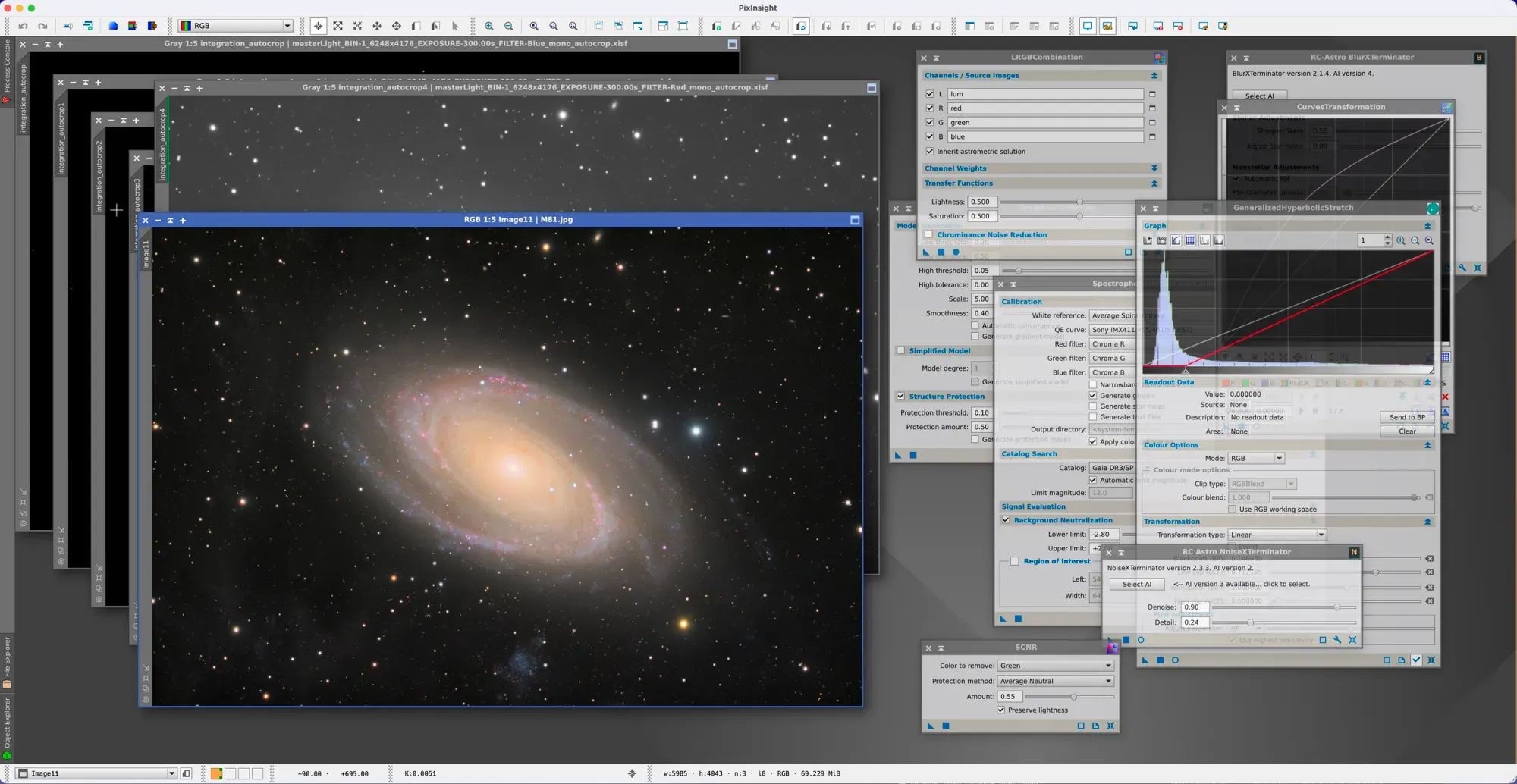
- Math-First Interface — Process names like "MultiscaleMedianTransform" assume you think in signal processing terms
- Documentation Gap — Reference docs read like academic papers, not user guides
- Developer-First UI — Process windows with dozens of numerical parameters, no visual preview for most operations
- Defaults Actually Work — Most processes produce excellent results without tweaking parameters
- Community Solves It — YouTube tutorials, WBPP automation, and friendlier third-party scripts
- You Don't Need the Math — "You could spend a lifetime mastering PixInsight's intricacies, but you certainly don't need to."
This isn't accidental. The Pleiades team has been explicit that PixInsight is built on mathematical rigor, and they view the data-driven approach as a feature, not a limitation. Their FAQ addresses the comparison to layer-based editors directly, essentially arguing that traditional approaches impose restrictions that users internalize as normal when they're actually degrading results.
There's truth to that argument, but it doesn't change the reality that most people who process astrophotography images come from a photography or visual arts background — not mathematics. The disconnect between how most people think about image editing (visual feedback, intuitive tools, undo-and-try-again) and how PixInsight asks you to work (parameterized processes, data analysis, methodical sequences) is the primary barrier to adoption.
The good news is that the community has largely solved this problem through education and automation. The built-in Weighted Batch PreProcessing (WBPP) script handles the entire calibration-to-integration pipeline with sensible defaults. Third-party scripts like the EZ Processing Suite, AutoIntegrate, and Seti Astro's tools wrap complex operations in friendlier interfaces. YouTube channels from Adam Block, Nico Carver, and others provide step-by-step visual walkthroughs. And critically, many processes produce excellent results with their default settings — you don't need to understand the math to use them effectively.
The Plugin Ecosystem That Changed Everything
If you'd asked experienced PixInsight users five years ago what made the software indispensable, they'd have talked about built-in processes like DynamicBackgroundExtraction and Deconvolution. Ask today, and the answer has shifted dramatically toward third-party tools — particularly the AI-powered plugins from Russell Croman's RC Astro.
The RC Astro XTerminator Suite represents a generational leap in astrophotography processing. BlurXTerminator uses AI-trained neural networks for deconvolution — sharpening images while correcting optical aberrations like coma, chromatic aberration, and tracking errors — without the dark halos that plague traditional deconvolution algorithms. NoiseXTerminator applies AI noise reduction that preserves fine detail and color integrity in ways that conventional wavelet-based approaches struggle to match. StarXTerminator cleanly separates stars from nebulosity for independent processing.
Each plugin costs around $60, and most serious PixInsight users consider them essential. Russell Croman received the Photographic Society of America's 2024 Progress in Photography award for this work — the field's most distinguished honor.
- BlurXTerminator AI · ~$60 — AI deconvolution that corrects coma, tracking errors, and chromatic aberration. CoreML GPU acceleration on Apple Silicon
- NoiseXTerminator AI · ~$60 — AI noise reduction with frequency separation. CoreML acceleration on Mac
- StarXTerminator AI · ~$60 — AI star removal for clean starless images. Cleaner than StarNet++ with fewer artifacts
- Generalized Hyperbolic Stretch · FREE — The community's preferred stretching tool with real-time preview. Now a full process module
- Seti Astro Scripts & Suite · FREE — Statistical Stretch, Cosmic Clarity, Star Stretch, NB-to-RGB, and more. Also available as a standalone Mac app
- NormalizeScaleGradient · FREE — Normalizes brightness and corrects gradients across subframes. Essential for varying conditions
Generalized Hyperbolic Stretch (GHS) is a free tool that has become the preferred stretching method for many imagers. It provides precise control over the non-linear stretch with real-time preview, replacing the older HistogramTransformation and CurvesTransformation for many users. GHS recently graduated from a script to a full process module, indicating its importance to the community.
NormalizeScaleGradient (NSG) and PhotometricMosaic by John Murphy solve two perennial problems — normalizing brightness and gradients across subframes (critical for images shot under varying conditions or with moonlight), and seamlessly blending mosaic panels. NSG has been praised as transformative for users in light-polluted locations.
Seti Astro's script collection — developed by Franklin Marek — has become a favorite for its practical, well-designed tools: Statistical Stretch, Star Stretch, Cosmic Clarity (AI sharpen/denoise), Continuum Subtract, and "What's In My Image" among many others. These scripts are available both within PixInsight's repository system and as a standalone Mac application — a detail worth highlighting for Mac users who might want to try these capabilities without committing to a full PixInsight license.
WBPP (Weighted Batch PreProcessing) deserves special mention as the built-in workhorse. It handles the entire pipeline from raw frames through calibrated, registered, integrated master images. For many users, WBPP is where 80% of the actual computational work happens.
The Mac Reality: Rosetta, CoreML, and the Silicon Question
Here's the uncomfortable truth: PixInsight is not compiled natively for Apple Silicon. It runs under Rosetta 2's x86 translation layer on M1, M2, M3, and M4 Macs. The Pleiades team has been focused on x86-specific optimizations — AVX instructions, FFT convolutions, redesigned astrometry engines — and the outdated JavaScript engine (the foundation of PI's entire scripting system) has been cited as a major blocker for an ARM port. Community discussion on Cloudy Nights in late 2024 noted that the PI team's version 1.9 announcements referenced macOS without confirming native Apple Silicon support.
This is frustrating, but context matters. Rosetta 2 is remarkably efficient, and PixInsight's performance on high-end Apple Silicon machines is genuinely good. An M4 Max MacBook Pro with 128GB RAM benchmarks impressively for WBPP workflows, and the RC Astro tools actually have a Mac-specific advantage: on macOS, BlurXTerminator, NoiseXTerminator, and StarXTerminator automatically leverage Apple's CoreML framework for GPU acceleration. No additional setup is required — the Neural Engine on Apple Silicon chips provides particularly fast inference for these AI models. Windows users, by contrast, need to configure CUDA and TensorFlow libraries manually.
PixInsight is hungry for RAM and fast storage. The developers recommend 64-128GB for production work, which positions Mac Studio and MacBook Pro configurations with maxed-out unified memory as natural fits — if you can stomach Apple's RAM pricing. Fast NVMe storage is critical; benchmarks show significant performance differences between internal SSDs, external Thunderbolt drives, and network-attached storage. For Mac users, the takeaway is clear: invest in the fastest storage you can afford, and consider a Thunderbolt 5 SSD if your internal drive is limited.
- CoreML GPU auto-acceleration for AI plugins
- Neural Engine for fast AI inference
- Unified memory architecture
- APFS = zero fragmentation
- Rosetta 2 translation layer (not native ARM)
- No native Apple Silicon build yet
- Expensive RAM upgrades
- Native x86-64 execution
- Full AVX instruction support
- CUDA GPU acceleration
- Affordable high-RAM configs
- Manual TensorFlow setup for AI tools
- NTFS fragmentation concerns
The PI team officially recommends Linux as the reference platform for maximum performance. That's worth knowing, but for Mac-centric workflows, the practical difference is modest for most processing tasks. Where it matters most is in heavily multithreaded operations like integration, where native ARM code could potentially unlock additional performance from the efficiency cores.
What the Community Says
The PixInsight community is passionate, occasionally frustrating, and remarkably generous. The official forum is active and the developers participate directly. Cloudy Nights, AstroBin, and Stargazers Lounge all have thriving PI-focused discussion. The ecosystem of free tutorials — on YouTube, personal blogs, and dedicated instruction sites like Adam Block Studios and Masters of PixInsight — is extensive.
One pattern emerges clearly from forum discussions: users who invest the time to learn PixInsight rarely go back. The "aha moment" — when the data-driven approach clicks and you start seeing your images as datasets to be optimized rather than pictures to be prettied up — is consistently described as transformative. But not everyone gets there, and that's completely fine. The astronomy community's processing tools have never been more diverse or more capable.

"PixInsight is the state of the art, it is a full on scientific tool that is not for everyone. The depth is staggering — quite often default settings do the trick, but the details are there if you're so inclined."
— AstroBin Forum
"The reference documentation is intimidating to say the least — aimed more at those that want detailed technical information than casual users."
— Urban Astrophotography
"In terms of value, PI delivers more for the money than any other product I've purchased in 20 years of astrophotography."
— Cloudy Nights
"I really like the data-driven approach. It encourages me to think critically about the quality of my data and how far I can push it."
— Urban Astrophotography
On-Ramps and Alternatives: You Don't Have to Start Here
PixInsight doesn't have to be the first — or only — processing tool in your workflow. Several alternatives on Mac can handle significant portions of the pipeline, and many experienced imagers deliberately split their work across multiple applications.
Astro Pixel Processor is the most direct alternative for pre-processing and stacking, and it's actually ahead of PixInsight in one crucial area: it ships with a dedicated Apple Silicon installer, compiled natively for M-series chips. APP's tab-based workflow is dramatically more approachable than PixInsight's interface, and its mosaic stitching is considered among the best available. At $60/year or $165 for a perpetual license, it's also significantly less expensive. APP won't replace PI's full post-processing depth, but for calibration, stacking, and gradient removal, it's excellent on the Mac.
Siril is free, open-source, and increasingly capable. It handles deep sky stacking and calibration with a high degree of automation, and its scripting system enables repeatable workflows. For Mac users on a budget, Siril plus a visual editor like Affinity Photo covers an enormous amount of ground.
Seti Astro Suite deserves special attention as a standalone Mac application. It brings several PixInsight-class capabilities — statistical stretch, AI denoise/sharpen (Cosmic Clarity), star removal, gradient correction, narrowband combination — to Mac users outside the PixInsight ecosystem. It's free, actively developed, and fills specific gaps that other tools miss.
GraXpert handles AI-powered gradient removal as a standalone application — one less reason to need PixInsight for that specific task.
For planetary imagers, the workflow is different entirely — tools like Strata for stacking and sharpening, or Siril for wavelet processing, cover the planetary pipeline without touching PixInsight.
PixInsight's 45-day trial is the full application — no watermarks, no disabled features, no file size limits. The trial requires a manual approval process (they verify you're a real person), so request it before you're ready to sit down and learn. Pair it with a beginner tutorial from Adam Block or Nico Carver, and you'll have a solid foundation well within the trial window.
All free except Affinity Photo ($75 one-time). Every tool runs natively on Apple Silicon. Best for newcomers learning the process before investing in PixInsight.
Every tool runs natively on Apple Silicon — no Rosetta 2. APP's tab-based workflow is dramatically friendlier than PI. Best for Mac users who want excellent results with a gentler curve.
The full pipeline: PI handles everything from raw frames through color calibration, deconvolution, noise reduction, and stretching. Many imagers still export to Photoshop or Affinity for final creative adjustments.
Who PixInsight Is For
PixInsight is for the astrophotographer who wants maximum control over their data and is willing to invest real time learning a fundamentally different way of thinking about image processing. It rewards patience, curiosity, and a willingness to understand why an operation works, not just how to apply it.
It's probably not the right starting point for someone new to astrophotography who just wants to stack and stretch their first set of light frames. There are faster paths to a satisfying image. But it may well be where you end up once you've hit the ceiling of friendlier tools and want to push your data further.
The Mac experience is good — not perfect, but good. The Rosetta 2 situation is a legitimate frustration, and the PI team's pace on Apple Silicon support has tested the patience of the Mac community. But the actual processing performance is strong, the RC Astro plugins benefit from CoreML, and the 45-day trial costs nothing but time. If you're curious, clear a weekend and give it an honest shot. You might fall in love with it. You might not. Either way, you'll understand why the community talks about it the way they do.
The most comprehensive resource for Mac-compatible astronomy software, hardware guides, and community perspective.