
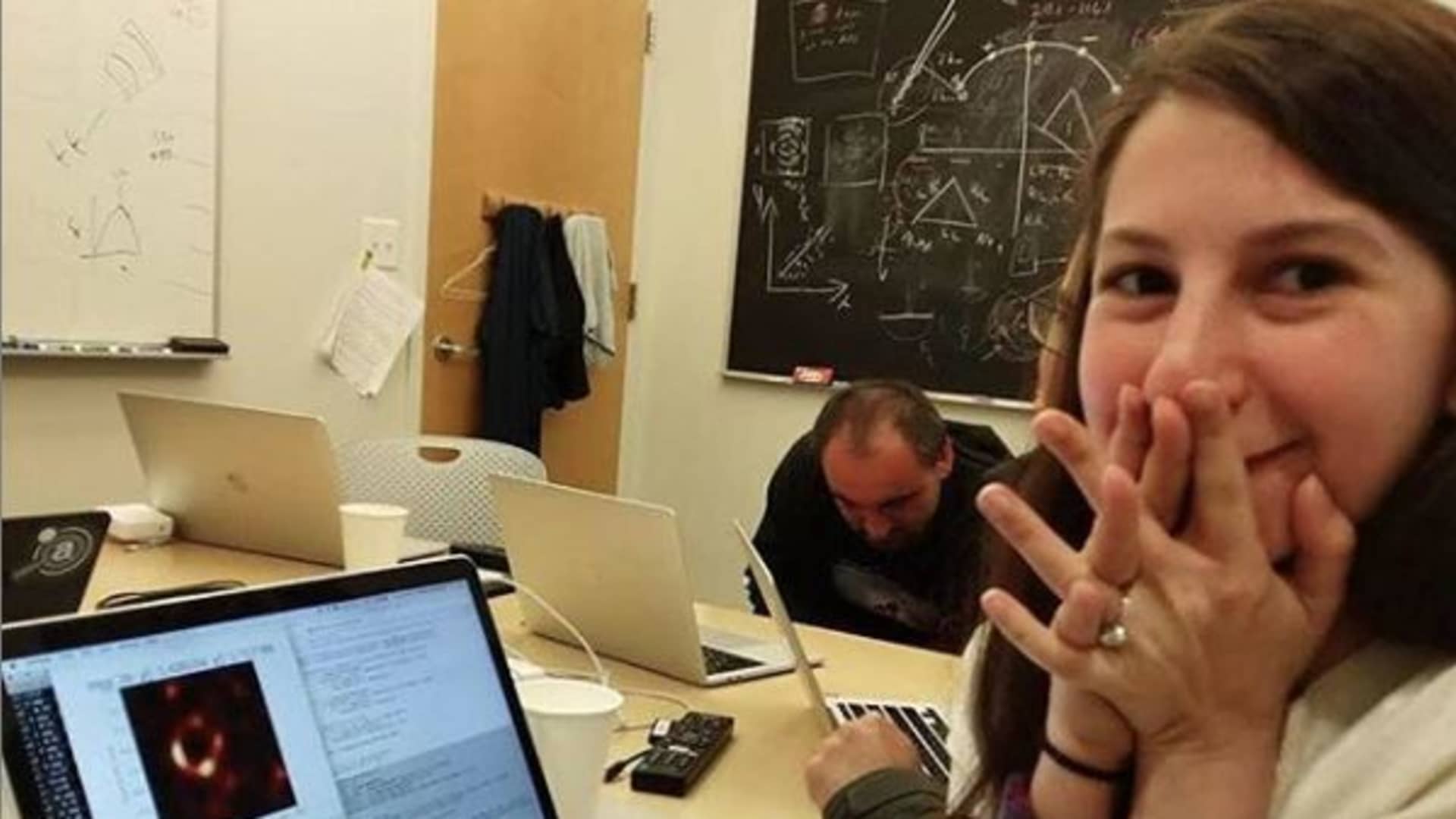
Katie Bouman's viral photo told half the story — here's why professional astronomers chose Mac long before that moment.
When Katie Bouman, a computer scientist at MIT's Computer Science and Artificial Intelligence Laboratory who developed the CHIRP algorithm that enabled the Event Horizon Telescope collaboration to produce the first-ever image of a black hole, became one of the first people to see that historic image in 2019, she was using a MacBook Pro — a moment that went viral but told only part of the story about how Macs support cutting-edge astronomical research from algorithm development to data visualization. The photo spread across social media with captions celebrating Apple's presence in a landmark scientific achievement, but it raised a question many Mac users in amateur astronomy have heard before: Was this representative, or was the Mac just there by coincidence? For those accustomed to hearing "you need Windows for serious work," the image suggested something different — but without context, it was hard to know what that MacBook actually did in the workflow that produced humanity's first glimpse of a black hole's event horizon.
The answer reveals a reality that professional astronomers have known for years: Mac isn't just viable for cutting-edge research — it's the dominant platform. The MacBook in Katie Bouman's hands wasn't an exception. It was completely normal.
What Actually Happened
Katie Bouman's role in the Event Horizon Telescope (EHT) project — a planet-scale array of eight ground-based radio telescopes spanning from Antarctica to Spain which combined to form a virtual Earth-sized telescope — was significant but collaborative. She developed CHIRP (Continuous High-resolution Image Reconstruction using Patch priors), an imaging algorithm that reconstructs radio telescope data into coherent images by learning patterns from natural image datasets. But she was one member of a team that developed multiple imaging algorithms to validate the final result. The viral narrative of a solo genius missed the point: this was team science at its most sophisticated, with researchers at institutions worldwide contributing algorithms, analysis pipelines, and validation frameworks.
The computation itself happened nowhere near that MacBook. Data from the eight EHT telescope sites — recorded on half a ton of hard drives because the data volume (5 petabytes) exceeded internet bandwidth capacity — was transported by commercial freight airplane to two locations: MIT Haystack Observatory in Massachusetts and the Max Planck Institute for Radio Astronomy in Germany. There, specialized supercomputers performed correlation, the process of aligning signals from each telescope site to a fraction of a trillionth of a second. This grid computer, built from approximately 800 CPUs connected through a 40 Gbit/s network, spent weeks processing the raw interferometric data into a form that imaging algorithms could work with.
So what was the MacBook doing? It served as Katie Bouman's terminal for monitoring processed results, running Python analysis scripts, and visualizing data output from the correlation supercomputers. This is the standard workflow in computational astronomy: heavy computation happens on institutional clusters or supercomputers, while researchers use their laptops — overwhelmingly Macs — for algorithm development, visualization, and analysis. The MacBook wasn't processing petabytes; it was the interface to the tools that did.
This workflow pattern extends far beyond black hole imaging. Whether processing data from the Atacama Large Millimeter Array (ALMA), analyzing photometry from ground-based surveys, or developing machine learning models for exoplanet detection, professional astronomers rely on Unix-based systems for the entire pipeline. The MacBook in the viral photo represented exactly that ecosystem — one where macOS serves as the researcher's daily driver for everything except the most computationally intensive correlation and simulation work.
Why Astronomers Choose Mac
More than 80 percent of astronomers at the Harvard-Smithsonian Center for Astrophysics use Mac computers, according to a 2011 AstroBetter survey, reflecting a broader trend in professional astronomy where Unix-based systems dominate due to their compatibility with decades of astronomical software development and the stability that lets researchers focus on science rather than system administration. This wasn't always the case — in the early 2000s, Linux was the default choice for computationally intensive research — but the migration to Mac accelerated between 2005 and 2015 as macOS matured and Apple Silicon promised (and later delivered) significant performance gains.
At astronomy conferences today, the laptop distribution tells the story visually. As one Physics Forums commenter noted, "Most look like Apple advertisements, with a few odd PCs that run Linux." Windows machines are rare enough to be noteworthy. This isn't brand loyalty or aesthetic preference — it's a pragmatic choice based on three pillars: Unix foundation, Python ecosystem, and stability.
The Unix foundation matters because a vast amount of astronomical software was developed on and for Unix operating systems. When your field's core tools were written for Unix, running a Unix-certified operating system (macOS is built on Darwin/XNU kernel) means those tools work natively, without emulation layers or compatibility headaches. Terminal commands, shell scripting, SSH access to remote clusters, automation workflows — all the infrastructure that makes computational research efficient is Unix-native.
The Python ecosystem thrives on Mac. Python with Scipy (scientific computing), Numpy (numerical arrays), iPython (interactive computing), and Matplotlib (visualization) transforms macOS into a complete astronomical analysis environment out of the box. ALMA even uses Python for telescope scripting. The scientific Python stack that powers modern astronomy research — from data reduction to statistical analysis to machine learning — works seamlessly on Mac without requiring virtual environments or cross-platform compatibility workarounds.
But perhaps the most revealing comment from the AstroBetter survey captures the stability argument: "Mac costs 30-40% more than a comparable Linux computer, but due to the far more complete and stable nature of OS X, I spend far less time doing basic sys-admin stuff." Professional astronomers aren't IT specialists — they're researchers who need reliable tools. The productivity gain from not troubleshooting driver conflicts, dependency issues, or desktop environment quirks pays for the hardware premium many times over.
Windows rarely appears in this workflow not because astronomers are anti-Microsoft, but because the Windows ecosystem never developed the computational astronomy infrastructure that Unix systems built over decades. As one forum user put it bluntly: "Most applications are unintuitive, their interfaces are widely varying — some programs require ASCOM drivers, some require native drivers, and some others require both! I'm afraid my computer will decide to upgrade itself and reboot mid imaging session." For research that involves multi-hour processing runs or remote observations, that kind of uncertainty is unacceptable.
The Unix Advantage
The technical foundation of Mac's dominance in astronomy traces back to decisions made in the 1970s and 1980s when Unix became the standard operating system for scientific computing. A vast amount of astronomical software was developed on and for the Unix operating system, creating a decades-long library of tools, pipelines, and frameworks that assume Unix conventions for file systems, permissions, process management, and inter-process communication. When macOS launched in 2001 with Darwin (a Unix-certified kernel) at its core, it inherited compatibility with this entire ecosystem.
CASA (Common Astronomy Software Applications), developed by the National Radio Astronomical Observatory and international partners, exemplifies this advantage. CASA is the primary data processing software for the Atacama Large Millimeter Array (ALMA) and the Very Large Array (VLA), running natively on macOS and Linux through its Python-based interface. Researchers use CASA for calibration, imaging, and analysis of interferometric radio telescope data — the same category of work that produced the black hole image. CASA was designed for Unix platforms from the start, and macOS benefits from that heritage.
The Python advantage extends beyond package availability. Because macOS treats Python as a first-class citizen (Python 3 is included with the operating system since macOS 12.3), astronomical researchers can start working immediately without installing language runtimes or configuring system paths. Want to install AstroPy (the core astronomy library for Python)? pip3 install astropy works out of the box. Need to run a Jupyter notebook for interactive analysis? No virtual machine required. The friction that Windows users experience — hunting for compatible binaries, managing PATH variables, dealing with line ending differences — simply doesn't exist on Mac.
Shell scripting and automation follow the same pattern. Bash, zsh, Python, Perl, and Ruby are all native to macOS. The cron scheduler works as expected. SSH to remote computing clusters uses the built-in Terminal without installing third-party clients. Makefiles execute correctly for compiling research code. Every Unix convention that decades of astronomy software assumes to exist — exists on Mac without configuration.
CASA's recent trajectory illustrates both the strength and evolution of Mac support in professional astronomy. CASA 6.7 dropped native support for Intel Mac machines, focusing development resources on Apple Silicon (M-series chips) and acknowledging that Rosetta 2 emulation provides adequate backward compatibility for Intel users who haven't upgraded. This wasn't abandoning Mac — it was recognizing that Apple Silicon represents the future of the platform and aligning development accordingly. For professional researchers, this signals confidence in macOS as a long-term platform choice.
The contrast with Windows is stark. While amateur astrophotography on Windows has developed a rich ecosystem of ASCOM-compatible applications, professional radio astronomy and computational research never made that same investment. Linux remains necessary for some specialized radio astronomy pipelines (particularly those validated only on RedHat distributions) and for operating high-performance computing clusters, but for individual research workstations — the computers where algorithms are developed, results are visualized, and papers are written — Mac has become the default at many institutions.
From Research to Amateur
The viral MacBook photo captured a research workflow, but the same foundational advantages that make Mac dominant in professional astronomy now apply to amateur astrophotography. The amateur ecosystem has evolved dramatically since 2019, particularly with the arrival of Apple Silicon and the maturation of native Mac capture and processing software.
Performance was once the compromise Mac users accepted for Unix stability. Not anymore. Apple Silicon has transformed Mac into a computational powerhouse for image processing. Astrophotographers on Cloudy Nights report PixInsight benchmark scores of 17,000 on M2 Mac desktops compared to 8,000 on Linux desktops and 2,000-4,000 on Windows laptops. That's not a marginal difference — it's a fundamental shift in what Mac hardware can deliver for computationally intensive workflows like planetary stacking, deep-sky calibration, and noise reduction.
Native capture software has matured alongside hardware improvements. Planet Stacker X, a macOS-native planetary imaging tool from Rain City Astro, provides AutoStakkert-level functionality without requiring Windows or virtualization. AstroImager 3.0 from Cloudmakers handles capture, autofocus, and video recording for both planetary and solar imaging as an all-Mac solution. The Mac Observatory software directory now catalogs over 100 macOS-compatible astronomy applications spanning every workflow category from planetarium software to plate solving to complete imaging suites.
KStars/Ekos remains a mixed success story on Mac. KStars — a free open-source planetarium and observatory control application originally developed for Linux, with Ekos (Ekos Kstars Observatory Suite) providing integrated equipment control, imaging sequences, and basic processing — officially supports macOS, but maintaining that support relies heavily on dedicated community members. Users on INDI forums share successful Apple Silicon builds compiled from source, complete with detailed instructions. It works, but it requires more technical investment than downloading a prebuilt application. For Mac users seeking that level of integrated control, the community keeps the project alive through volunteer effort.
- Developer: National Radio Astronomical Observatory (NRAO)
- Platform: macOS (Apple Silicon native), Linux
- Current Version: CASA 6.7 (Intel support via Rosetta 2)
- Purpose: Data processing for ALMA, VLA, and other interferometric radio telescopes
- License: Free and open source
The workflow parallel between professional and amateur astronomy is direct. Professional astronomers use Mac for algorithm development, data analysis, and visualization — relying on institutional supercomputers only for the most computationally demanding correlation and simulation work. Amateur astrophotographers use Mac for capture, calibration, stacking, and processing — relying on external services like Astrometry.net or local plate solving only when needed. Both workflows benefit from Unix stability, Python extensibility, and the ability to focus on the work rather than fighting the operating system.
For Mac users building an astrophotography workflow, the path forward is clearer than ever. Modern astronomy cameras from ZWO, QHY, and Player One all provide macOS SDK support, meaning native capture applications can control them without ASCOM translation layers. Mounts from iOptron, Sky-Watcher, and Celestron work with Mac software through INDI or direct serial communication. Filters, focusers, and accessories integrate through the same protocols that professional observatories use. The hardware ecosystem no longer treats Mac as an afterthought.
What This Means for Mac Astronomers
The MacBook in Katie Bouman's viral photo wasn't doing anything extraordinary — it was performing the exact role that Macs play every day in professional astronomy research. That ordinariness is the story. Mac isn't a compromise platform that professionals tolerate despite limitations. It's the preferred platform at major observatories because Unix heritage, Python workflows, and system stability align perfectly with how computational astronomy actually works.
For amateur astronomers and astrophotographers wondering whether Mac is viable for serious imaging work, the answer from professional astronomers is unambiguous: More than 80% of them made the same choice you're considering. The tools that produced the first black hole image — CASA, Python analysis scripts, visualization frameworks — run natively on the same operating system you use for capturing deep-sky images from your backyard.
The ecosystem gaps that existed five or ten years ago have largely closed. Native capture software now rivals Windows alternatives. Apple Silicon performance exceeds most Windows and Linux machines for image processing. The Mac Observatory software directory demonstrates the breadth of available tools across every workflow category. And the Unix foundation that makes Mac natural for professional research — terminal access, Python ecosystem, shell scripting, SSH to remote resources — applies equally whether you're processing Event Horizon Telescope data or stacking your first mosaic of the Heart and Soul nebulae.
The viral photo wasn't proof that Mac can support astronomical research. It was a window into the reality that Mac has been supporting astronomical research for decades — and continues to strengthen its position as Apple Silicon delivers performance that was unimaginable when Katie Bouman began developing CHIRP. The MacBook behind the black hole was exactly where it belonged.
"PixInsight benchmark scores of 17,000 on M2 Mac desktops compared to 8,000 on Linux desktops and 2,000-4,000 on Windows laptops. That's not a marginal difference — it's a fundamental shift."
— Cloudy Nights user
"Most applications are unintuitive on Windows, their interfaces are widely varying — some require ASCOM drivers, some require native drivers, and some others require both! I'm afraid my computer will decide to upgrade itself and reboot mid imaging session."
— Physics Forums commenter
"At astronomy conferences today, most laptops look like Apple advertisements, with a few odd PCs that run Linux. Windows machines are rare enough to be noteworthy."
— Physics Forums observer

Common questions about Mac in professional astronomy and amateur astrophotography.