
Deep-sky stacking software combines multiple long-exposure astrophotography frames — calibrated with darks, flats, and bias frames — into a single high-signal image by aligning star patterns and averaging out noise. On macOS, where Windows' standard DeepSkyStacker doesn't exist, Mac users now have five serious options spanning free open-source tools to professional-grade commercial applications, all with native or Rosetta 2 compatibility on Apple Silicon. Mac Observatory tracks the current compatibility status of every major stacking application in the Mac Astronomy Software directory.
If you've tried to stack astrophotography images on a Mac, you've hit the wall: DeepSkyStacker doesn't run on macOS, HEIC conversion crashes in free tools, and every Windows tutorial assumes you're using software that simply doesn't exist in the Mac ecosystem. That gap — the DeepSkyStacker problem — has frustrated Mac astrophotographers for nearly two decades. But the Mac stacking landscape has caught up. Here's every option that works in 2026, with honest comparisons, troubleshooting workflows, and the complete free-to-pro pathway.
Why DeepSkyStacker Doesn't Solve This on Mac
DeepSkyStacker — the free, Windows-only stacking application developed by Luc Coiffier — has been the standard entry point for deep-sky processing since 2006, handling calibration, registration, and stacking with minimal setup. Its absence on macOS has historically sent Mac users toward either commercial alternatives or complex open-source workflows. DeepSkyStacker is Windows-only software. No Mac version exists. Never has.
This creates the canonical Mac astrophotography beginner pain point. Every Windows tutorial references DSS. Mac users encounter this wall immediately when searching for stacking guidance. The "just use Windows" sentiment persists in forums — Cloudy Nights threads regularly suggest buying a $200 mini PC rather than wrestling with Mac workflows. But that advice is outdated. Mac-native options now exist at every experience level and budget tier.
What's Available on Mac Right Now
Five serious options handle deep-sky stacking on macOS: Siril (free, open-source), Astro Pixel Processor (commercial, Apple Silicon native), Starry Sky Stacker (Mac App Store simplicity), PixInsight (professional gold standard), and Affinity Photo (hybrid stacking features). Web-based fallbacks exist for planetary imaging but not deep-sky work — Eise.app wraps PlanetarySystemStacker for high frame-rate planetary video, not long-exposure deep-sky frames.
The landscape breaks into three tiers: free tools requiring setup attention, commercial applications offering plug-and-play simplicity, and professional platforms demanding steep learning curves but delivering unmatched control. Each serves different workflows, budgets, and experience levels.
Free Stacking on Mac: Siril and What Else Exists
Siril is a free, open-source astronomical image processing application developed by the Siril team, available natively on macOS with Apple Silicon support, designed for deep-sky image calibration, registration, stacking, and post-processing. Version 1.4.2 was released on February 18, 2026. Siril handles the full pipeline: load light frames, apply calibration frames (darks, flats, bias), register star patterns across frames, stack with outlier rejection, and stretch the final image. It supports FITS, SER, TIFF, RAW, and HEIC formats — though HEIC handling requires specific dependency configuration covered in the troubleshooting section below.
Siril's strength is completeness. Where DeepSkyStacker stops at stacking, Siril continues through background extraction, color calibration, histogram stretching, and photometric color calibration. Scripting automation is available for batch processing multiple imaging sessions. The interface follows GIMP/Photoshop conventions — layers, tools, adjustable parameters. Community sentiment from Cloudy Nights and Reddit reflects this dual nature: "Pretty good," "great for stacking, background extraction, color calibration and stretching" balanced against "some trouble getting into a consistent workflow with it." The software is powerful but assumes familiarity with astronomical imaging concepts.
RAM requirements matter with Siril. The application loads full stacks into memory during processing. Minimum 8GB RAM handles modest frame counts (50–100 frames at 26MP from a mirrorless camera). Serious work benefits from 16GB or more — a 200-frame stack of 26MP images consumes roughly 10–12GB during processing.
Affinity Photo by Serif offers built-in astrophotography stacking features within a general-purpose photo editor. At $70, it's commercial software many Mac creatives already own. The stacking features work — align star patterns, composite frames, reduce noise — but lack the calibration frame support and precise star alignment algorithms dedicated stacking software provides. Affinity Photo handles casual DSLR/mirrorless workflows adequately but serious deep-sky imaging benefits from dedicated tools like Siril or commercial alternatives.
Paid Mac Stackers: From $40 Simplicity to $200 Power
Astro Pixel Processor is a commercial deep-sky processing suite developed by Ivo Jager, available natively on macOS with full Apple Silicon optimization, handling the complete pipeline from calibration and registration through stacking, integration, and final processing with exceptional mosaic tools. Starting with version 2.0.0-beta9, the macOS installers are fully signed and notarized by Apple for both Intel and Apple Silicon hardware. A free trial lets you evaluate the full feature set before purchasing.
APP represents the closest Mac equivalent to DeepSkyStacker's plug-and-play simplicity. Load your light frames, point to calibration frames, choose stacking settings, click integrate. The software handles star alignment, outlier rejection, and gradient removal automatically while exposing advanced options for experienced users. Community sentiment from Cloudy Nights validates this: "Will absolutely give you better results than DSS in a similar plug and play fashion," "very affordable," "handles all your needs from stacking through final image processing."
Apple Silicon optimization delivers measurable performance gains. APP runs approximately 2.5× faster on M-series Macs compared to Intel versions on comparable hardware. A 200-frame stack taking 12 minutes on an Intel Mac completes in under 5 minutes on an M3 Pro. For mosaic work — combining multiple panels into a single wide-field image — APP's tools are exceptional. The software handles panel alignment, gradient matching, and seamless blending better than any Mac alternative except PixInsight.
Pricing tiers range from approximately $200 to $240 depending on licensing options. For Mac users wanting professional results without PixInsight's learning curve, APP hits the sweet spot between Siril's free-but-complex and PixInsight's expensive-and-deep.
Starry Sky Stacker is a commercial Mac App Store application developed by the same team behind Starry Landscape Stacker, designed to align tracked deep-sky images, assign quality estimates, allow frame selection based on quality, and composite the remaining frames into a final stack. At $39.99, it represents the most accessible entry point for casual Mac astrophotographers. The interface follows macOS conventions — drag frames into the application, adjust alignment settings, export the stacked result.
Limitations define Starry Sky Stacker's niche. No FITS support — DSLR/mirrorless RAW files require conversion to TIFF first. No calibration frame support — you're stacking uncalibrated light frames only. No alt-azimuth mount support — the software expects equatorially tracked images with field rotation either absent or minimal. Community sentiment reflects this: "Greatly reduced the noise and improved the quality" from casual users, "very basic" from serious imagers. If you're shooting with a DSLR on a star tracker and want simple, Mac-native stacking without learning Siril, Starry Sky Stacker delivers. If you're shooting with an astronomy camera outputting FITS files, you need different software.
PixInsight: The Gold Standard (If You're Ready)
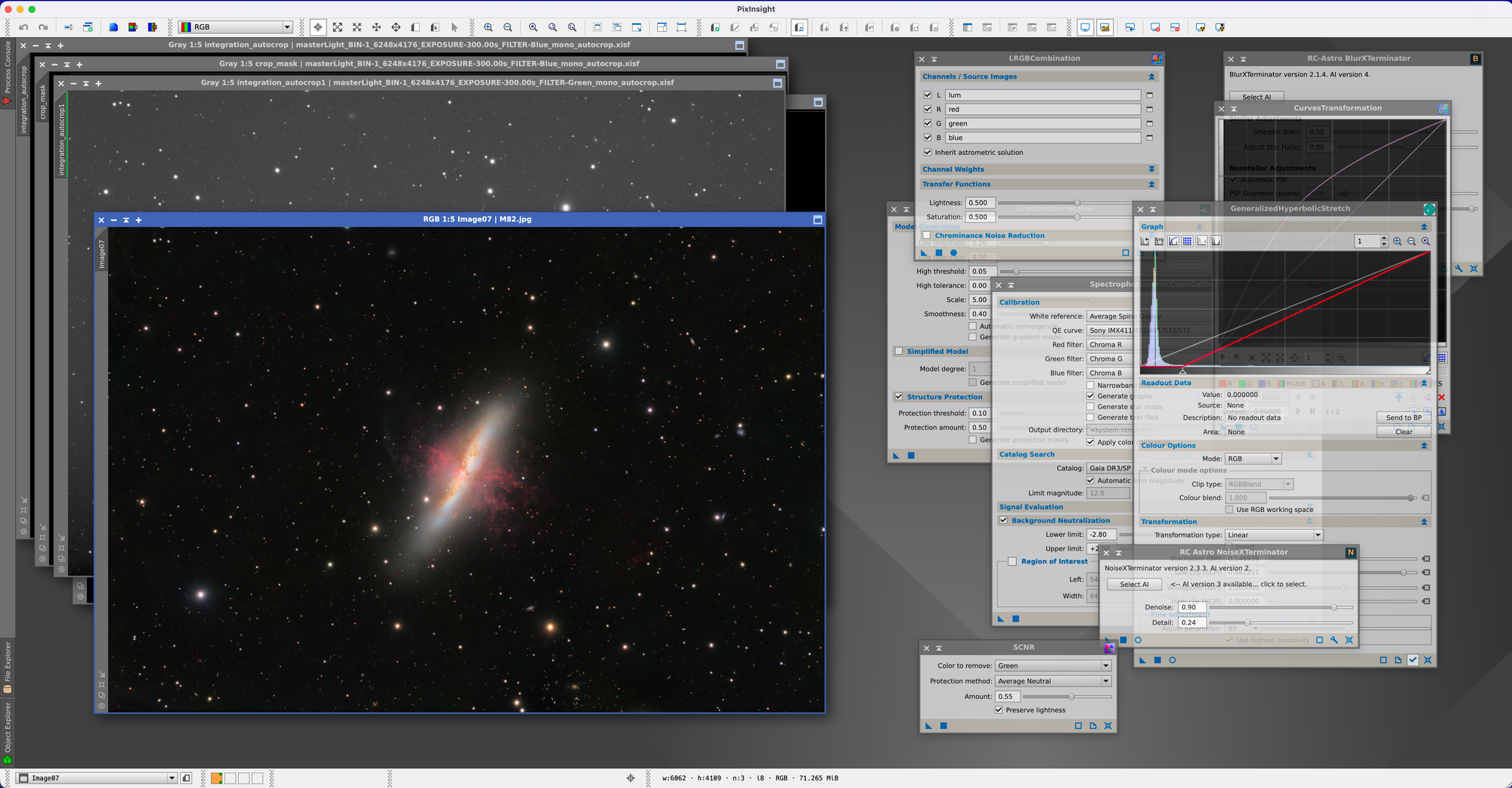
PixInsight is a professional astronomical image processing platform developed by Pleiades Astrophoto, available on macOS via Rosetta 2 (Apple Silicon) or natively on Intel, offering unmatched depth in calibration, registration, stacking, and processing with a modular scripting architecture and advanced tools like deconvolution, drizzle integration, and non-linear stretching. The software runs on macOS through Rosetta 2 emulation on Apple Silicon — not natively, though performance remains excellent according to user reports with no noticeable slowdown compared to Intel Macs.
PixInsight licensing starts around $300 for a perpetual license. The investment buys access to the most comprehensive astrophotography processing environment available on any platform. Community sentiment reflects the capability: "The best astrophotography software ever written," "heavily customizable and provides full control over the process." The learning curve is steep. PixInsight doesn't guide you through a workflow — it provides hundreds of tools (called processes) and expects you to understand when and how to apply them.
The WeightedBatchPreProcessing (WBPP) script automates the calibration, registration, and stacking workflow, bringing PixInsight closer to push-button operation. Even with WBPP, PixInsight demands understanding of concepts like sigma clipping rejection, local normalization, and image integration weighting. For beginners just starting deep-sky imaging, PixInsight is overkill. For intermediate imagers ready to extract every bit of signal from their data, PixInsight becomes the tool of choice.
Drizzle integration — combining multiple undersampled subframes into a higher-resolution final image — works seamlessly in PixInsight. Deconvolution sharpens star patterns and recovers detail lost to atmospheric seeing or tracking errors. Non-linear stretching tools (GeneralizedHyperbolicStretch, ArcsinhStretch) provide finer control than Siril's or APP's histogram stretch dialogs. These capabilities separate PixInsight from every other Mac stacking option.
Community Voice: What Mac Astrophotographers Recommend
Siril gets the most beginner recommendations despite setup friction. From Cloudy Nights: "I downloaded the Mac version of Siril and it seems pretty good. I downloaded some raw data to practice on and have been pretty happy with it." Another user notes: "With Siril and Affinity Photo on a Mac as a beginner you should be set for a long time. Siril is great for stacking, background extraction, color calibration and stretching."
APP earns praise for approaching DeepSkyStacker's simplicity on Windows. Multiple Cloudy Nights users recommend it: "AstroPixelProcessor works very well," "Another vote for AstroPixel Processor. It will handle all your needs from stacking through final image processing if you need. It is very affordable." The free trial matters — users can evaluate whether APP's workflow matches their needs before purchasing.
PixInsight commands reverence mixed with intimidation. From Nature TTL: "To me, PixInsight is the best astrophotography software ever written. It works on MacOS, Windows, and Linux." Deep Sky Workflows adds: "PixInsight remains my tool of choice for processing images and does a great job of stacking. For advanced users, it is heavily customizable and provides full control over the process."
The "just use Windows" sentiment persists but weakens. From Cloudy Nights: "I tried to use Ekos on my Mac with a Linux mini pc on the scope. Lots of difficulties getting it to work, ended in failure. Sometimes, the path of least resistance is just to get a Windoze pc." Another user counters: "A capable mini pc costs $200. You would spend at least this much in Tylenol trying to get astro stuff working on a Mac." This reflects historical frustrations more than current reality — APP, Siril, and PixInsight all work reliably on modern macOS.
Decision Framework: Choose Your Path
The right Mac stacker depends on experience level, budget constraints, and format needs. Here's how to choose:
Beginners on a budget: Start with Siril (free) or Starry Sky Stacker ($40). Siril requires setup attention but delivers professional results and teaches core concepts. Starry Sky Stacker offers immediate simplicity but limits growth — you'll outgrow it once you acquire an astronomy camera or need calibration frame support. If you're shooting DSLR/mirrorless on a star tracker and want the fastest path to a good image, Starry Sky Stacker works. If you're willing to invest setup time learning Siril, you won't need to switch tools later.
Intermediate users wanting simplicity: Astro Pixel Processor ($200–$240) hits the sweet spot. The plug-and-play workflow approaches DeepSkyStacker's ease while delivering results approaching PixInsight quality. Apple Silicon optimization means fast processing. Excellent mosaic tools. Free trial available. APP works for serious imaging without demanding PixInsight's learning investment.
Advanced users needing full control: PixInsight ($300+) becomes essential once you're shooting with premium equipment, pursuing mosaics, or want access to deconvolution and drizzle integration. The steep learning curve pays dividends. Community support through forums and YouTube tutorials (Light Vortex Astronomy, AstroTreasure) eases the learning process. If you're considering PixInsight, download the 45-day trial and work through tutorials before purchasing — the investment only makes sense if you'll commit to learning the platform.
Acknowledge tradeoffs honestly:
- Siril: Free but requires setup attention, HEIC handling needs care, interface assumes familiarity with astronomical concepts
- APP: Paid but plug-and-play, excellent mosaic tools, 2.5× faster on Apple Silicon, free trial reduces purchase risk
- PixInsight: Expensive and steep learning curve but unmatched depth, drizzle integration, deconvolution, professional-grade results
- Starry Sky Stacker: Very simple Mac-native experience but limited — no FITS support, no calibration frames, no alt-azimuth mounts
"I downloaded the Mac version of Siril and it seems pretty good. I downloaded some raw data to practice on and have been pretty happy with it."
— Cloudy Nights user
"Another vote for AstroPixel Processor. It will handle all your needs from stacking through final image processing if you need. It is very affordable."
— Cloudy Nights user
"To me, PixInsight is the best astrophotography software ever written. It works on MacOS, Windows, and Linux."
— Nature TTL
"A capable mini pc costs $200. You would spend at least this much in Tylenol trying to get astro stuff working on a Mac."
— Cloudy Nights user (outdated sentiment from 2018)
Choose based on specific workflow needs. If you're shooting mosaic panels, APP or PixInsight. If you're using an astronomy camera outputting FITS files, any option works — Siril, APP, or PixInsight. If you're using DSLR/mirrorless and want simple stacking only, Starry Sky Stacker. If budget is zero and you're willing to learn, Siril delivers professional results.
How to Set Up Siril on Apple Silicon (and Fix HEIC Crashes)
Download Siril from siril.org and install the macOS version. The application runs natively on Apple Silicon. First launch may require allowing the application in System Settings → Privacy & Security if macOS blocks unsigned software (Siril is open-source and may not be notarized depending on build).
HEIC support exists in Siril but depends on the libheif library being correctly compiled into your installation. Siril documentation confirms support via the x265 video codec, handling images up to 12-bit bitdepth with lossless support depending on compiled libheif capabilities. If Siril crashes during HEIC or JPEG conversion to FITS, verify libheif is installed via Homebrew:
` brew install libheif `
Check Siril's compiled dependencies: open Siril, navigate to Help → About Siril, review the Dependencies list. If libheif appears with version information, HEIC support should work. If HEIC conversion still crashes after confirming libheif installation, batch-convert HEIC to TIFF using macOS Preview before importing to Siril. Select all HEIC files in Finder, open in Preview, File → Export Selected Images, choose TIFF format, export. No quality loss — TIFF preserves full bit depth.
Open-source tools requiring setup attention but delivering professional results. Steep learning curve but no cost ceiling.
Commercial application with Apple Silicon optimization and exceptional mosaic tools. Free trial reduces purchase risk.
Industry-standard platform with unmatched depth in deconvolution, drizzle integration, and non-linear stretching. Steep learning curve.
Alternative workflow: Use camera RAW files directly (NEF from Nikon, CR2 from Canon, ARW from Sony) and bypass HEIC entirely. DSLR and mirrorless cameras output RAW formats Siril reads natively without conversion. If you're shooting astrophotography, shoot RAW — HEIC/JPEG discard dynamic range data you need for stretching faint nebulosity.
RAM recommendations matter with Siril. Minimum 8GB handles modest frame counts. 16GB or more benefits larger stacks — a 200-frame stack of 26MP images consumes 10–12GB during processing. Close unnecessary applications before running Siril on 8GB Macs.
Scriptable workflows automate repetitive tasks. Siril's scripting language handles batch processing multiple imaging sessions. Community-contributed scripts exist for common workflows — OSC (one-shot color) preprocessing, monochrome narrowband processing, planetary RGB combination. Scripts live in Siril's installation directory under scripts/. Load and run scripts from the Scripts menu.
HEIC, JPEG, RAW, FITS, TIFF — Format Juggling Explained
The mobile-to-Mac workflow gap creates format confusion. iPhone captures in HEIC. DSLR captures RAW (NEF, CR2, ARW) or JPEG. Astronomy cameras capture FITS. Serious stacking software expects FITS or TIFF input. Understanding when conversion is necessary and when it's optional prevents frustration.
HEIC to TIFF conversion: Use macOS Preview or Affinity Photo. Select files, File → Export, choose TIFF format with LZW compression (lossless). Preserves full bit depth. Required if Siril crashes on HEIC or if you're using Starry Sky Stacker (no HEIC support).
RAW to TIFF conversion: Often unnecessary. Siril and APP read DSLR RAW formats directly. PixInsight reads most RAW formats. Conversion only needed for Starry Sky Stacker or if you're pre-processing in Affinity Photo before stacking.
Why FITS? FITS (Flexible Image Transport System) is the astronomical imaging standard format. Preserves full bit depth (16-bit or 32-bit floating point), stores calibration metadata (exposure time, temperature, filter), supports multi-extension files (embedding calibration frames). Astronomy cameras output FITS natively. Serious processing tools read FITS.
HEIC support depends on the libheif library being correctly compiled into your Siril installation. Install via Homebrew: brew install libheif — then check Help → About Siril → Dependencies to verify libheif appears in the list. If crashes persist after confirming libheif installation, batch-convert HEIC to TIFF using macOS Preview before importing to Siril: select all HEIC files in Finder, open in Preview, File → Export Selected Images, choose TIFF format with LZW compression (lossless). No quality loss — TIFF preserves full bit depth.
When TIFF is fine: Starry Sky Stacker and Affinity Photo don't need FITS metadata. They're aligning and averaging pixel values, not reading exposure time or sensor temperature. TIFF works for these tools.
Astronomy cameras simplify this: ZWO, QHY, and Player One cameras output FITS files directly. No conversion needed for any Mac stacking software. You load FITS lights, darks, flats, bias frames into Siril, APP, or PixInsight and stack. The format juggling problem primarily affects DSLR/mirrorless users shooting on tripods or star trackers.
Common questions about deep-sky stacking on Mac from the astrophotography community.
Can I run DeepSkyStacker on a Mac?+
What is the best free deep-sky stacking software for Mac?+
How does Astro Pixel Processor compare to PixInsight on Mac?+
Can I stack iPhone astrophotography images on a Mac?+
Does PixInsight run natively on Apple Silicon?+
How much RAM do I need for deep-sky stacking on Mac?+
Why does Siril crash when opening HEIC files?+
brew install libheif), then check Help → About Siril → Dependencies to verify libheif appears in the list. If crashes persist, batch-convert HEIC to TIFF using macOS Preview before importing — this is a lossless workaround that preserves full bit depth.