
What is camera sensor tilt?
This year marks my 6th year into the astrophotography hobby. Just about every camera I’ve owned has suffered from some kind of sensor tilt. Mass manufacturing methods without a good QC process inevitability end up with sensor tilt in the sensors. Sensor tilt occurs when the sensor is not orthogonal to the imaging plane. The sensor itself is not 100% level across the face of the camera, and is slightly tilted. In many cameras this is never noticeable when taking pictures of every day objects. In astrophotography, where we’re photographing stars that are expected to look like tiny points of light, this usually appears across your images by having slightly elongated or strange shaped stars on one side or corner of the images you take.
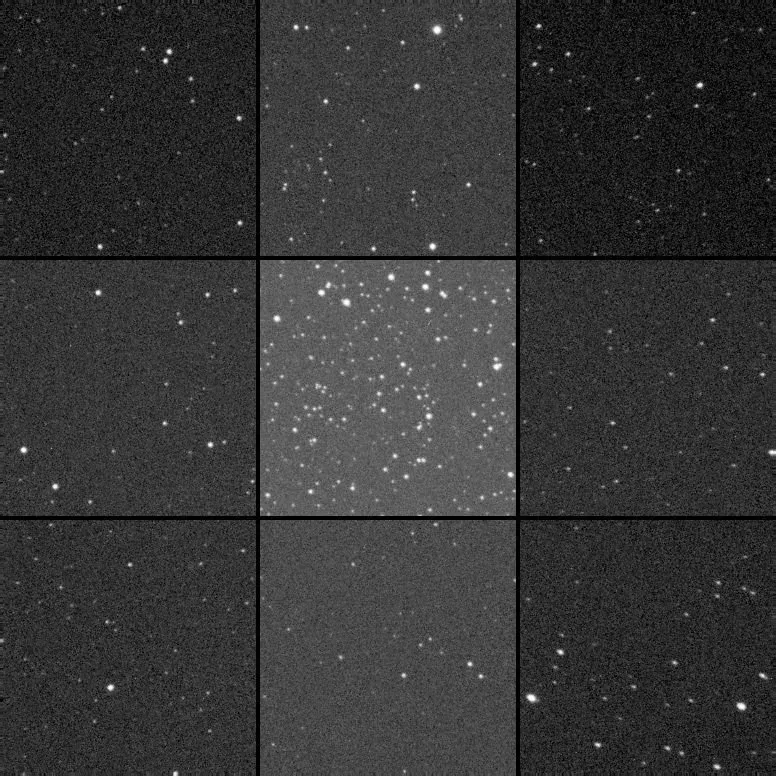
I’ve used the Aberration Inspector within PixInsight to create a grid of all corners, sides and center of the image to show how the stars look across the frame. This is a single frame of Caroline’s Rose shot with the Esprit 100 and a ZWO ASI2600MC-Pro camera. I debayered the color image, extracted the luminance and run the script on the stretched image to show these results. This amount of tilt is how the sensor came from the manufacturer and has had no adjustments applied to correct for it.
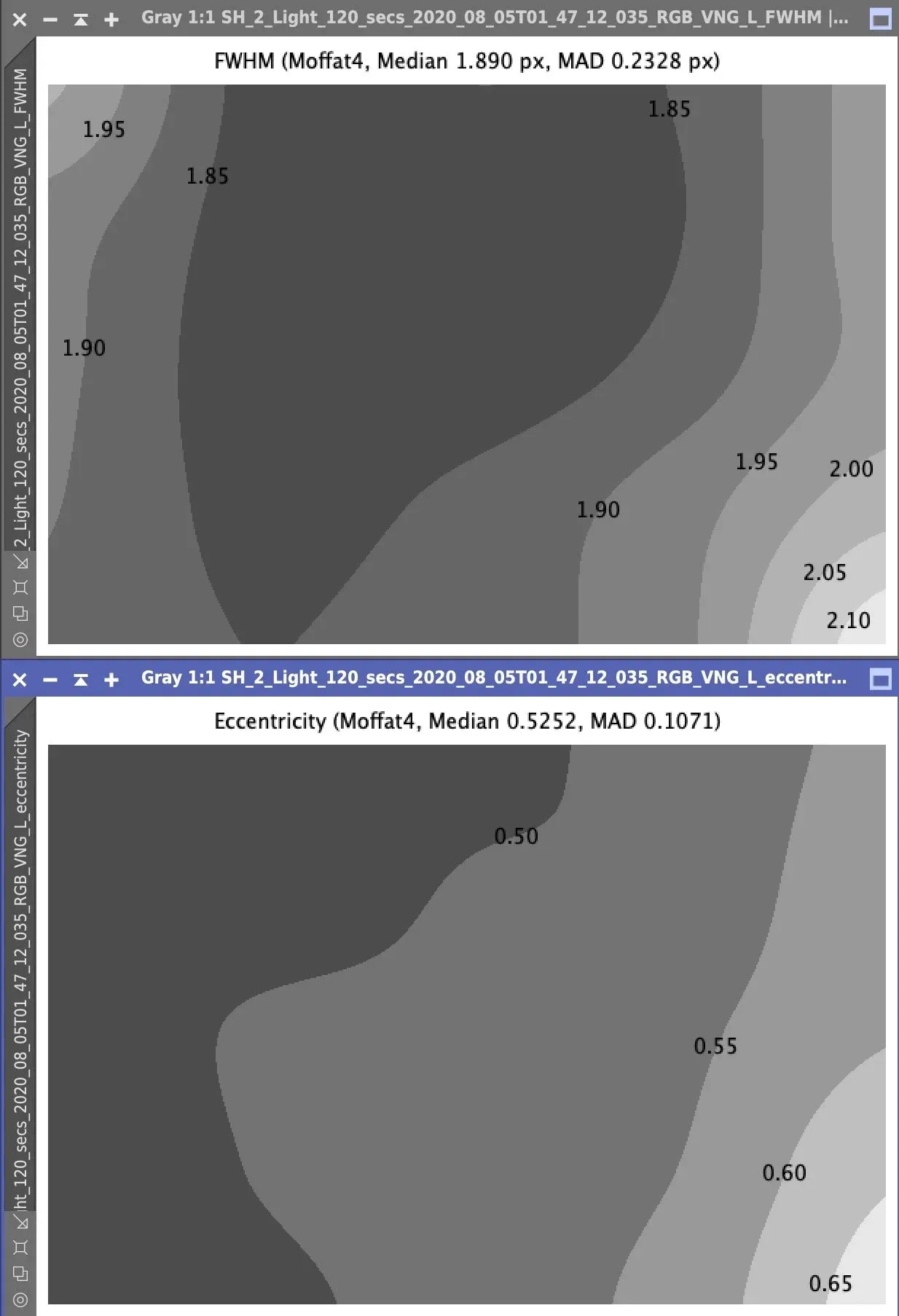
In this next set of images I show the FWHM Eccentricity calculations for the tilted image. FWHM in the top part of the image shows how in focus each area of the frame is, and you can see towards the bottom right of the frame the stars are less in focus. The same goes for the Eccentricity plot. Eccentricity is how round your stars are across the image. Very round in the upper left, and not so round in the lower right. A clear case of tilt in the image.
Just to be clear though, tilt in your images can come from many things. Sag, due to heavy weight of your image train, a poorly collimated focuser, mirror shift in a reflector where the primary mirror isn’t locked down, and also from a non-orthogonal image sensor.
This method of collimating your sensor will only remove sensor tilt. And there are variations of this method which can remove tilt from your entire system assuming you have rigid, threaded connections through quality parts of your imaging train.
How do we get rid of the tilt?
One way to do this, and the reason it’s taken me 6 years before attempting tilt removal, is to shoot images of an area of the sky with lots of stars, then make adjustments to your tilt adjuster, and take more images to see how things have changed with your image after making the adjustment. There issomesoftware thatcan aidin helping you do this. You will read about many people attempting this method which is fraught with frustration. Hair-pulling frustration…while trying to correct for this under the stars in the dark of your back yard. In my case, during the summer months, mosquito-infested sweltering-heat which only makes the process less tolerable. So I just lived with the issue.
Being a perfectionist though, and finally finding a method to do this indoors, I’ve undertaken the steps to remove tilt from my cameras after 6 years.StarlightXpress published an article on their website showing a camera collimating rig they made. The advent of this post, and a thread onCloudy Nightsalong with support in that thread from (@Peter in Reno, @rockstarbill, @corpze and others) got me heavily involved in this process. You’re welcome to sort through the gory details of that thread as we work through the issues of creating the rig, and troubleshooting how to make the adjustments, but I’m about to outline them below.
The camera sensor collimating rig
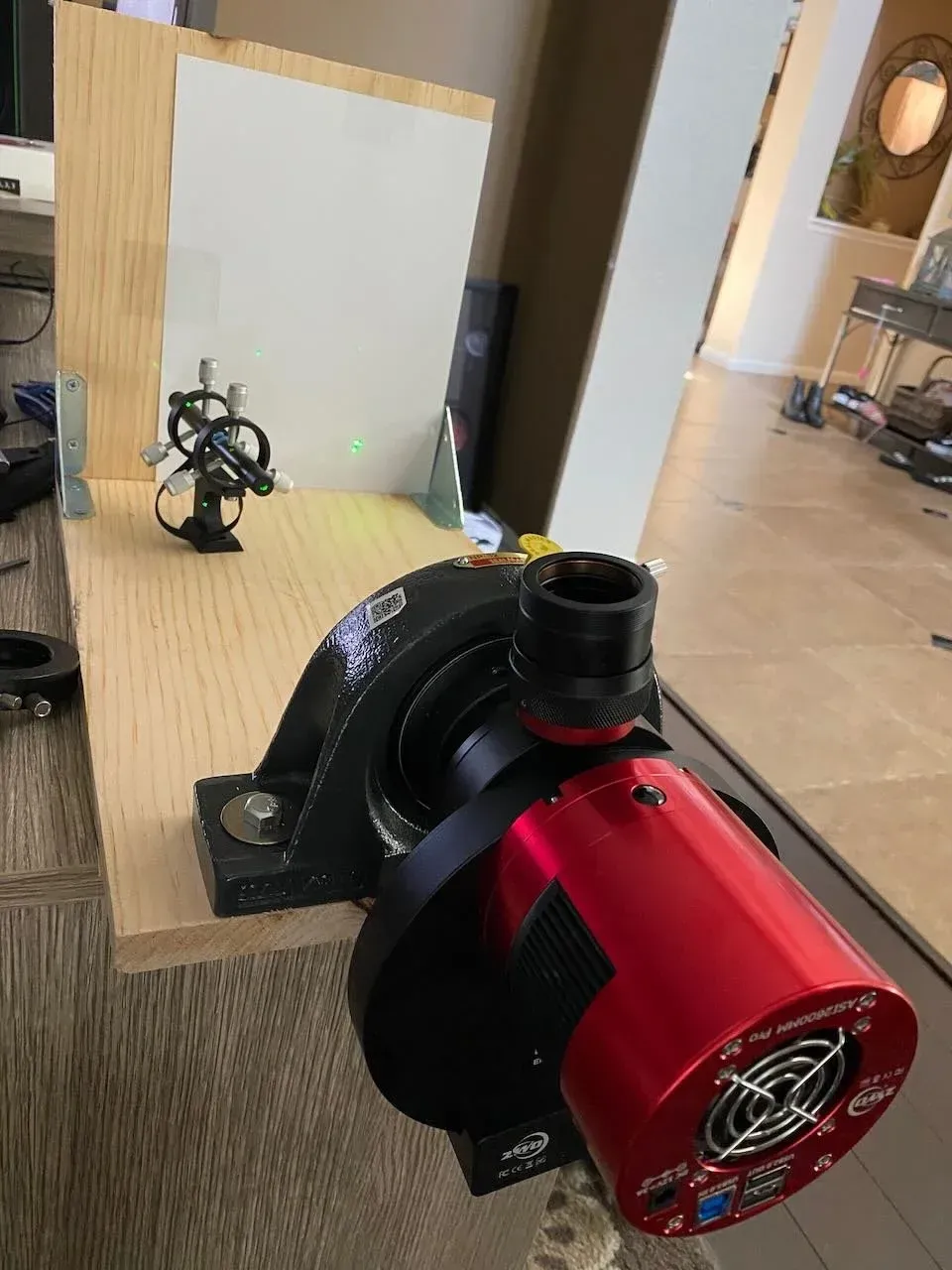
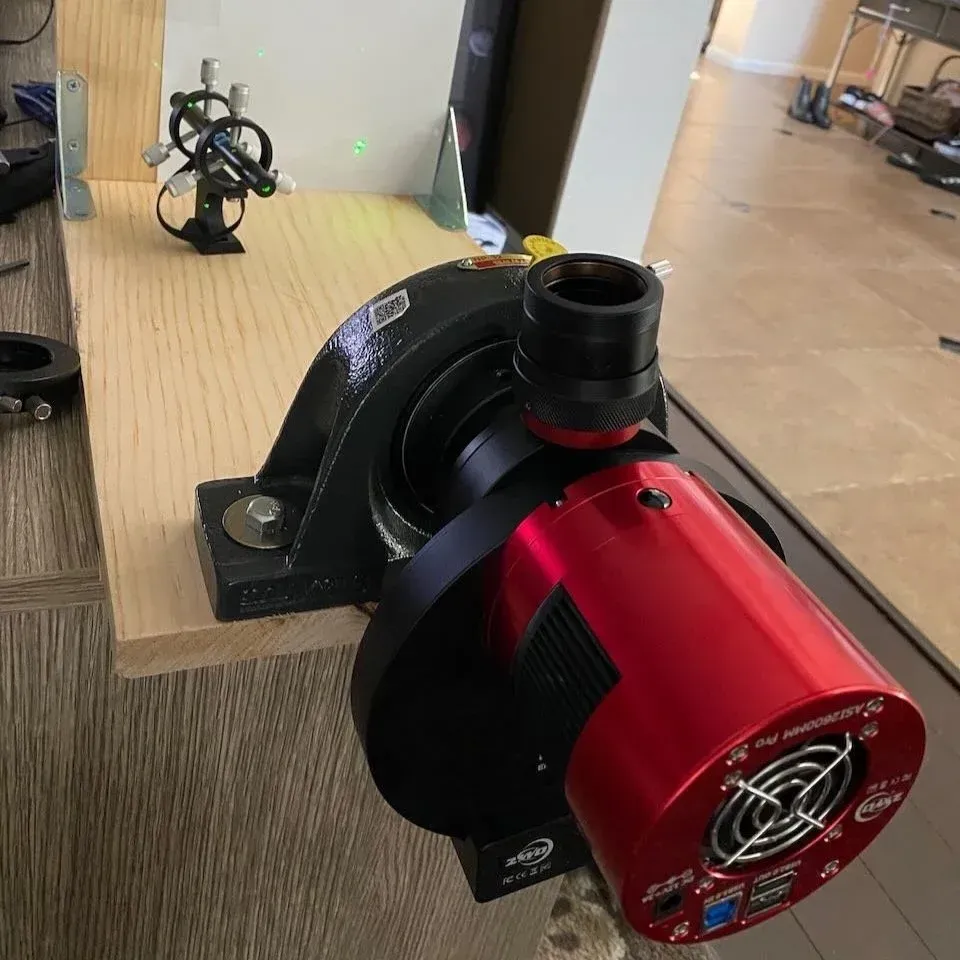
This rig, allows you to mount the camera from the tilt adjuster back in a rotating device (in this case it’s a mounted bearing with a 2” inner diameter), and shine a laser at the sensor window which reflects a grid of the sensor pixels, sensor cover slip window, and sensor window itself onto a flat surface. By rotating the camera, and making adjustments to the tilt adjuster you can effectively remove all tilt from your camera sensor.
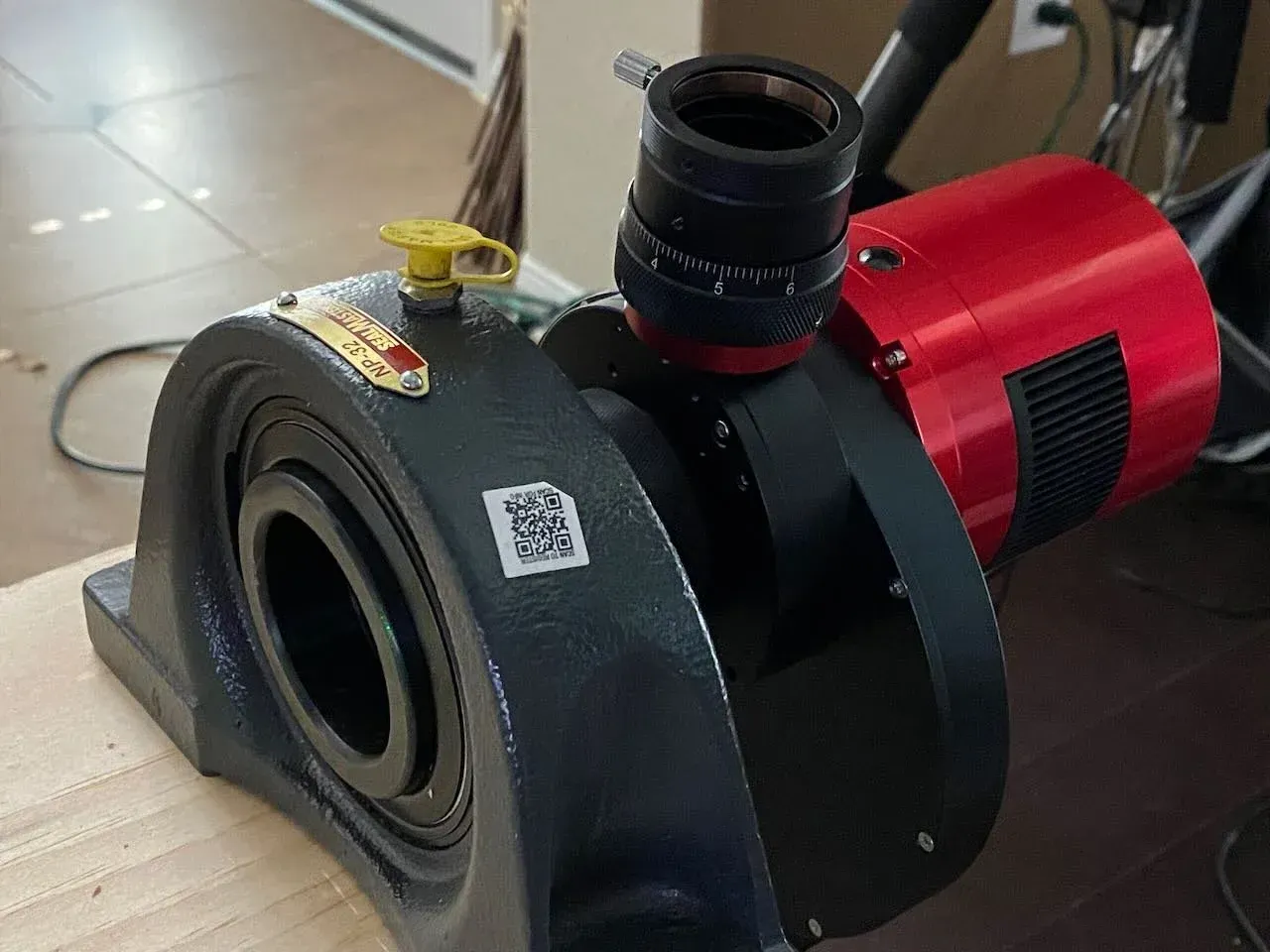
I built this with parts available from the hardware store and internet, and it’s pretty straight forward. It took me about 15 minutes to build once I had the parts in place.
Shopping list:
- 11 1/4 in. x 3/4 in. x 8 ft (standard shelf board or plywood) available in the lumber section of the hardware store
- 2 in. Zinc-Plated Heavy Duty Corner Brace (2-Pack)
- Mounted Steel Ball Bearing with Cast Iron Housing for 2" Shaft Diameter, with Set Screw
- Two 2” self taping wood bolts with 1” washers to bolt down the bearing.
- Green laser pointer with mounting bracket
- 2” nose piece adapter
- Tilt plate adjuster (either built into the camera, or purchased separately)
This was the parts list for my setup, and the mounted steel ball bearing is very expensive at $250 or so. You don’t need this at all. There’s a way simpler and cheap method for accomplishing the same thing, but this is the part that I bought before discovering there was a cheaper way to do this. I found that my Moonlite 2” compression ring and some tube extenders I had laying around could have accomplished the same thing for effectively free.
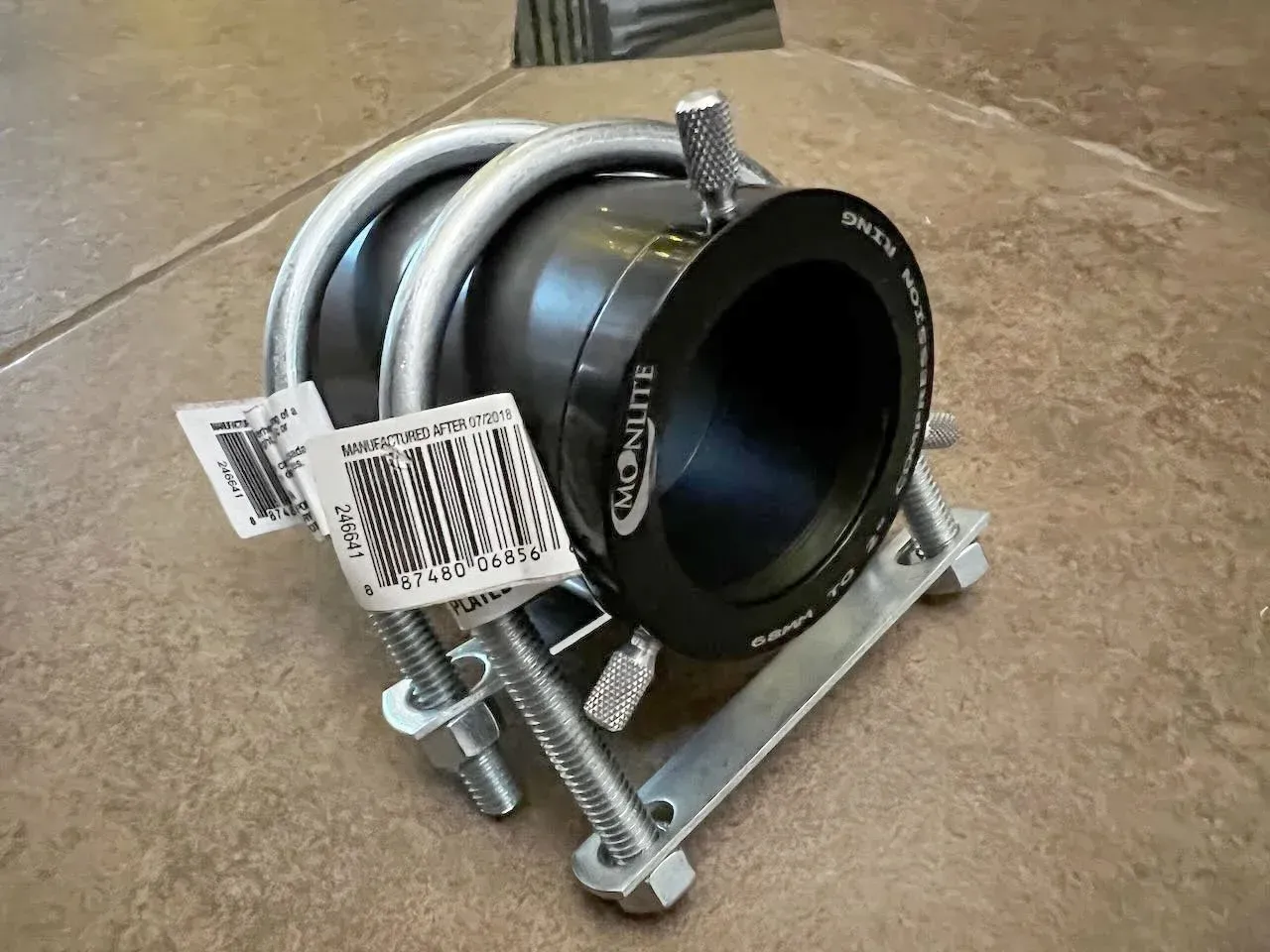
Assemble your rig
Building the rig is very simple. Just look at the photo above of the completed rig. Saw your board into a few pieces, you’ll have more than enough. I would make the bottom piece around 24 inches. And the top board only needs to be tall enough to hang a sheet of paper on it (or not). I found the paper made it easier to see the reflected dots, and you can mark their position on the paper with a pencil to help in collimating/adjusting tilt. Your corner brackets help hold the vertical board, and the bolts are for bolting down the bearing or 2” compression ring tube.
How to remove your sensor tilt
Now for the final steps.
- Remove your camera assembly from your telescope at the tilt plate back to the camera.
- Thread the 2” nose piece adapter on to the tilt plate.
- Insert the nose piece/camera assembly into the bearing, or compression ring and lock it down so it doesn’t fall out. If you have a camera assembly with filter wheel, just hang the edge of your rig over the end of a table so you can fully rotate the camera assembly in the bearing.
- Turn on the laser, and shoot it through the open end of the assembly at the camera sensor.
- Move the laser around to adjust the projected reflection on the back board so that you can see not only the pixel grid reflected, but the two bright reflections from the sensor glass and sensor protection window. (Note: you can peek your head and look through the barrel, try to aim your laser towards the center of your camera sensor or just off to one side, making sure if you rotate the assembly in place the laser doesn’t go off the short edge of the sensor.)