
Your deep sky imaging archive — cataloged, visualized, and searchable. Native on Apple Silicon.
Beta requires macOS 14 or newer and an Apple Silicon Mac.
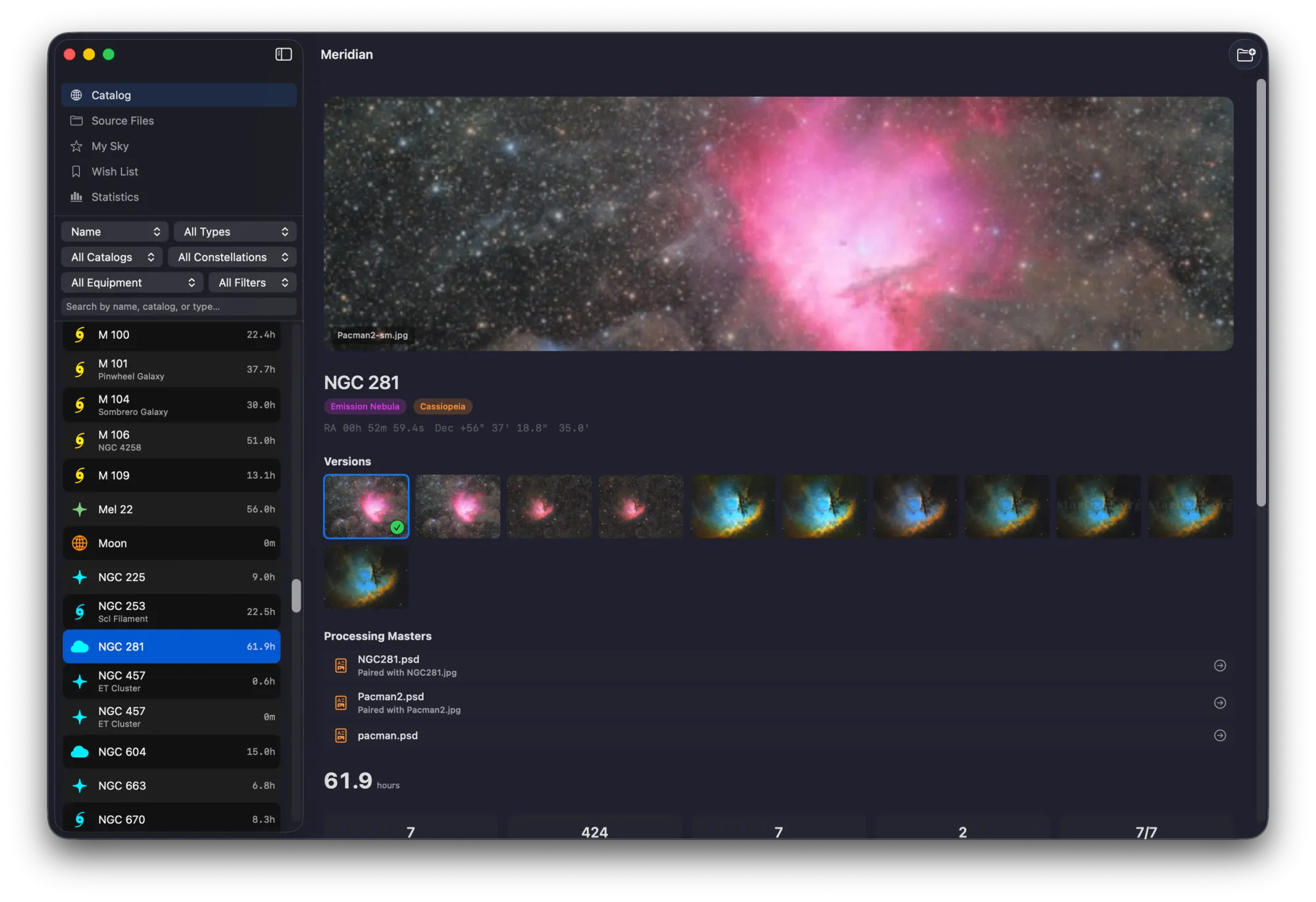
Your imaging archive deserves better than a folder of folders.
After years of imaging, your data is scattered across drives, naming conventions have drifted, and you can't remember which equipment you used for that one session two years ago. Finding a specific sub from a specific night means clicking through folder after folder, hoping your file names are descriptive enough.
Meridian fixes this. Point it at your imaging folders and it reads every FITS and XISF header, resolves objects across 20 astronomical catalogs, and builds a searchable, visual catalog of your entire archive. It never modifies your files — it only reads them.
Object Recognition
41,730 objects across 20 catalogs — resolved automatically.
Meridian reads FITS and XISF headers, extracts object names, and resolves them against a built-in database spanning 20 astronomical catalogs.
Tier 1 — Core Catalogs
Tier 2 — Extended Catalogs
Tier 3 — Advanced Catalogs
M42 = NGC 1976 = Sh2-281 = LBN 974 — Meridian knows they're all the same object and groups your data accordingly.
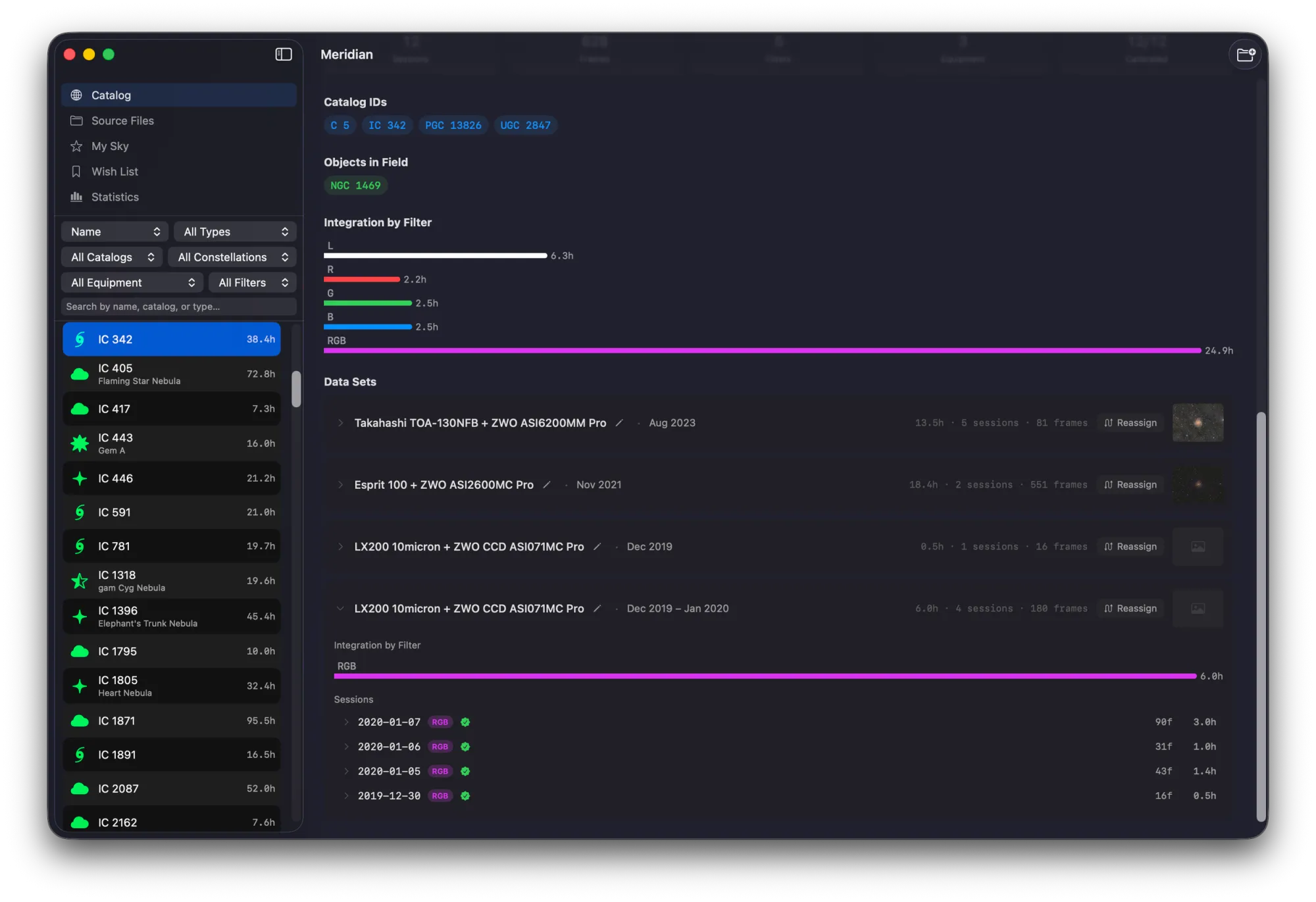
Every target you've ever shot. Everything about it in one place.
Meridian organizes your archive by astronomical object — not by folder, not by date, not by file name. Each target gets a dedicated detail view with your best processed image as the hero, total integration time, per-filter breakdown, full session history, and every equipment setup you've used.
Sort by integration time, filter count, or date. Filter by catalog, object type, or equipment. Use Cmd+K to jump to any target instantly. Your archive becomes a living reference of everything you've captured.
Know what to shoot tonight — before you set up.
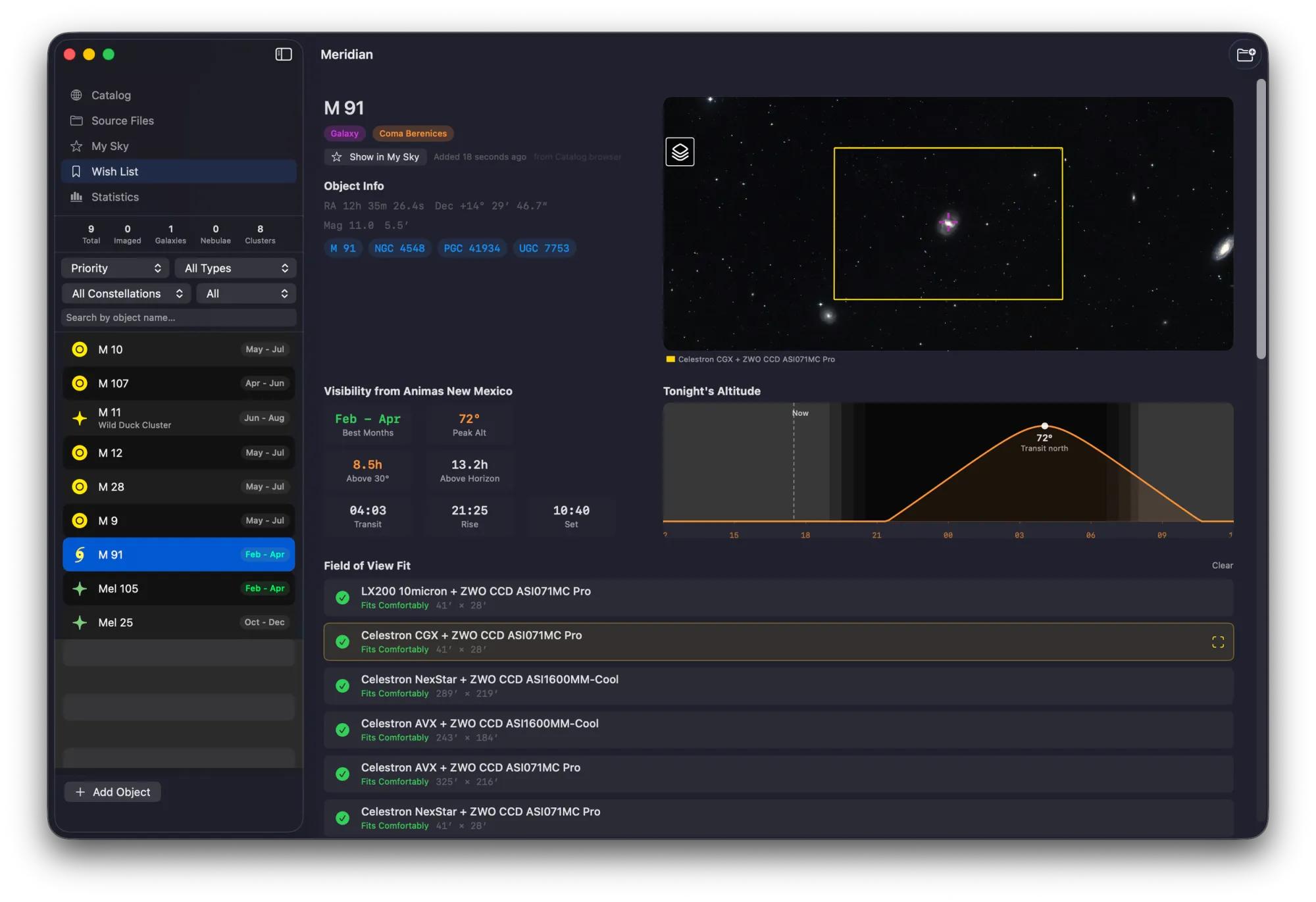
PROMeridian's wish list and visibility planning tools let you build a target list, check altitude and transit times for your location, compare field-of-view with your equipment, and plan sessions across multiple imaging sites.
Visibility Data
Altitude, azimuth, transit time, and hours above horizon for every target on your wish list.
FOV Comparison
See how targets fit your sensor and telescope combination before committing to a session.
Multi-Site
Save multiple imaging locations and switch between them for accurate visibility calculations.
Wish List
Build and maintain a list of targets you want to image, with visibility status updated nightly.
Built for the Mac from the ground up.
Meridian is written entirely in Swift and SwiftUI, compiled natively for Apple Silicon. It uses SwiftData for its local database and Metal for GPU-accelerated rendering. It's not a port, not an Electron wrapper, not a web app in a frame — it's a real Mac app.
Full dark mode support. Keyboard shortcuts for everything. Menu bar access. A Quick Look extension that lets you preview FITS files directly in Finder, even when Meridian isn't running. It looks and feels like it belongs on your Mac because it was designed for nothing else.
What Meridian Can Do
Nine capabilities. One app. Zero file modifications.
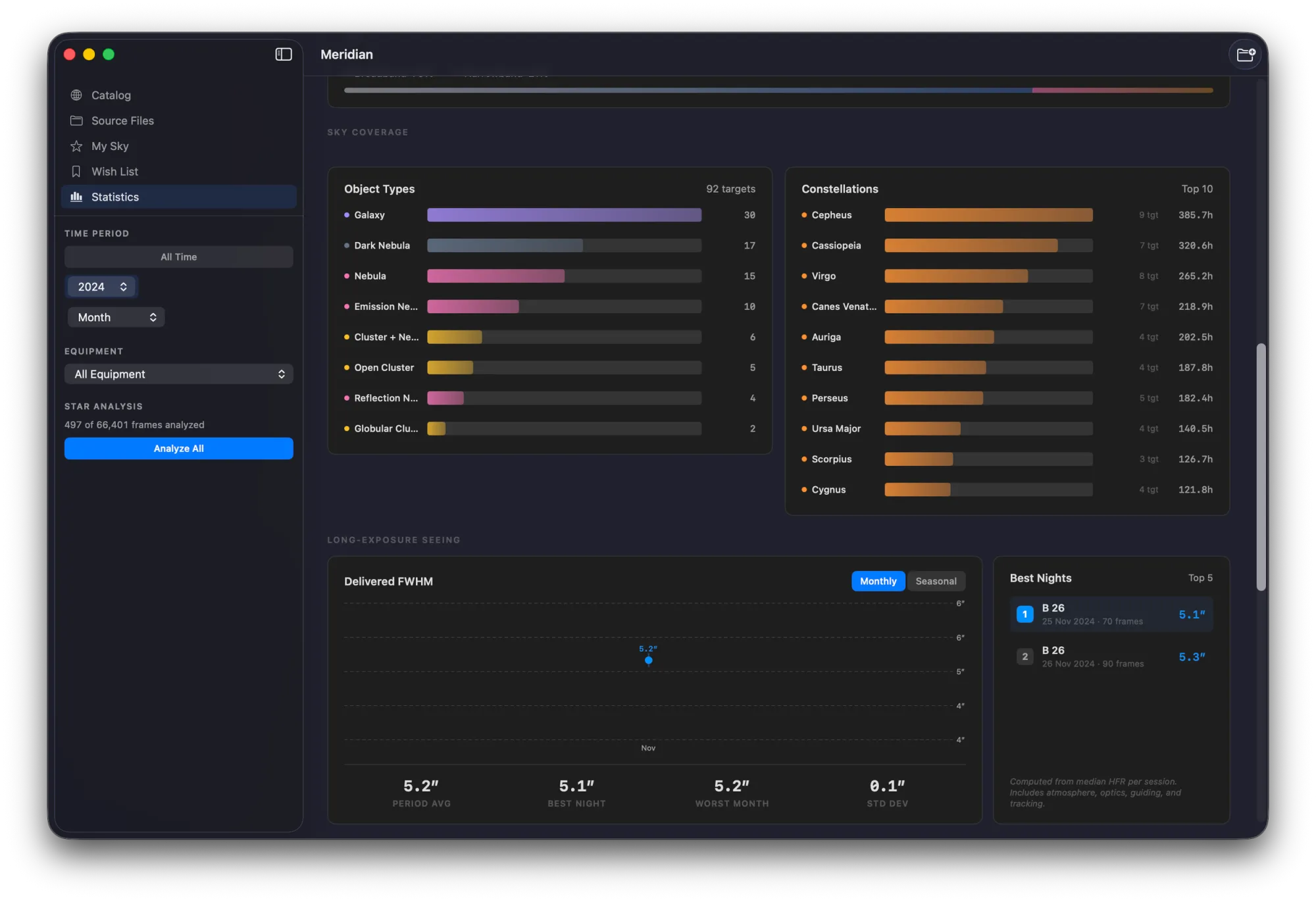
Statistics Dashboard
8 sections of imaging analytics — activity heatmaps, filter usage, sky coverage, equipment stats, and more.
Interactive Sky Map
Powered by Aladin Lite — see every target you've imaged plotted on an interactive sky survey.
Quick Look Extension
Preview FITS and XISF files directly in Finder with spacebar. Works even when Meridian isn't running.
Equipment Tracking
Telescopes, cameras, and filters extracted automatically from FITS headers. No manual entry.
Star Extraction & Seeing
HFR and FWHM analysis across your subs — track seeing conditions and focus quality over time.
Live File Watching
FSEvents monitoring — new files appear in your catalog automatically as they're written to disk.
Plate Solving
Built-in plate solver determines exact sky coordinates for images missing positional data.
Auto-Stretched Thumbnails
Midtone Transfer Function (MTF) stretch applied to every thumbnail — see your data, not black rectangles.
Strictly Read-Only
Meridian never writes to, moves, renames, or modifies your imaging files. Your data stays exactly where it is.
Compatibility
File Formats
Works With
Requirements
Simple pricing. No subscriptions.
Buy once, own it forever. Free tier included.
Meridian Free
$0
Free forever
- ✓ Folder scanning & indexing
- ✓ Full cataloging
- ✓ Auto-stretched thumbnails
- ✓ Object resolution (20 catalogs)
- ✓ Quick Look extension
- ✓ Live file watching
Meridian Pro
$34.99
One-time purchase
Everything in Free, plus:
- ✓ Interactive sky map
- ✓ Wish list & visibility planning
- ✓ Statistics dashboard
- ✓ Star extraction & seeing analysis
- ✓ Equipment management
- ✓ Plate solving
- ✓ Spotlight integration
- ✓ Multi-site support
Download Meridian for macOS
Currently in beta via TestFlight. Free to try — no account required.
Join the TestFlight BetaRequires macOS 14+ · Apple Silicon
One Ecosystem
From photon to archive.
The Mac Observatory Suite covers the entire planetary imaging workflow. Capture in Laminar, stack and sharpen in Strata, catalog in Meridian.
Swift & SwiftUI · Apple Silicon Native · Metal GPU · No Subscriptions
Meridian FAQ
Does Meridian work on Intel Macs?
No. Meridian requires Apple Silicon (M1 or later). The app is built natively for the ARM architecture and uses Apple Silicon-specific frameworks including Metal and SwiftData that are optimized for these chips.
Does Meridian modify my imaging files?
Never. Meridian is strictly read-only. It reads FITS/XISF headers and image data to build its catalog, but it never writes to, moves, renames, or modifies your files in any way. Your data stays exactly where it is.
What's the difference between Free and Pro?
Free gives you a fully functional imaging archive — scanning, cataloging, object resolution across 20 catalogs, auto-stretched thumbnails, Quick Look, and live file watching. Pro adds the interactive sky map, wish list with visibility planning, statistics dashboard, star extraction and seeing analysis, equipment management, plate solving, Spotlight integration, and multi-site support.
Does it work with data from N.I.N.A.?
Yes. Meridian reads standard FITS headers including those written by N.I.N.A., and extracts target names, filter information, exposure details, equipment data, and coordinates. It also works with data from SGPro, APT, KStars/EKOS, ASIAIR, and PixInsight.
How long does the initial scan take?
It depends on the size of your archive and the speed of your storage, but most users see their initial scan complete in minutes. Subsequent launches are near-instant because Meridian only processes new or changed files.
Can I use it with external drives?
Yes. Meridian works with any mounted volume — internal drives, external SSDs, USB drives, or NAS volumes. If a drive is disconnected and reconnected, Meridian picks up where it left off gracefully without re-scanning from scratch.
Does the Quick Look extension require the app to be running?
No. The Quick Look extension is a standalone system extension that works independently. Once Meridian is installed, you can press spacebar on any FITS or XISF file in Finder to see a preview — even when the Meridian app isn't running.